Cold email outreach in 2026: The full process and what the inbox checks first
Cold email outreach in five stages, checked against published Google sender rules, with a ten account hook test, a copyable sequence and four failure fixes.
 Michael Doyle16 min read
Cold email outreach is the practice of emailing a business contact who never asked to hear from you, with a specific reason for writing. It runs in five stages: build a list you can defend, set up a separate sending domain, write a first touch worth reading, follow up on a fixed cadence, and measure what still works.
Most of the effort in a cold email outreach strategy sits in the two stages nobody sees. The list decides whether the message is relevant, and the sending setup decides whether it arrives.
What you need before you start
This covers business to business outreach sent from your own mailboxes to named people at named companies, usually for lead generation or partnerships. It does not cover newsletter marketing to people who signed up.
Two neighboring cases follow different rules and are worth naming so the process below does not get applied to them. Writing to a hiring manager is one, and how to cold email for a job covers what changes in tone and length.
Student outreach is the other, and cold emailing for an internship works to a shorter ask and a different sense of timing.
What to have ready
A sending domain separate from the one your company email runs on, so a complaint cannot reach the inbox your customers use.
Two or three mailboxes on that domain, each warmed for at least two weeks before a campaign touches them.
A written account filter and 200 to 500 companies that match it, rather than a scraped export of an industry.
One verified address for a named role at each company, with hard bounces removed.
About 40 minutes of research per 25 prospects, which is what produces a first line that fits one company only.
A record of replies, bounces and complaints per mailbox, reviewed weekly.
How the work shifts by who is sending
The stages stay the same whoever is sending. The time goes elsewhere.
Who is sending | What changes | Where the time goes |
|---|---|---|
A founder selling alone | The sender can answer anything in the reply | Research and answering replies |
An SDR on a small sales team | Volume rises and the account list arrives ready made | Cadence and mailbox rotation |
An agency running client campaigns | Every client needs its own domain and reputation | Setup and per client reporting |
A freelancer chasing retainer work | Past work replaces case studies | A short portfolio line per niche |
Anyone doing B2B outreach for the first time | The first campaign is a calibration run | Learning what a reply looks like |
Stage 1: Build a list you can defend
A list you can defend is one where you could explain, for any company on it, why that company would care this month. That test removes most scraped lists immediately.
Where the buying group is large and technical, the account work runs deeper still, and lead generation for tech companies sets out that version of the filter.
Write the account filter first
Start with company traits rather than job titles: industry, headcount band, funding stage, the software already in place, and the trigger that makes the problem current.
This is the same object as an ideal customer profile, applied before a single name is collected. Titles come second, as a role rather than a string. "The person who owns onboarding" survives a title change.
Turning that role into a real address is its own step, and the ways to find someone's email address differ sharply in success rate.
What happens: you end up with a company list, a named role per company, and a written reason each one is there.
Done when: you can pick five rows at random and give the reason out loud without opening your notes.
How accurate B2B email data actually is
Contact data decays as people change jobs, and every stale address costs you twice. A hard bounce is a wasted send, and enough of them together push the whole mailbox into filtering.
When the address is gone but a direct dial is not, finding an email from a phone number is the fallback, and it works less often than it sounds.
Two habits keep the number down. Verify addresses before the first send rather than after the first bounce, and re verify anything older than about 90 days. Addresses that come back as catch all, meaning the server accepts everything and confirms nothing, go last.
The detail sits in the methods for verifying an email address and how each one fails.
What happens: the list shrinks, sometimes by a fifth.
Done when: the remaining addresses are verified and dated, with catch all rows separated out.
Which other channels to run alongside the email
Cold email outreach rarely runs alone, and the second channel is a decision rather than a default. LinkedIn does not replace email for most B2B outreach, since a connection request reaches only people active there.
Approach | Best when | What it costs you |
|---|---|---|
Email only | The offer explains itself and one or two people decide | Slower to reach anyone who ignores email |
Email plus LinkedIn | The role is senior and publicly active there | A second daily habit, plus limits that cap volume |
Email plus a phone call | Deal size justifies a live conversation and the number is direct | Call blocks and a script that survives ten seconds |
Email plus a warm introduction | You share a real connection inside the account | Time spent asking, and a favor you can spend once |
Stage 2: Set up the sending domain and mailboxes
The sending setup decides whether stage 3 ever gets read. Get it wrong and your best written message lands where nobody looks.
Warm the mailboxes before the first campaign
A new domain with no sending history looks the same to a filter as a domain bought yesterday for spam, because that is often what it is. Warming means sending small volumes of real conversational mail that gets opened and replied to, over two to four weeks.
Start under 20 sends per mailbox per day and raise the number gradually. Authentication happens in the same pass: SPF, DKIM and DMARC records published on the sending domain first. The setup sits in these email deliverability best practices.
Google publishes its requirements for senders in plain language, including the authentication records every sending domain needs.
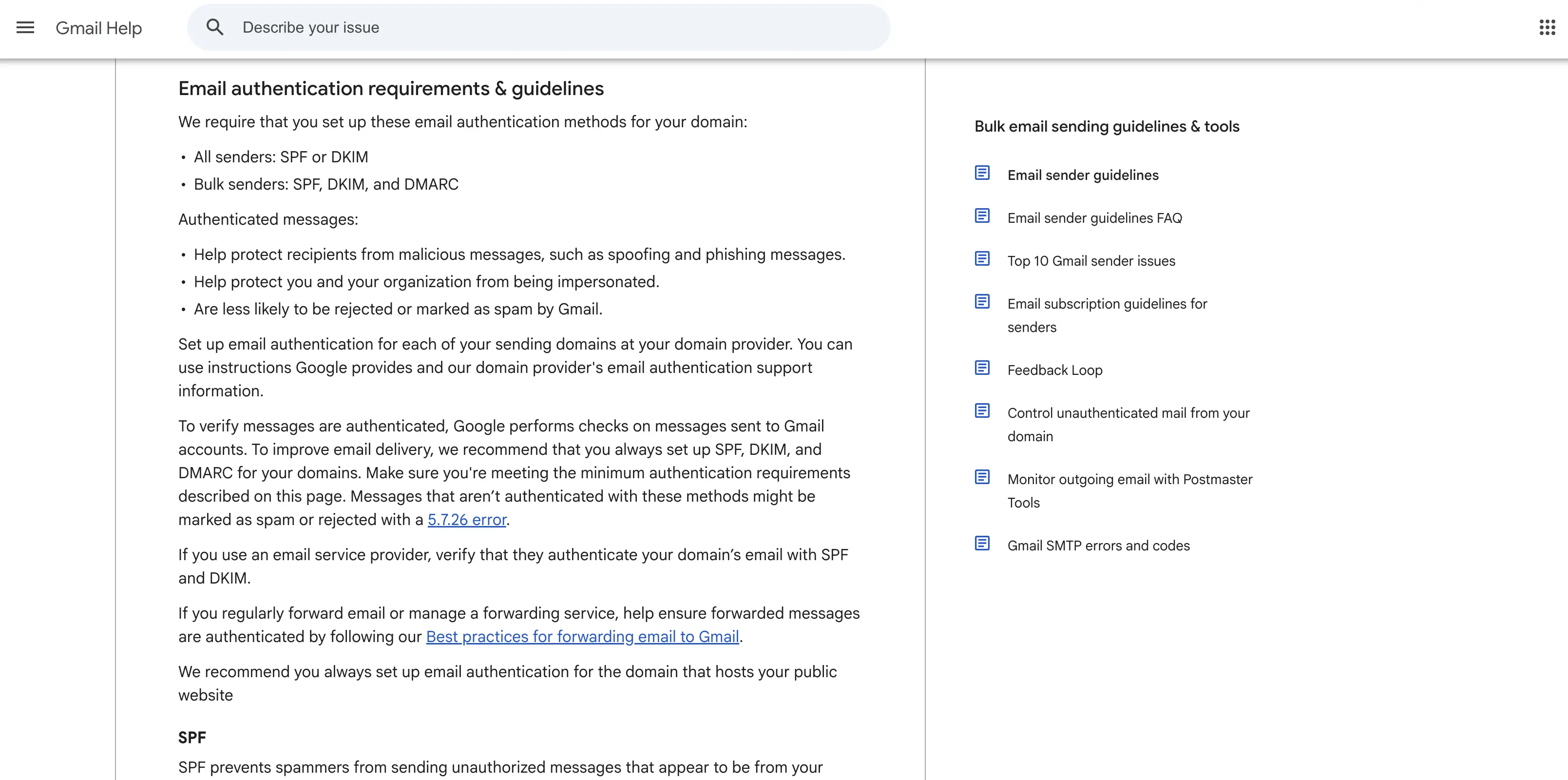
The requirements are public, so nothing about what a sending domain must carry is guesswork.
Dedicated IP or shared IP
Most cold email outreach runs on shared sending infrastructure, where your reputation mixes with everyone else in that pool. At low volume that is the right choice, since a dedicated IP with almost no traffic never builds enough history to earn trust.
A dedicated IP starts to make sense once volume is steady and high enough to keep the address warm on its own.
Below that line it is a liability rather than an upgrade, since every reputation problem is yours alone with no volume to dilute it.
What happens: you have a warmed domain, authenticated records, and a sending pool matched to your volume.
Done when: test sends from each mailbox land in the main inbox on two different providers.
Stage 3: Write the first touch
I ran the research step across ten B2B software companies before writing anything, looking for one specific, dated, public fact on each company's own website that could open an email. Nine of the ten had a usable fact somewhere.
Only four of those facts carried a visible date. Two of the four were dated inside the last 30 days; the others were 110 and 254 days old.
What I looked for | Out of ten accounts | What it changes in the email |
|---|---|---|
A specific public fact on the company's own site | 9 | Almost every account gives you something better than a compliment |
A visible date attached to that fact | 4 | Without a date you cannot honestly call it recent |
A date inside the last 30 days | 2 | Only two accounts supported an opening line about something new |
Find the hook before you write the email
That result changes the order of the work. Writing first and hunting for a hook afterwards produces the line everyone recognizes: "I saw your recent post", attached to something published fourteen months ago.
Finding the hook first tells you which of two emails you are writing.
Personalization here means a fact, not a compliment. When the fact is dated and recent, name it and let the date do the work.
When the fact is real but undated, name the fact and drop the word recent. When nothing specific exists, open on the account level pattern instead and accept that this prospect gets a weaker email or gets dropped.
What happens: every prospect is sorted into dated hook, undated hook, or no hook.
Done when: no email in the batch claims recency it cannot support.
Plain text or formatted
Send the first touch as plain text, with no tracking pixel, no hosted images and no signature block full of logos and social icons. A message from one person to another does not carry a header image, and the formatting is what gives away that a sending tool produced it. Plain text also removes the open tracking pixel, which is the main thing formatted mail is carrying.
Stripped back that far, a first touch has only five moving parts. The breakdown below labels each one in the order it appears.
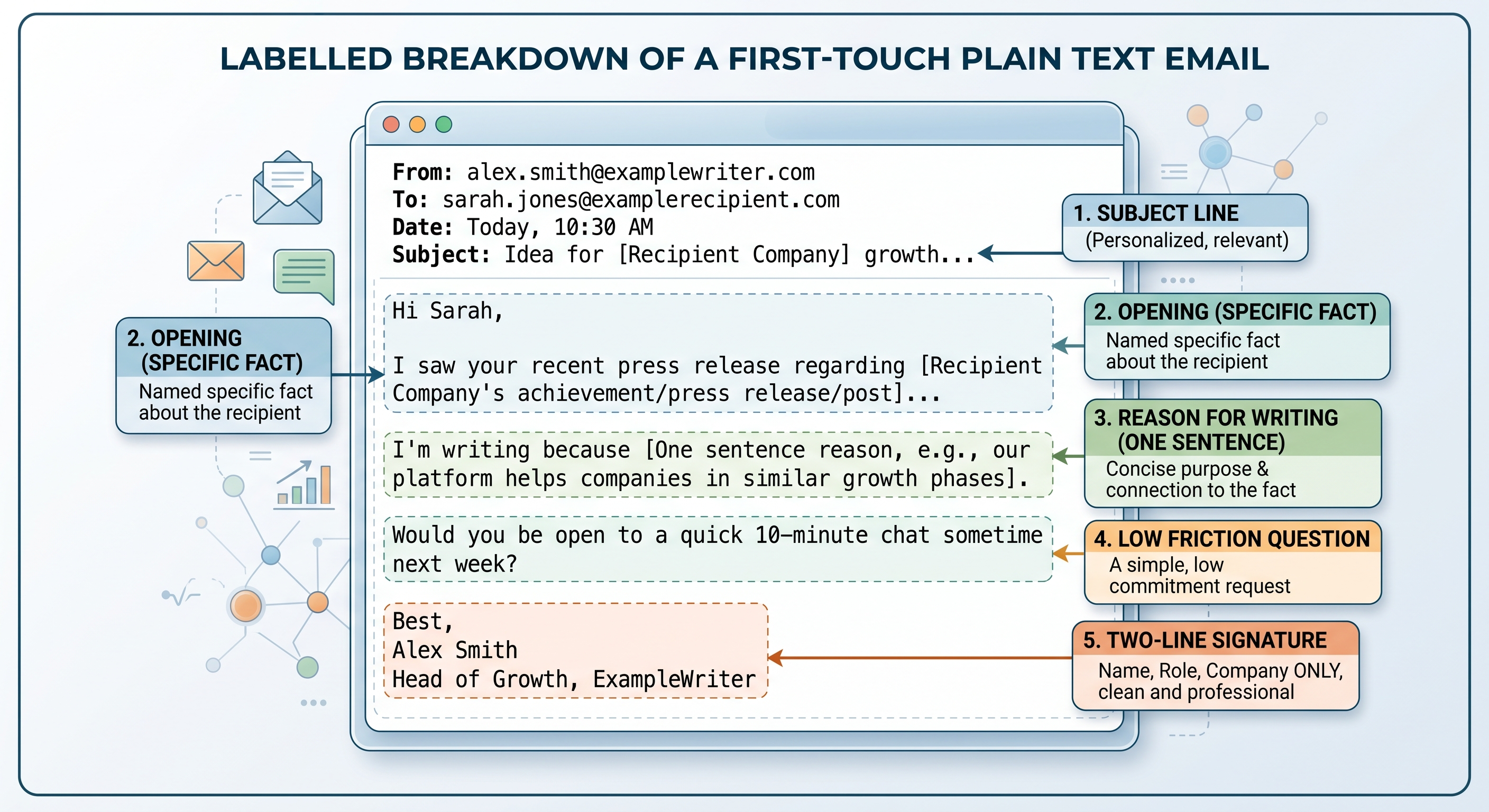
Every part earns its place, and anything outside those five is decoration. No public page shows a first touch split this way with the reasoning attached to each part, so this one is drawn rather than captured.
Subject line, length and the signature
Keep the subject line short, lower case, and free of anything that reads as a campaign. Four to six words naming the actual subject beats anything clever. The body runs to about 90 words.
The signature carries your name, role and company, since every extra line is another element for a filter to weigh. Where the body is the hard part, working from cold email templates and replacing the specifics beats a blank page.
Stage 4: Build the follow up sequence
Most replies arrive after the first message, which is the whole argument for a sequence.
A single send that gets no answer is not evidence the account is uninterested, and what a second or third touch should actually say is set out in these follow up templates for when the first email fails.
The cadence
Four to five touches across three weeks covers the realistic window without becoming pressure. Day 0, day 3, day 8, day 14 and day 21 is a workable spacing, and the best times to send cold emails decide where inside those days each touch lands. Every touch after the first carries a new reason to exist.
Automation handles the scheduling. It does not supply that reason, and repeating the original pitch in different words is the most common way a sequence fails.
Adding a phone call to the sequence
A phone call placed between email two and email three gives the prospect a voice attached to a name they have now seen twice.
Put the call after the second email rather than before the first, so the name is already familiar.
The call is short, and its job is to make the next email land differently. Whether it connects or reaches voicemail, the following email references it in the first line.
What the opening seconds should say is a separate skill, and the structure of a cold call script matters more than the words.
What happens: the sequence has five scheduled touches, one of which is not an email.
Done when: each touch has a written reason that does not repeat the one before it.
What the receiving mail system checks
Before a person reads anything, the receiving system has already scored the message. That scoring is not a mystery, because the two largest providers publish what they measure.
The thresholds Google publishes
Senders of more than 5,000 messages a day to Gmail accounts have to meet a published set of requirements, and the complaint threshold catches most campaigns.
Google's instruction is to "Keep spam rates reported in Postmaster Tools below 0.30%", roughly three complaints in a thousand sends. Marketing and subscribed messages also have to support one click unsubscribe with a visible unsubscribe link in the body.
United States law adds its own floor. The FTC compliance guide requires accurate header and subject information, a valid physical postal address, and a working opt out that must be honored within 10 business days, with penalties reaching $53,088 for each violating email. Rules elsewhere are stricter, and GDPR treats a named person's work address as personal data.
What the recipient's mail app hides from you
The other half of the receiving side is what the recipient's mail app does on their behalf. Apple's Mail Privacy Protection "downloads remote content in the background by default" whether or not the person engages with the email, and routes it through relays that mask the IP address.
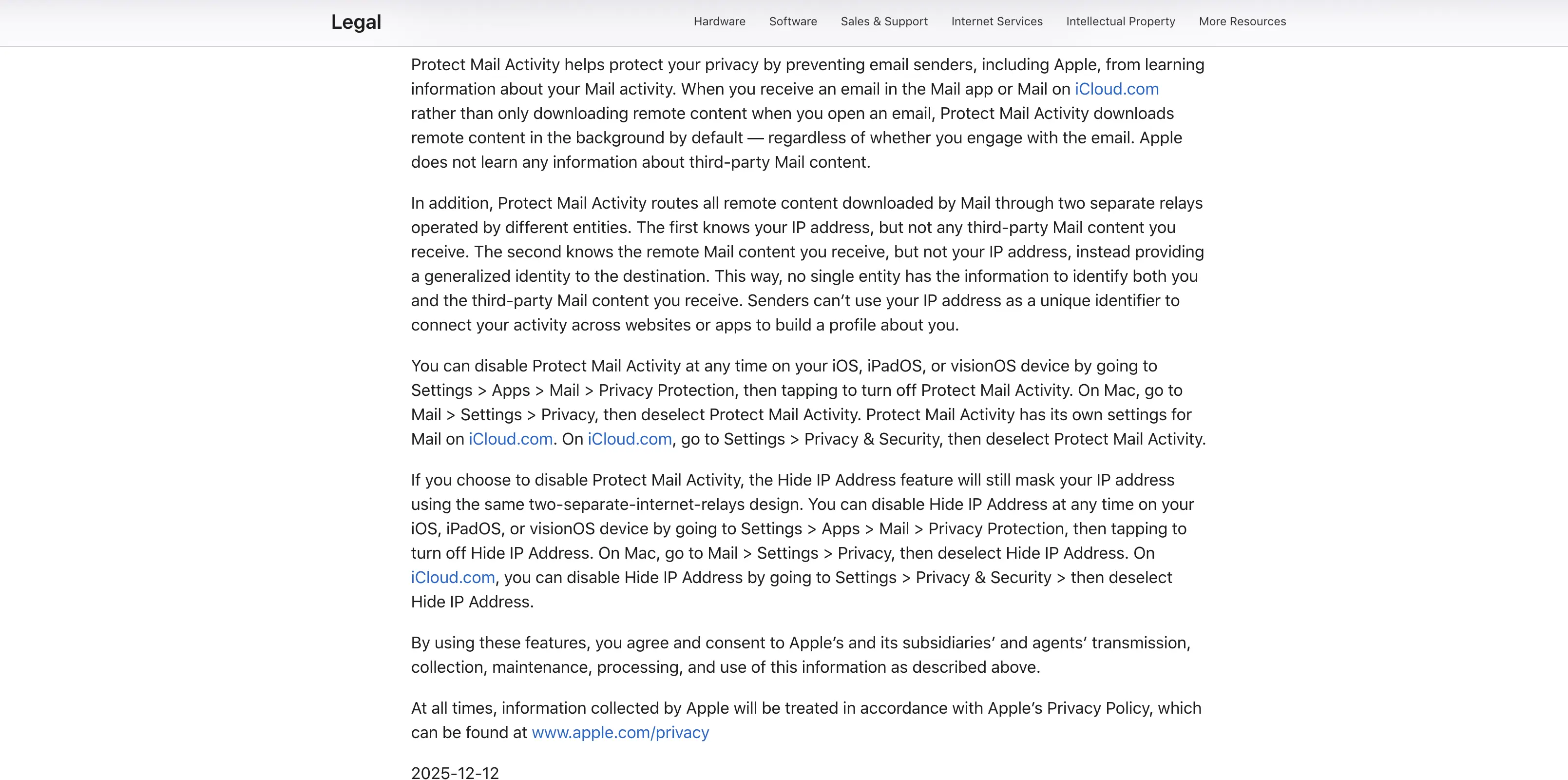
The behavior is documented by the company that built it, so this is a stated default rather than an estimate.
Stage 5: Measure what is still working
Three numbers per mailbox, checked weekly, tell you almost everything: reply rate, bounce rate and spam complaint rate.
Open rate is not the number to watch
Open tracking works by loading a hidden image, and Mail Privacy Protection loads that image whether or not anyone opened the message.
Every Apple Mail recipient on your list therefore registers as an open, which inflates the number and hides the shape of the campaign.
Reply rate replaces it. A reply is an action nothing can perform on the recipient's behalf, and it tracks the thing you actually want. Positive reply rate, counted separately from total replies, is the version worth reporting.
Mailbox health checks
Scaling cold email outreach means adding mailboxes rather than raising the volume on the ones you have. Each mailbox carries its own reputation, and one bad list can take a single mailbox down without touching the others.
Check the complaint rate per mailbox rather than per campaign, and watch for a sudden rise in bounces, which usually means unverified addresses got through.
Pause a mailbox when its bounce rate crosses roughly 3 percent in a week, or when complaints climb toward the published 0.30 percent ceiling. Pausing early costs a few days. Sending through it costs the domain.
What happens: you have weekly numbers per mailbox rather than one blended campaign figure.
Done when: you can name the weakest mailbox and why.
The five touch sequence you can copy
The timing and job of each touch are fixed. The content is yours.
Touch | Day | The job of this touch | Done when |
|---|---|---|---|
1 | 0 | Name the fact, give one reason for writing, ask one question | It could only have gone to this company |
2 | 3 | Add one proof point or a short result from similar work | It carries evidence the first email did not |
3 | 8 | A phone call, then an email referencing it in the first line | The email makes no sense without the call |
4 | 14 | Raise a problem the first email never mentioned | It could stand alone as a first email |
5 | 21 | Close the loop and invite a no | It gives an easy way to end the thread |
A first touch example, with your specifics in place of the descriptions:
Subject: [four to six lower case words naming the actual subject]

Hi [first name],

[One sentence naming the specific public fact, with its date if it has one.]

[One sentence connecting that fact to a problem you work on, written as a
statement about them rather than a claim about you.]

[One question answerable in a single line, with no meeting attached.]

[Your name]
[Role], [Company]
When cold email outreach stops working
Four failure states account for most campaigns that stall. Each has a different fix, and treating all four as a copy problem is how teams rewrite the same email for a month.
Symptom | Likely cause | Fix |
|---|---|---|
Replies stopped across every mailbox at once | Domain or IP reputation fell, not a copy problem | Pause sending, check rates per mailbox, resume at a quarter of the volume |
Bounce rate rose sharply on one batch | Stale addresses entered the list | Stop that batch, re verify anything older than 90 days, split out catch all rows |
Opens look healthy but nobody replies | Automatic image loading inflates the number | Ignore opens, rewrite the closing question so one line answers it |
A few angry replies and a complaint | The list is off target, not the message | Rebuild the account filter, drop rows you cannot justify in a sentence |
Practitioner write ups land in the same place. In a March 2026 Indie Hackers post, a founder reviewed the results of 820 cold emails and found that changing the audience moved reply rates by more than a factor of five, while subject line testing and heavier signatures changed nothing.
FAQs
Why should cold email outreach run on a separate domain?
A spam complaint attaches to the sending domain. If that is the domain your company email runs on, a bad campaign can push invoices and customer replies into spam folders. A separate domain can be rebuilt without touching your main mail.
Can LinkedIn replace cold email for B2B outreach?
For most B2B outreach, no. A connection request reaches a less crowded inbox, but only for people active there, and daily limits cap volume. Running both against the same account list beats choosing one.
How many cold emails can one mailbox send per day?
Start below 20 per mailbox per day and raise it gradually over several weeks. Above roughly 50 per mailbox is where most teams see complaint and bounce rates climb. Adding mailboxes is safer than pushing one harder.
Is cold email outreach legal?
In the United States, yes, provided it follows the CAN SPAM Act: accurate headers and subject line, a valid physical postal address, and a working opt out honored within 10 business days. Rules elsewhere are stricter, and GDPR treats a work address as personal data.
Does cold email outreach still work in 2026?
It still produces meetings, but the margin for a poor list is gone. Published sender requirements put a ceiling on complaint rates, so campaigns built on scraped lists fail faster than they used to. Narrow, researched lists still get replies.
What to fix first
If replies are low, the instinct is to rewrite the email. Try the list first. Take 30 rows at random and write one sentence for each explaining why that company would care this month.
The rows where the sentence will not come are costing you the campaign.
About the author
Michael Doyle writes about B2B sales at Leaderr. He covers prospecting, cold outreach, sales data, and pipeline building, with a focus on what actually works for SDRs, founders selling on their own, and small sales teams. Connect with him on LinkedIn.