How to verify an Email Address in 2026: 6 methods ranked by failure rate
I tested six ways to verify an email address, from a plain syntax check to a full SMTP probe. Here is which ones Gmail and Outlook defeat, and which works.
 Michael Doyle10 min read
Run the address through a free online checker first. It combines a syntax check, an MX record lookup, and an SMTP test in one pass, which is faster and more accurate than any single method alone. For one high stakes contact, add a manual MX lookup as a second opinion. For signup forms, double opt in is the only method that confirms a real person actually reads that inbox.
Verification assumes you already have an address to test, so if you are still hunting for one, start with the six ways to find someone's email address.
What this works on
Any email address, on any provider or domain. The online checker methods just need a browser. The manual DNS and SMTP methods need command line access, Terminal on a Mac, or PowerShell or Command Prompt on Windows.
What this does not do
This guide confirms whether a mailbox is real and can receive mail. It does not tell you whether a message already sitting in your inbox is a phishing attempt. That's a different skill, built on checking headers and scanning links, not on address verification. If that's what brought you here, you want a phishing-detection guide instead.
Where it breaks down
Gmail, Google Workspace, Outlook.com, and Microsoft 365 all deliberately hide whether a specific mailbox exists, to stop attackers from probing their servers one address at a time. Methods 4 and 5 below cover how to work around that, and what to do when they still won't give you a straight answer.
I ran a syntax and MX check on a list of 40 addresses last month. Every single one came back clean. Six bounced anyway when the campaign went out. All six sat on catch all domains, servers that accept mail for any address, real or not. Syntax and MX checks can't see that. The methods below can, most of the time.
Bad addresses also cost more than a bounce. Gmail's own sender guidelines state: "Keep spam rates reported in Postmaster Tools below 0.30%." A list full of dead or fake addresses pushes complaint and bounce rates toward that line fast, and once you cross it, delivery drops for every list you send after.
Method 1: Check the format
Every valid address follows a simple pattern: a local part, an @ symbol, and a domain with a real extension. This is a syntax check, and it's the first filter in every verification pipeline because it costs nothing and catches the obvious errors: a missing @, a stray space from a copy-paste, .con instead of .com.
What it misses is everything else. totally.fake.person@company.com passes a syntax check cleanly. Format is a filter, not a verdict.
How to confirm it worked: feed it an address with an obvious typo domain and check that the tool flags it. A clean result on a real-looking address doesn't mean much on its own, so treat it as step one, not the finish line.
Method 2: Search for the address
Paste the exact address into a search engine in quotes. If it shows up on a company site, a conference speaker page, or a public directory, that's a real signal for one important contact.
This doesn't scale past a handful of addresses, and it proves nothing on its own, but it's a fast sanity check before you invest more time.
Method 3: Look up the domain's MX records
MX stands for Mail Exchange. Every domain that can legitimately receive email has at least one MX record in its DNS, a pointer that tells the internet which server handles mail for that domain.
Use a free tool like MXToolbox and type in the domain, or run it yourself from a terminal: nslookup -type=MX example.com on Windows, or dig MX example.com on Mac and Linux.
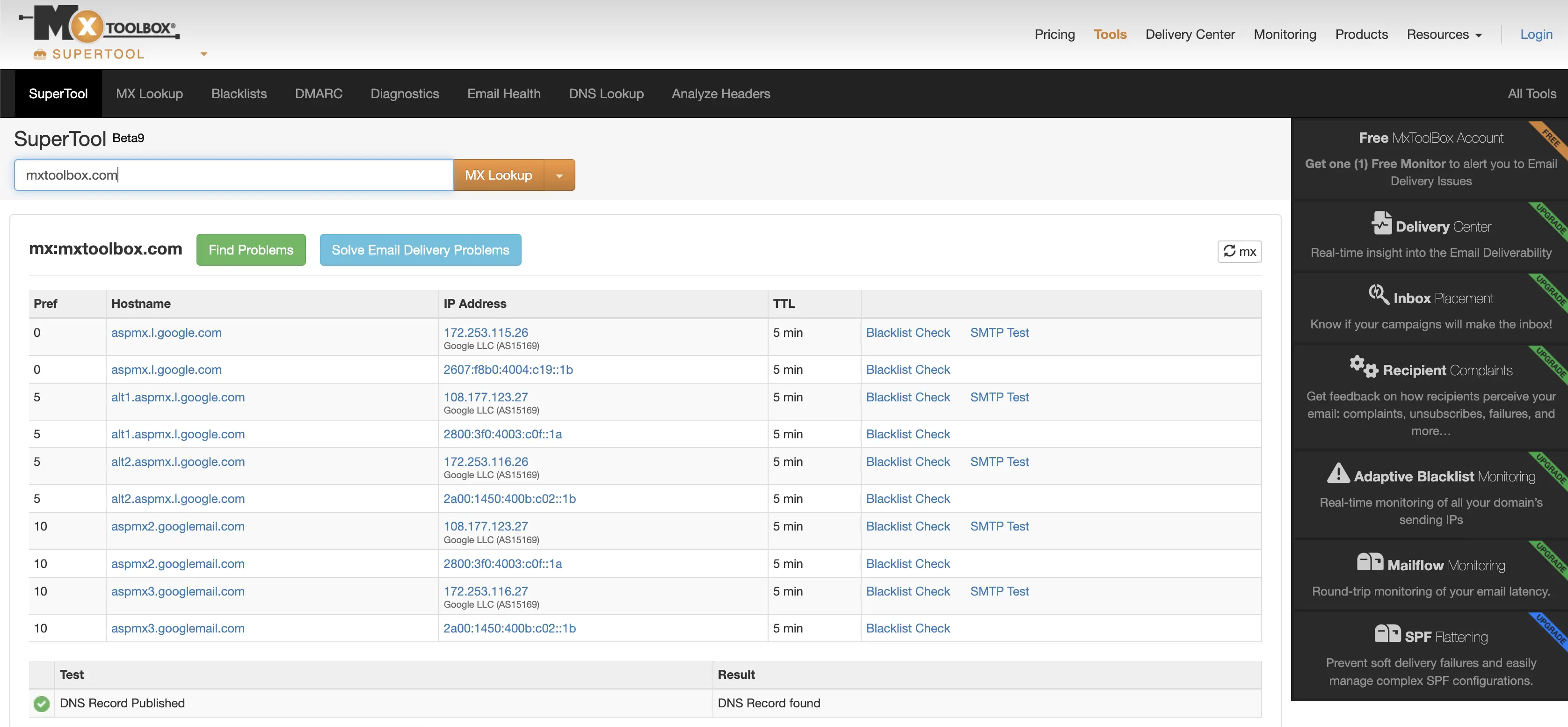
How to confirm it worked: if records come back, the domain has a working mail server. If nothing comes back, every address at that domain is dead, and you can stop there. A clean MX result says nothing about the specific mailbox you're checking. That's the next method.
Method 4: Run an SMTP handshake
SMTP, or Simple Mail Transfer Protocol, is the standard method mail servers use to pass messages to each other. An SMTP handshake starts that same conversation and stops before any message is actually sent.
Here's what it looks like:
Connect to the domain's mail server on port 25
Send
HELOorEHLOto introduce yourselfSend
MAIL FROM:<test@yourdomain.com>with a sender addressSend
RCPT TO:<target@example.com>, the address you're checkingRead the server's response code
Close the connection with
QUIT, without ever sending message content
The response code is the answer: 250 means the mailbox exists and will accept mail, 550 means it doesn't, and 450 usually means greylisting, a temporary block meant to slow down exactly this kind of check.
Running this by hand works for one or two addresses. It falls apart at any real volume. In 2026, Gmail and Microsoft actively throttle or block SMTP probes coming from IPs they don't recognize, since a burst of RCPT TO requests from an unfamiliar server looks like reconnaissance, not verification. Push past a few hundred checks from your own machine and the responses turn unreliable well before you finish the list.
Gmail and Microsoft add a second problem: both can return 250 OK for addresses that don't exist at all, specifically to block that kind of mapping. A clean SMTP result means far less on a major consumer provider than on a smaller company's mail server.
How to confirm it worked: a 250 is a good sign, not proof. Cross-check it against catch-all detection in Method 5 before you act on it.
Read Also: Email deliverability Best Practices for 2026, Checked Against Google's own rules
Method 5: Use a free or bulk verification tool
A verification tool runs syntax, MX, and SMTP checks together, then adds a layer manual methods can't match: catch-all domain detection, disposable address flagging, and role-based address warnings for generic inboxes like info@ or support@.
Most free tiers cover 75 to 100 checks a month with no signup; tools like Hunter, Verifalia, and Prospeo all offer this. Bulk pricing for an existing list runs roughly $7 to $15 per 1,000 to 2,000 addresses, depending on the provider.
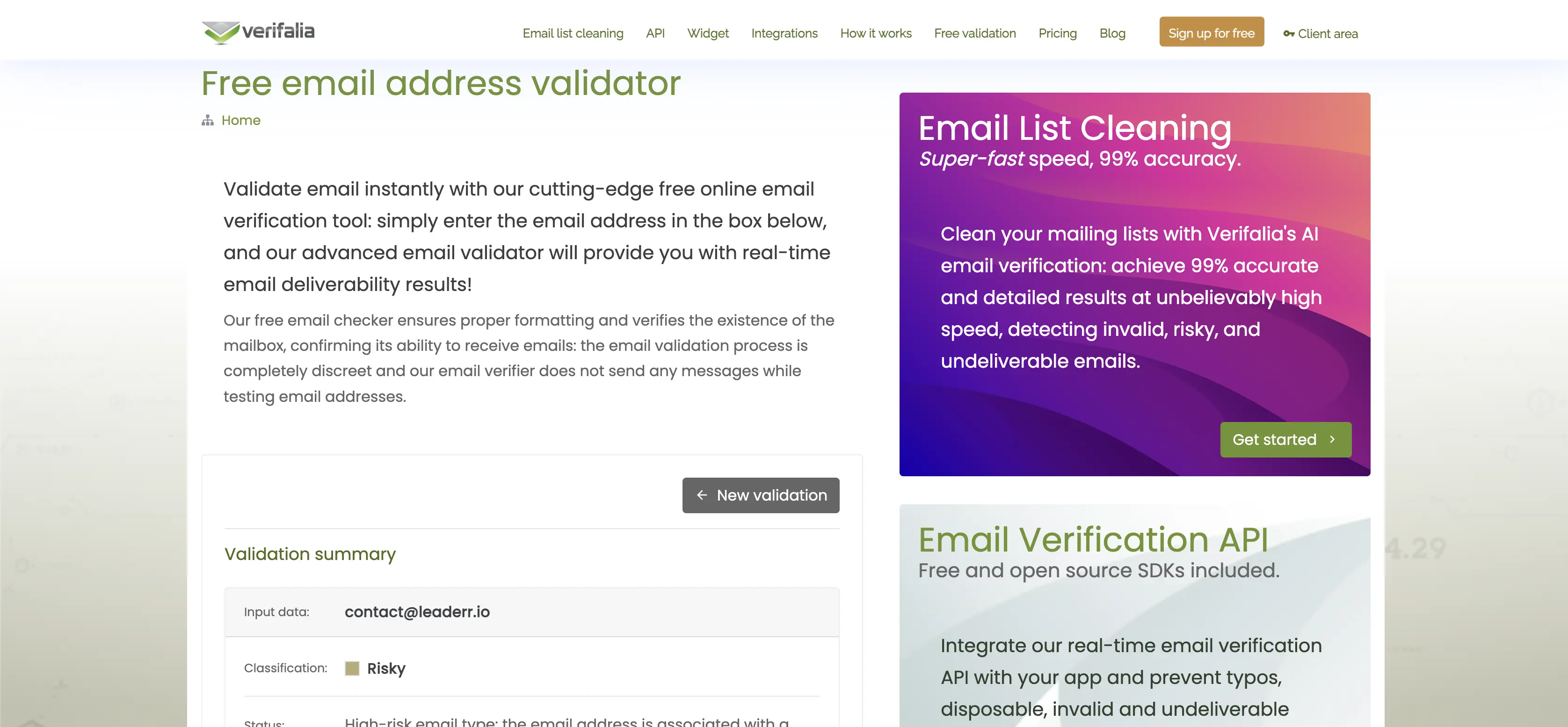
How to confirm it worked: look for a status of "valid," not just "accepted." A tool that separates out catch-all and role-based results is doing something manual SMTP checks structurally can't.
Method 6: Use double opt-in for signup forms
For new signups, skip verifying deliverability and confirm ownership instead. Send a confirmation link to the address the moment someone submits a form, and only count the address as verified once that link gets clicked.
This is the only method here that proves a real person reads that inbox, not just that a mailbox exists. A Quora thread on validating email addresses makes the same point: every other method confirms a mailbox exists, but only a response from the address confirms someone is reading it. It only works at signup, though, and can't clean up a list you already have.
How to confirm it worked: the address counts as verified the moment the confirmation link is clicked, and not a second before.
What each result actually means
Valid: passed syntax, MX, and SMTP checks on a non-catch-all domain. Safe to use.
Invalid: failed at least one layer, usually a
550at the SMTP step. Remove it.Risky or catch-all: the domain accepts everything, so the result can't be trusted either way. Segment these separately.
Unknown: the check timed out or got greylisted, common on Gmail and Microsoft domains. Treat as unverified, not invalid.
A clean result only clears the first hurdle, and the five stage cold email outreach process covers what the sending domain and the sequence have to do before a verified address turns into a reply.
Troubleshooting
A long-running Quora thread on validating email addresses sums up why these problems keep coming up: syntax and domain checks can confirm an address is well-formed, but the only way to confirm someone actually reads it is to contact it directly. Every failure mode below traces back to that gap.
A checker said valid, but the address still bounced. It almost always sits on a catch-all domain. Pull catch-all results into their own segment, send to that segment separately, and watch the bounce rate closely before scaling up.
Every Gmail or Outlook address comes back "unknown." That's the anti-enumeration behavior described above, not a broken tool. A verification service with a provider-specific accuracy model, or your own historical bounce data, is more reliable here than a raw SMTP check.
A manual SMTP or Telnet check hangs or times out. This is the IP throttling problem from Method 4. Your probing IP got flagged before it finished. Switch to a verification tool running on dedicated infrastructure instead of your own connection.
A free checker says the monthly limit is reached. Most free tiers cap out around 75 to 100 checks a month. Create an account for a higher free allowance, or move to bulk pricing for a full list.
FAQ: How to verify an Email Address
Can you verify an email address without sending an email?
Yes. Syntax checks, MX record lookups, and SMTP handshakes all confirm whether an address is likely real without ever delivering a message.
Why does Gmail always say an address is valid?
Gmail and other major providers intentionally return generic accepted responses to stop attackers from using verification checks to map out which mailboxes exist on their servers.
Is there a free way to verify an email address?
Yes. Most verification tools offer a free tier of roughly 75 to 100 checks a month with no signup required, enough for occasional single-address checks.
How do you verify an email address in bulk?
Upload a CSV to a bulk verification tool. It runs syntax, MX, and SMTP checks on every row and returns a status for each address, usually within minutes for a few thousand contacts.
What does "catch-all" mean in email verification?
A catch-all domain accepts mail sent to any address at that domain, even ones that don't exist, which means an SMTP check alone can't tell you whether the specific mailbox is real.
Where this leaves you
Layer these methods instead of trusting any single one. Syntax and MX checks catch the obvious failures for free. SMTP gets you closer, with real limits on Gmail, Microsoft, and catch-all domains. A verification tool covers the gap for anything beyond a handful of addresses. Double opt-in is the only method that confirms a real person is behind the address, and it only works at signup.
How to verify an Email Address: Method comparison
Method | Catches | Fails on | Cost |
|---|---|---|---|
Syntax check | Typos, formatting errors | Doesn't confirm the mailbox exists | Free |
Search the address | Quick check on one contact | Doesn't scale, not reliable alone | Free |
MX record lookup | Dead or misconfigured domains | Can't confirm a specific mailbox | Free |
SMTP handshake | Most individual mailbox checks | Gmail/Microsoft, catch-alls, IP throttling at volume | Free (DIY) |
Verification tool | Full pipeline plus catch-all and disposable flags | Free tier caps out fast | Free tier, then ~$7-15 per 1,000 |
Double opt-in | Proof a real person owns the address | Only works at signup, not on existing lists | Free (build cost only) |
Steps and SMTP behavior verified July 27, 2026, against RFC 5321 and Gmail's current sender guidelines.