

CRM in sales stands for customer relationship management: the system a sales team uses to store every contact, track every deal through a pipeline, and see what needs a follow up today.
A 2024 Gartner sales survey cited in Salesforce's research on sales statistics found that reps spend 60% of their time on non selling tasks, including manual data entry, which is the exact problem a CRM system in sales is built to cut down.
Who this is for, and what you need before you start
This article is for anyone who has heard "put it in the CRM" and wants a plain answer, not a vendor pitch. It fits new reps, sales managers comparing CRM tools in sales for the first time, and marketers who need to understand what sales actually does with the data. It is not a feature by feature comparison of specific CRM products, and it will not tell you which one to buy.
You do not need any software open to follow along. If you want to try the pipeline template later in this article, it helps to have a rough list of five to ten real deals in your head, whatever stage they are actually in right now.
A lead becomes a record in the CRM
What happens: Someone shows interest, gets referred, or gets found through prospecting, and a rep creates a contact record. That record usually holds a name, a company, a role, an email, a phone number, and notes from the first conversation. This is basic contact management, and it is the smallest unit a CRM system in sales actually works with.
Those starting fields, a verified email address and a job title matched to a name and a company domain, usually exist before a rep ever picks up the phone. Finding that contact in the first place is its own step, covering the four stages a rep works through before a lead even reaches this point.
Done when: the record exists with an owner, a source, and at least one way to reach the person.
The deal moves through a sales pipeline
What happens: Once a lead is qualified, it becomes a deal, sometimes called an opportunity, and it enters a sales pipeline in the CRM. A sales pipeline in a CRM is usually shown as a set of stages, often as a visual board where each deal is a card that moves left to right: new lead, qualified, meeting booked, proposal sent, closed. This visual layout is what most people picture when they hear the phrase CRM in sales funnel view, even though "funnel" technically describes the shrinking count of deals at each stage and "pipeline" describes the deals themselves moving through it.
The sales process in a CRM is just that stage list, defined once and then applied to every deal so a manager can compare deals against each other instead of reading forty separate notebooks.
Done when: every open deal has a stage, a dollar value, and a next step written down, not just remembered.
Pipeline and funnel are only two of the terms sales teams often use differently from each other; a fuller breakdown of b2b sales terms that come up in real deals covers the rest.
CRM automates the repeatable parts of selling
What happens: Sales automation in a CRM handles the steps that follow a pattern: sending a reminder email, logging a call, updating a stage when a deal ages past a set number of days. Sales force automation, often shortened to SFA, is the older, more formal name for this same idea. It came from the earliest CRM products in the 1990s, built specifically to automate contact tracking, forecasting, and reporting for sales teams rather than customer service or marketing.
A sales sequence in a CRM is a set order of touches, an email, then a call, then a second email, that fires automatically once a rep enrolls a contact in it. This is the layer that turns a static contact record into an active outreach plan, and it is closely related to how an AI SDR automates the earliest outreach steps before a human rep ever gets involved.
Done when: at least one repeatable task, a reminder, a stage nudge, or a sequence step, runs without a rep manually triggering it.
Sales and marketing read from the same CRM
What happens: CRM in sales and marketing means both teams work off one shared set of contact and deal records instead of two disconnected lists. Marketing adds a contact from a form fill or an event; sales adds notes from a call; both see the same history. Vendors call this a single source of truth, meaning nobody has to ask "did anyone already talk to this person" because the answer is already in the record.
This shared view is also where sales enablement content and coaching get matched to what a specific deal actually needs, based on where that deal sits in the CRM.
Done when: a marketing sourced lead and a sales sourced lead show up in the same list, with the same required fields, not two separate spreadsheets.
CRM feeds sales management and forecasting
What happens: CRM in sales management means a manager can pull a report instead of asking each rep for a status update. Deal stage, deal value, and expected close date roll up into a sales forecast.
A 2021 Forrester study on the business value of CRM found that CRM automation alone increases customer retention by as much as 15%, largely because reporting catches stalled deals and cooling accounts before a manager would otherwise notice.
This reporting layer is what separates a CRM from a plain contact list, and it is also where lead scoring ranks which of the leads sitting in the CRM are worth working first, based on fit and behavior rather than gut feel.
Done when: a manager can answer "what is likely to close this month" using the CRM alone, without a status meeting.
A pipeline template you can copy
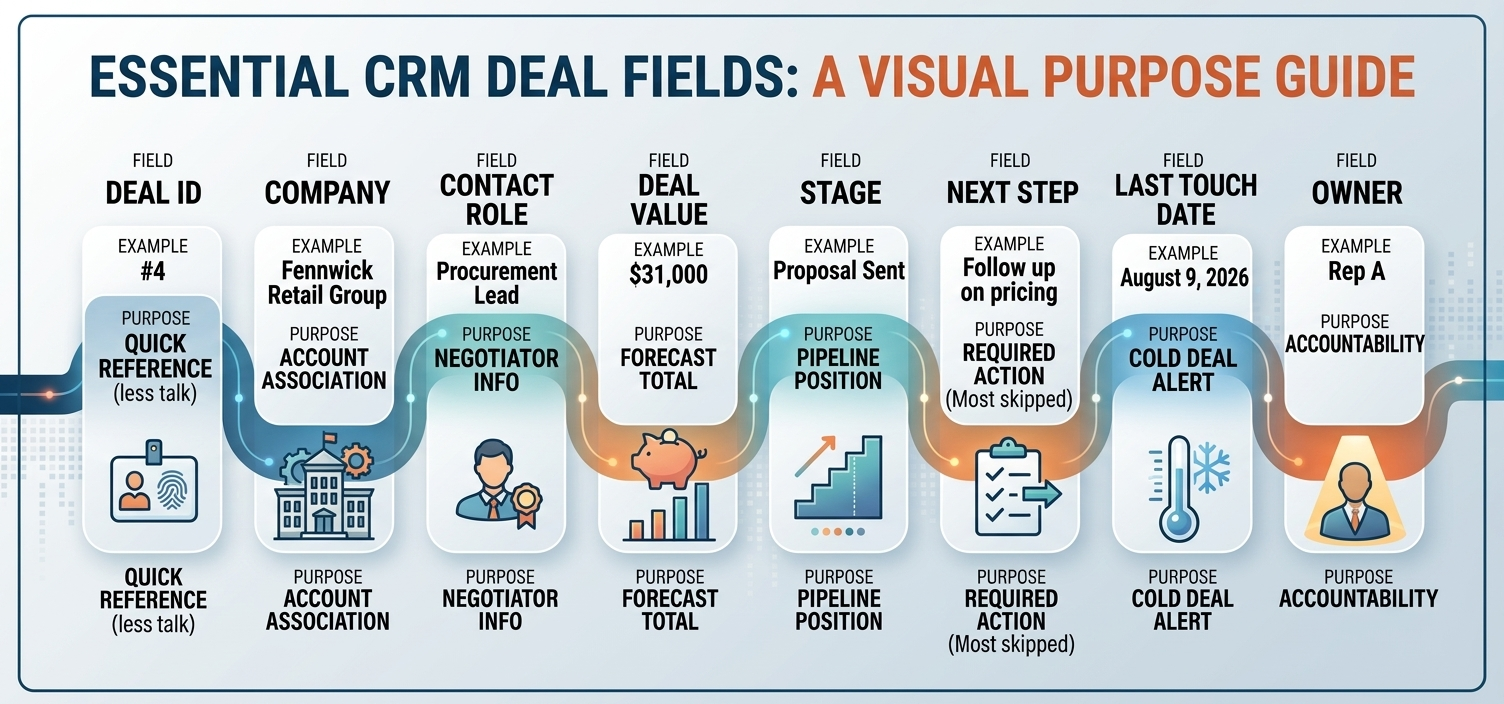
I built a five stage pipeline and populated it with ten mock deals to see how few fields a working CRM record actually needs. Eight fields covered every deal without leaving out anything a manager would ask about: deal ID, company, contact role, deal value, stage, next step, last touch date, and owner.
Field | Example | Why it is there |
|---|---|---|
Deal ID | 4 | Lets you reference one deal in a call without saying the company name twice |
Company | Fennwick Retail Group | The account the deal belongs to |
Contact role | Procurement lead | Tells a rep who they are actually negotiating with |
Deal value | 31000 | What gets summed into the forecast |
Stage | Proposal sent | Where the deal sits in the pipeline right now |
Next step | Follow up on pricing questions | The single most skipped field |
Last touch date | August 9, 2026 | Flags deals going cold before a manager has to ask |
Owner | Rep A | Who is accountable for the next move |
Two of the eight fields, next step and last touch date, needed a manual update every single time a deal changed stage. Those two fields going stale is the fastest way a CRM stops matching reality.
Common mistakes teams make with CRM in sales
Skipping the CRM until volume forces the issue. In one long running discussion among early stage founders on Hacker News, several answered a simple question, do you use a CRM, by describing a shared inbox or a spreadsheet instead. That works at low deal volume. It stops working the moment two reps touch the same account and neither one knows what the other already said.
Letting next step and last touch date go stale. As the pipeline template above shows, these are the two fields a CRM depends on the most and the two fields reps skip first when they are busy.
Treating sales and marketing contact lists as separate instead of shared. When CRM in sales and marketing means two exports that get merged by hand once a month, duplicate and conflicting records pile up fast.
Confusing sales force automation with modern sales automation. SFA originally meant contact tracking, forecasting, and pipeline reporting. Today's sales automation often adds sequences and AI drafted outreach on top of that base. Evaluating a tool against the older, narrower definition alone misses what current CRM software actually does.
FAQs: What is CRM in sales?
What is the role of CRM in managing sales leads?
A CRM gives every lead a single record, an owner, and a stage, so a manager can see which leads are being worked and which ones have gone quiet.
What are the types of CRM in sales?
The three common types are operational (day to day contact and pipeline tracking), analytical (reporting and forecasting), and collaborative (shared access across sales, marketing, and support).
Is CRM in sales the same as CRM in sales and marketing?
No, CRM in sales usually means the pipeline and deal tracking a rep uses daily, while CRM in sales and marketing describes that same underlying system shared across both teams so contact history is not duplicated.
What is sales force automation in a CRM?
Sales force automation, or SFA, is the original term for the contact tracking, forecasting, and reporting functions built into the earliest CRM products, distinct from newer AI driven features.
What is a sales sequence in a CRM?
A sales sequence is a set, ordered series of outreach steps, such as an email followed by a call, that a CRM triggers automatically once a rep enrolls a contact in it.
Manual tracking compared with a CRM
Approach | Best for | Setup time | Main risk |
|---|---|---|---|
Spreadsheet or shared inbox | A handful of deals, one or two people | Under an hour | No history once a rep leaves or a deal goes quiet |
Standalone CRM | A full sales team with a defined pipeline | A few days to a few weeks | Data goes stale if next step and last touch date are not enforced |
CRM with built in sales automation | Teams doing high volume outbound | A few weeks, plus sequence setup | Automated sequences that go out with no human review |
Making CRM a habit, not a chore
A CRM only works if the two fields that change constantly, next step and last touch date, actually get updated. Everything else in this article, the pipeline stages, the automation, the shared marketing view, the forecast, depends on those two fields staying current. Start there before adding anything else.