What is b2b contact data, and why it goes bad faster than vendors admit
B2b contact data explained: what it actually includes, why accuracy decays this fast, and a repeatable test to run before you buy or renew any provider plan.
 Michael Doyle14 min read
B2b contact data is the set of business level records, name, title, work email, direct phone, and company details, that sales and marketing teams use to reach the right person at another company.
The industry benchmark decay rate is 2.1 percent a month, so an unverified list loses real accuracy within weeks, not years. Test a sample before you trust any provider's published number.
What you need before you start
Before you compare providers or run a test, get these four things in place.
A live sample of contacts to test, ideally 50 to 100 pulled from a real target list, not a demo file the provider hands you.
Someone on the team who can run an email check and a phone spot check before the first real send goes out.
A cancellation date on the calendar the day you sign, not the week the renewal notice arrives.
A clear answer on which regions and job levels the list actually has to cover, the ideal customer profile the list needs to match, since coverage varies more by region than most pricing pages let on.
Who should prioritize what changes by team size and structure:
Team | What to prioritize | What to watch for |
|---|---|---|
Solo founders and freelancers | Cost per usable contact over raw database size | Free tiers that cap out after the first small pull |
Small sales teams and SDRs | An easy way to layer a second source, since there is little time to verify records by hand | Credit based plans with a markup on overage credits |
Agencies running several clients | Coverage across every region a client sells into | Per seat pricing that does not scale with client count |
Enterprise and compliance heavy teams | Documentation for every consent and deletion request | Contracts that renew automatically at a higher tier |
This guide focuses on testing a provider and pricing it correctly rather than ranking vendors by name. For a side by side look at how the major providers compare on price and coverage, a full comparison of the leading options covers what each tier actually includes.
What b2b contact data actually means
The phrase covers more than an email address. Three distinct layers sit inside most providers' records, and knowing which one you are buying decides whether a plan actually fits the task.
Contact level data
This is the layer most buyers picture first: a name, a job title, a work email, a direct phone number, and a LinkedIn profile URL. It is also the layer that ages fastest, since a single job change can invalidate the email, the phone number, and the title all at once. A closer look at what a verified email address actually means covers that one field on its own, since email carries most of the weight in a typical outreach list.
Firmographic and technographic data
Firmographic data describes the company rather than the person: employee count, industry, revenue band, and headquarters location. Technographic data goes a layer deeper, showing which software a company runs, recent hiring activity, or a funding event.
Neither one goes stale as fast as contact level data, since a company's industry rarely changes month to month even when its staff does.
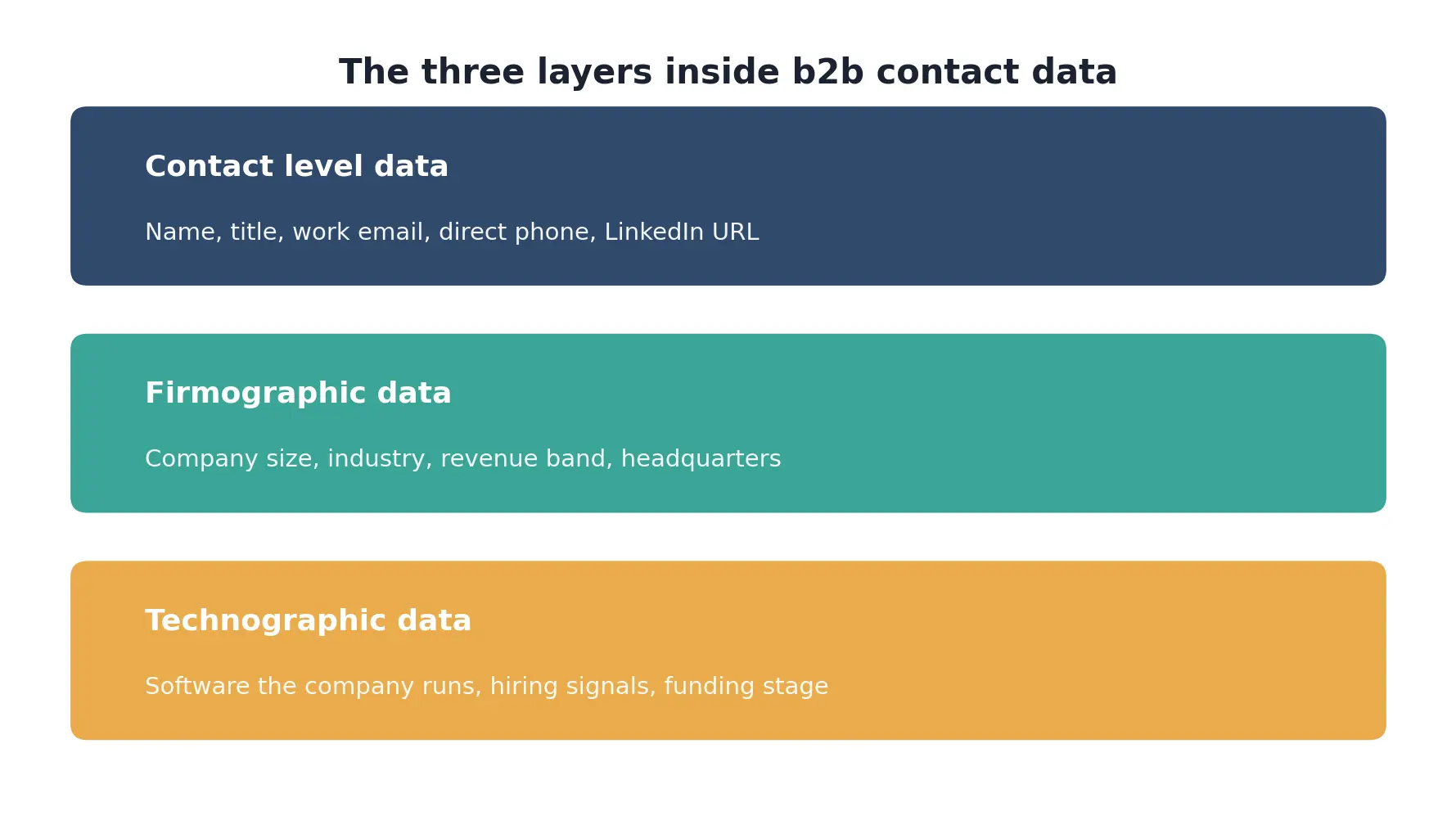
Most providers sell some blend of all three, priced by credit or by seat. A plan that is strong on firmographic breadth can still be weak on contact level freshness, which is the gap the next section covers.
Why the accuracy numbers on pricing pages rarely match reality
A provider's advertised accuracy is measured at the moment a record enters the database, not at the moment you use it. The gap between those two points is where most of the frustration with contact data comes from.
Why job changes break a database faster than anything else
A work email tied to a title stops working the moment that person leaves the company, and a direct line often gets reassigned within days.
Professionals are also changing jobs more often than they used to: LinkedIn's own research found that professionals entering the workforce today are on pace to hold twice as many jobs over a career compared to fifteen years ago.
That single trend, on its own, is enough to keep any static database sliding out of date.
What a claimed accuracy percentage leaves out
An accuracy claim rarely states the date it was measured against, and it rarely separates emails, phones, and titles into their own figures even though they decay at different speeds. At a 2.1 percent monthly decay rate, the rate HubSpot cites from Marketing Sherpa research, a list that started at 98 percent accurate is already down to roughly 90 percent by month five.
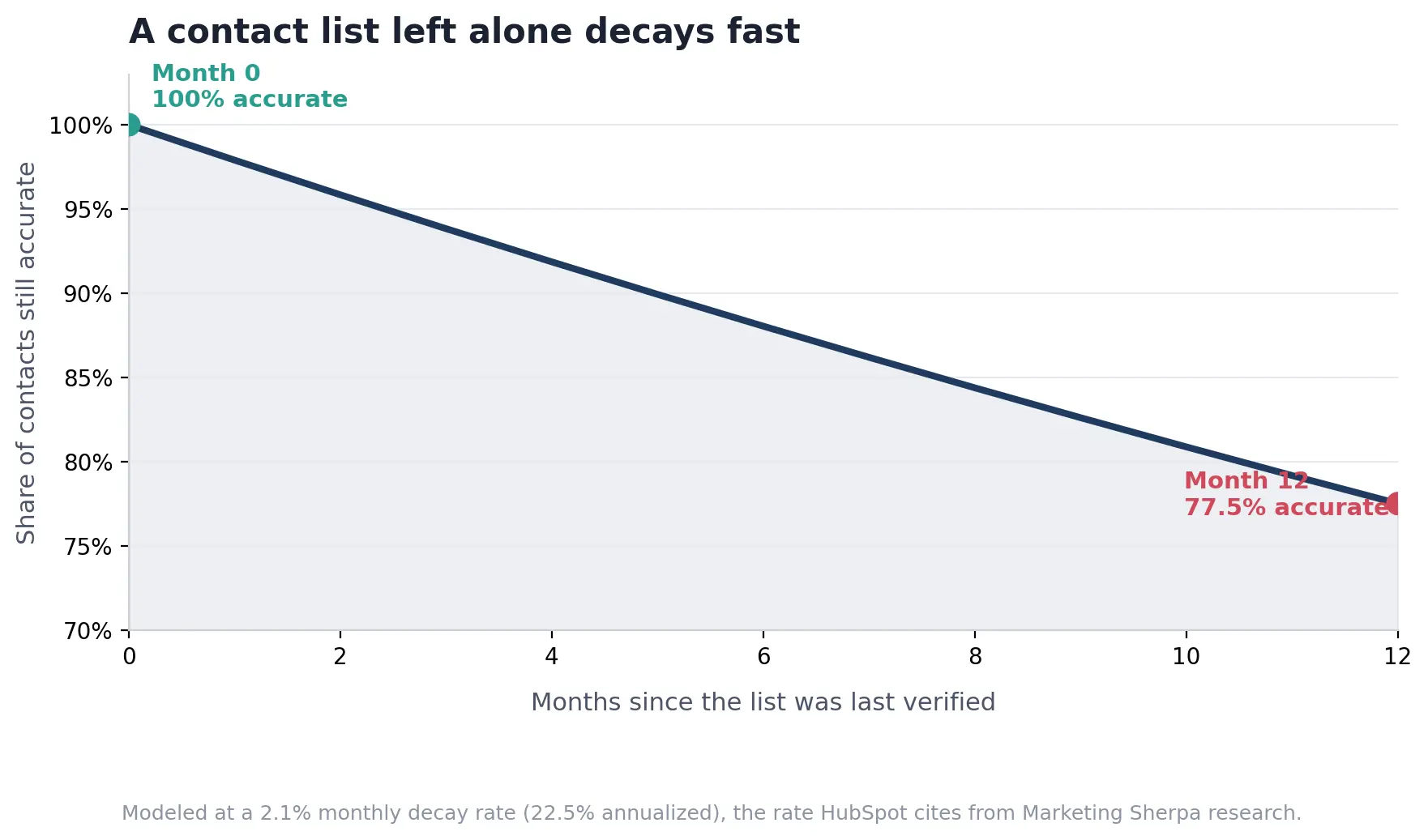
The chart above models a full year with no refresh at all. Most teams sit somewhere between month two and month six of that curve when they open a list they bought a while ago and start seeing bounces.
How to test a b2b contact data provider before you buy
A repeatable test beats a sales call every time, and it takes less time than most buyers expect.
One founder's account of switching data providers is a useful illustration of what happens without a test step. After exporting close to five thousand contacts and launching a campaign, over three hundred emails bounced within four days and a client found messages reaching people who had left their jobs nearly two years earlier.
The fix afterward was the same repeatable process below, run before the list ever reached an inbox.
Pull a real sample
Export 50 to 100 contacts from the segment you actually plan to target, not a curated demo list. A provider's demo data is almost always cleaner than its production data.
Validate the emails
Run every address through a syntax and mailbox check before you send anything. This step alone catches most of the dead addresses a database has not yet flagged as invalid.
Spot check the phone numbers and titles
Call or look up ten to fifteen numbers by hand and compare the listed title against the person's current LinkedIn profile. Phone accuracy and title accuracy are usually worse than email accuracy, since both change without triggering any automatic recheck.
Score it before you sign
Add up the usable percentage across all three fields, email, phone, and title, and compare that single number against the price per seat. A provider that looks cheap on the pricing page can still cost more per usable contact than one that looks expensive.
Here is the checklist in a copyable form:
Pull 50 to 100 contacts from a real target segment.
Run every email through a validation check.
Hand check ten to fifteen phone numbers and titles against LinkedIn.
Calculate the usable percentage across all three fields.
Divide the plan price by the usable contact count, not the advertised contact count.
Confirm the cancellation window and write the date down before you sign anything.
Single source data vs layering multiple providers
Once a test comes back short, the next decision is whether to switch providers or add a second one on top of the first. This is where waterfall enrichment comes in, a form of data enrichment that checks a second and third source only for the records the first provider could not fill.
Approach | How it works | What it usually misses |
|---|---|---|
Single source database | Pulls every record from one company's own index and refresh schedule | Anything that index has not recrawled recently, with no fallback source |
Waterfall across two to three providers | Checks a second and third source only for the records the first one left blank | Nothing on its own, but it costs more per contact and takes longer to run |
Manual verification only | A person checks each contact by hand before outreach begins | Does not scale past a small list, and misses phone or title changes a database would catch automatically |
Waterfall enrichment is not free. Each additional source adds a per contact cost, so most teams reserve it for accounts above a certain deal size rather than an entire list. For everything else, a single well tested source with a routine recheck is usually enough.
What b2b contact data actually costs per usable contact
Seat and credit pricing is the number on the page. Cost per usable contact is the number that actually determines return on the purchase, and almost no provider publishes it.
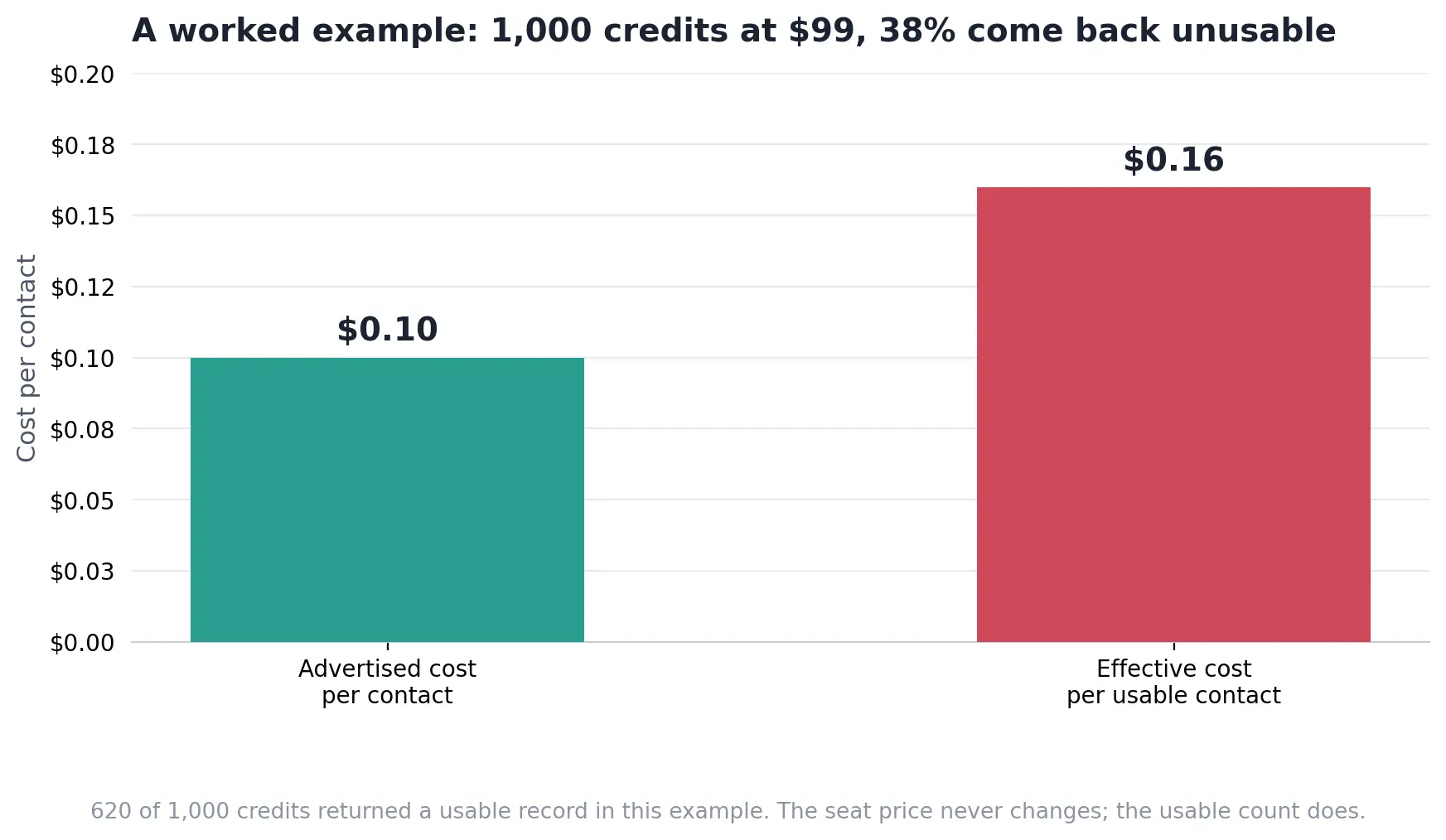
The seat price on the invoice stays fixed no matter what. The usable contact count is the number that actually moves, and it is the one worth calculating before you compare two plans.
The formula
Cost per usable contact = Total plan price ÷ Number of contacts that pass your test
Divide the total plan price by the number of contacts that pass your test, not the number of credits included in the plan. That single change in the denominator is usually where the real price difference between two providers shows up.
A worked example
Advertised rate: $99 ÷ 1,000 credits = $0.10 per contact Test result: 620 of 1,000 credits come back usable Real rate: $99 ÷ 620 usable contacts = $0.16 per usable contact
A plan priced at 99 dollars for 1,000 credits looks like 10 cents a contact on the pricing page. Run those credits through the checklist above and suppose 380 come back with a dead email, a wrong number, or a stale title, a plausible outcome at the decay rates already covered.
That leaves 620 usable contacts, which puts the real cost at roughly 16 cents per usable contact, 60 percent higher than the advertised rate.
Run this same math on your own sample before comparing two providers by sticker price alone.
What happens after you send to a bad contact
A bounced email or a wrong number does not just waste one outreach attempt. The bounce rate on that one send changes how the next hundred emails perform too.
What the inbox checks first
Gmail publishes an exact threshold for this. Bulk senders are expected to keep their user reported spam rate below 0.1 percent, and rates at or above 0.3 percent make a sender ineligible for delivery support until the rate stays under 0.3 percent for seven straight days.
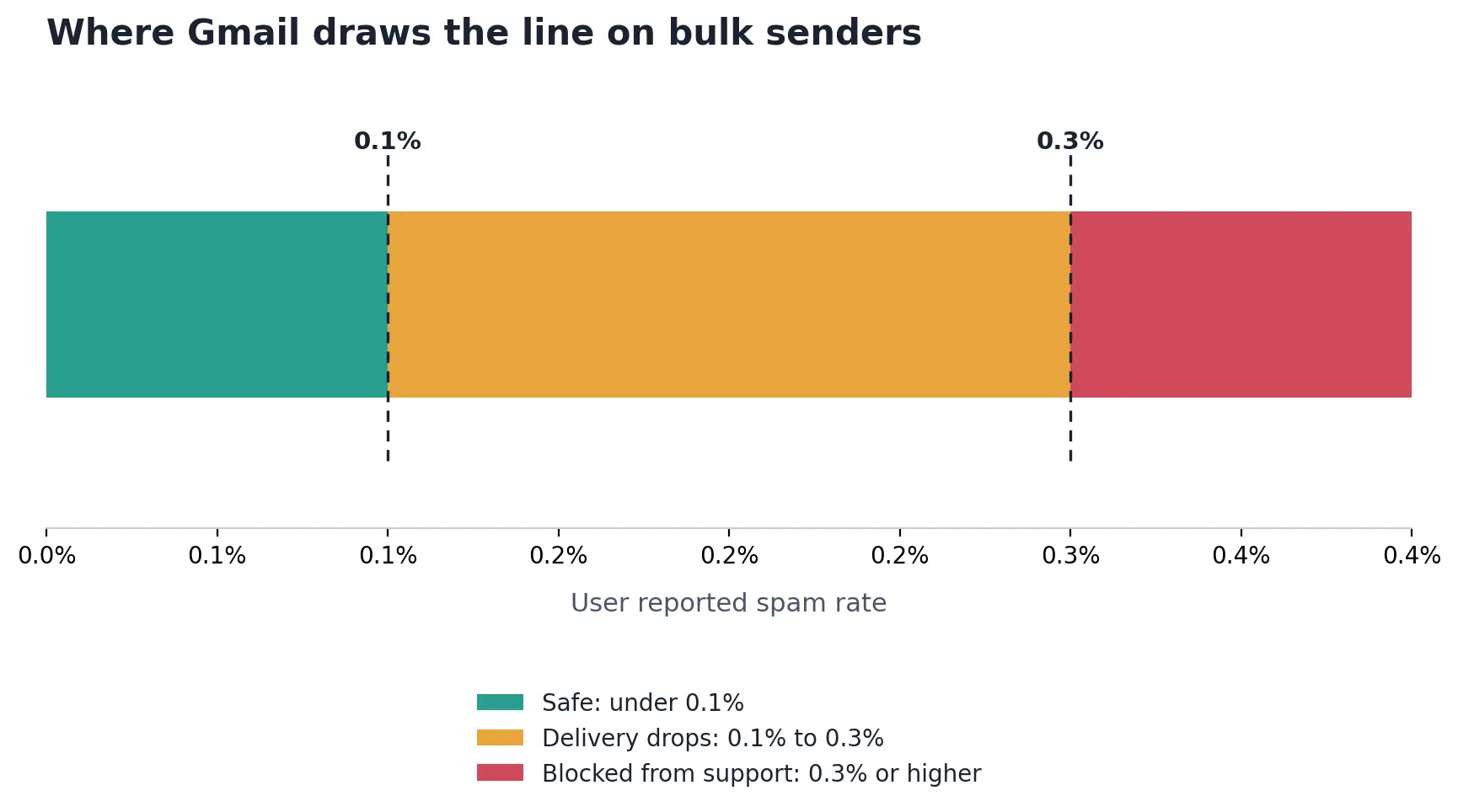
A list full of stale contacts pushes bounce and complaint rates toward that second threshold fast, since dead addresses and mismatched titles both tend to generate spam reports rather than replies.
What a bounce actually costs you
Every hard bounce is logged against the sending domain, not just the individual message. A domain that crosses Gmail's threshold does not just lose that one campaign; every message from that domain, including ones sent to good addresses, starts landing in spam until sender reputation recovers.
Related guidance on staying under these thresholds is covered in a full deliverability walkthrough checked against Google's current rules.
Where the real risk hides: contracts and the new deletion rule
Accuracy and cost are not the only two variables. Two risks rarely show up until after a contract is already signed.
Auto renewal and cancellation traps
Multi seat data contracts commonly auto renew at the listed rate, and some renew into a higher tier if usage crossed a threshold during the term. Neither shows up clearly until the invoice arrives.
Symptom | Likely cause | Fix |
|---|---|---|
A renewal invoice arrives well above the plan you signed | Auto renewal clauses that lock in a higher tier without a new signature | Calendar the cancellation window the day you sign, and get the renewal terms in writing |
Support goes quiet once the contract is active | Some providers staff sales heavily and support lightly after close | Check the provider's public review score before signing, not after a problem starts |
A deletion request sits unresolved for weeks | The provider has not finished registering with California's deletion system | Ask directly whether the provider is registered before you hand over any records tied to California residents |
The California deletion rule that takes effect in August
Buying access to a b2b contact database is legal in the United States, provided the provider collected the records lawfully and offers a way to honor a removal request. Most providers already cover GDPR in Europe and CCPA in California on their standard compliance page.
A newer California rule goes further than either one, and it applies to any provider that qualifies as a data broker under state law.
The California Privacy Protection Agency's Delete Request and Opt Out Platform, known as DROP, lets a California resident file one deletion request that reaches every registered data broker at once.
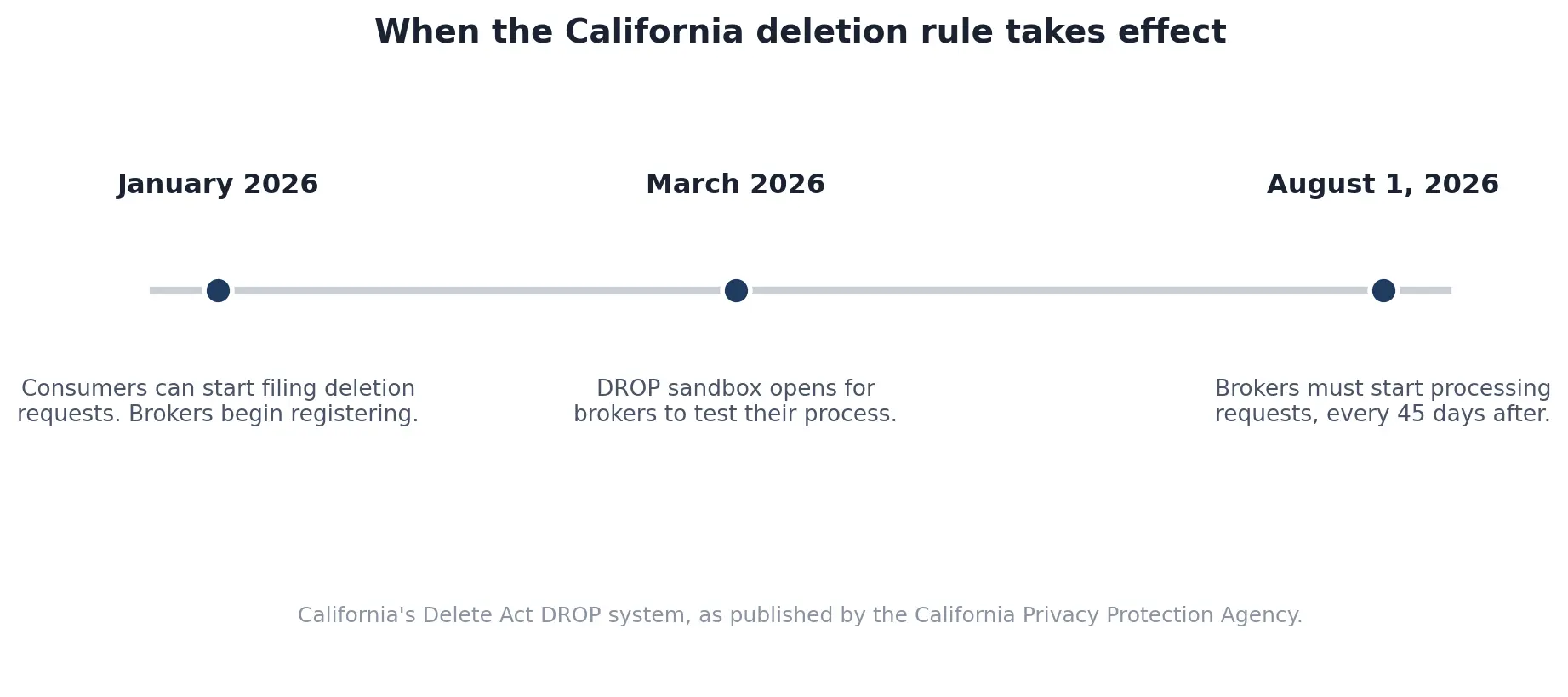
Registered brokers must begin processing deletion requests by August 1, 2026, and after that date they are required to check the deletion list and process matching requests at least once every 45 days.
A provider still building this process is a real operational risk if any of the contacts in your database are California residents, since a missed request carries a penalty of 200 dollars a day per unresolved request under the published rules.
FAQs
How accurate are B2B contact databases in 2026?
Accuracy depends on how recently a record was checked, not on the vendor's advertised percentage. A database that decays at the industry benchmark rate of 2.1 percent a month is already down to roughly 90 percent by month five, even if it started at 98 percent on day one. Test a live sample before trusting any published figure.
How often does B2B contact data go stale, and how often should you refresh it?
Contact data starts losing accuracy as soon as it is pulled, since people change jobs, numbers get reassigned, and companies get acquired. Refresh any list you are actively using every 30 to 60 days, and treat anything older than 90 days as unverified until you run it through a check again.
What is the difference between a B2B contact database and a data enrichment tool?
A contact database is a set of records you search or export directly. A data enrichment tool starts from contacts you already have and fills in missing fields such as title, phone, or company size. Many providers sell both, so check whether a plan sells new records or updates to existing ones.
Can you use more than one B2B contact data provider at the same time?
Yes, and layering two or three sources on the same contact, known as waterfall enrichment, is how teams recover records that any single database misses on its own. It costs more per contact than one subscription, so most teams save it for their highest priority accounts rather than a full list.
Does a bigger database matter more than a more accurate one?
Not for outreach that depends on replies. A database of hundreds of millions of contacts is not more useful than a smaller one if a large share of the bigger set bounces or reaches the wrong person. Test accuracy on your actual target list before comparing providers by size alone.
Can a B2B contact database connect to my CRM?
Most major providers connect directly to Salesforce, HubSpot, and Pipedrive, usually through a native integration or a simple export. Confirm the connection pushes updates both ways, since a one way export means every correction made in the CRM never makes it back into the source list.
Before you sign the next contract
A repeatable test, a real cost per usable contact, and a calendar reminder for the cancellation window cover most of what a pricing page leaves out. None of it takes more than an afternoon to run once, and the same checklist works on the next renewal too. Run it before the first purchase and run it again before every renewal, since a provider that passed the test a year ago is not the same provider today.
Sources reviewed September 3, 2026.
About the author
Michael Doyle writes about B2B sales at Leaderr. He covers prospecting, cold outreach, sales data, and pipeline building, with a focus on what actually works for SDRs, founders selling on their own, and small sales teams.