Best B2B database providers for 2026: what the pricing pages will not tell you
A sourced guide to the best B2B database providers for 2026, covering accuracy testing, real published pricing, free tier stacking, and compliance red flags.
 Michael Doyle11 min read
The best B2B database providers for 2026 fall into three groups: broad providers like ZoomInfo and Apollo.io, phone verified providers like Cognism and Lusha, and budget providers like UpLead.
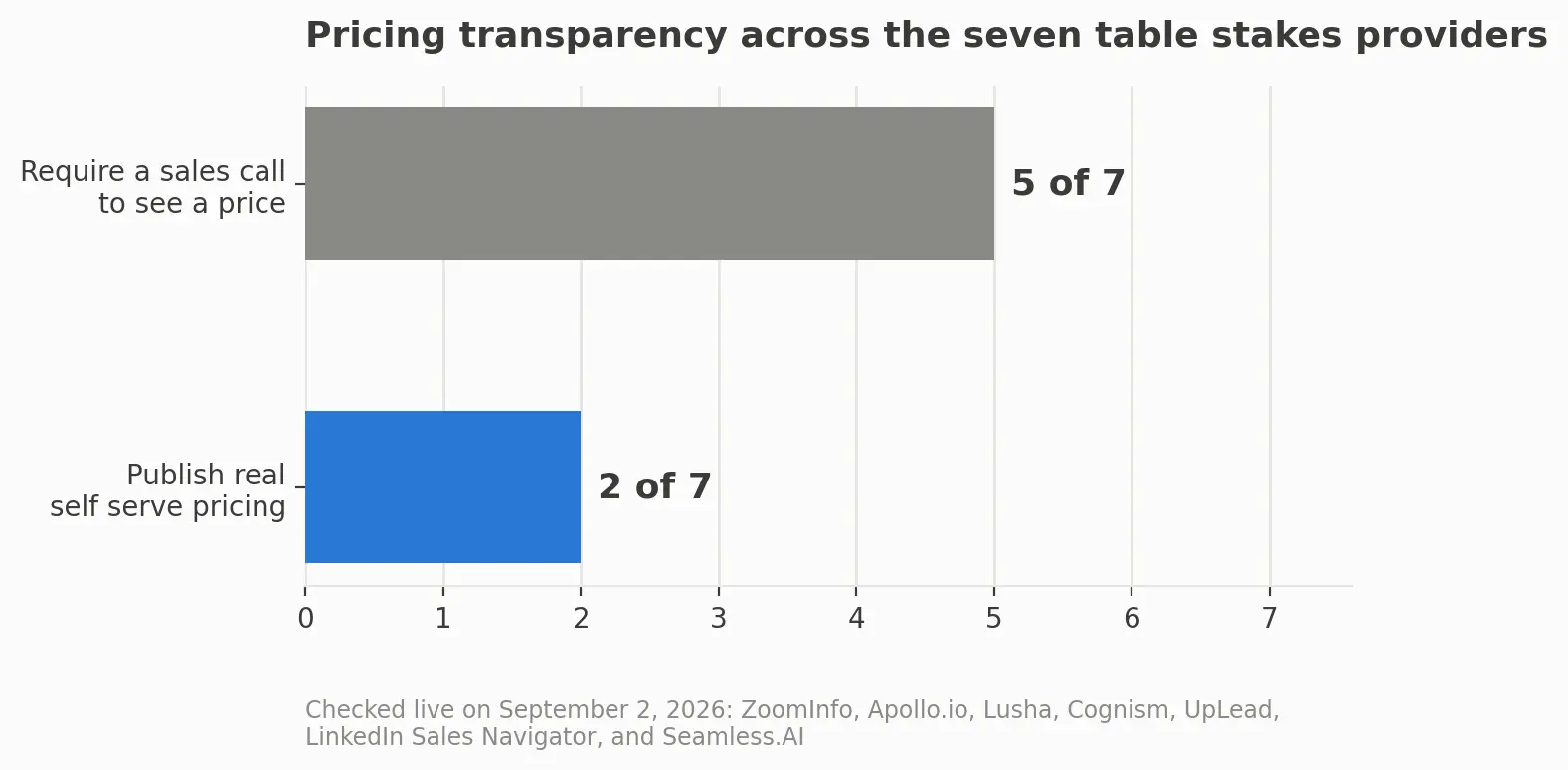
Only two of the seven most compared providers publish a real self serve price. The rest require a sales call before you see a number.
That gap between the marketing page and the actual bill is why comparisons of this topic stall on the same seven names without a straight answer on accuracy or price.
This guide covers what each provider type sells, what a full year actually costs, and where a small team gets real coverage for nothing.
What you need before you start
Get four things straight first, since each changes which provider fits.
Monthly contact volume, since providers can look identical until this number forces a plan choice.
Region. Coverage outside the US and UK varies, and few providers state exact counts by country.
Data type. Some teams only need an email and a job title. Others need phone numbers, technology used, or intent signals.
Who checks the invoice. A solo founder on a personal card faces different limits than an SDR whose manager approves an annual contract.
This covers finding, comparing, and paying for a general purpose contact database, not building a scraper or buying a one time list with no ongoing service.
Segment | What matters most | Where to start looking |
|---|---|---|
Solo founder or freelancer | Cost per verified contact at low volume | Free tiers, stacked together |
SDR at a small team | Fast setup, no procurement process | A provider with self serve, published pricing |
Agency running outreach for clients | Per client cost control and export limits | Credit pooling across seats |
Enterprise buyer | Region depth, security review, integrations | A provider that will run a paid pilot first |
What a B2B database provider actually sells
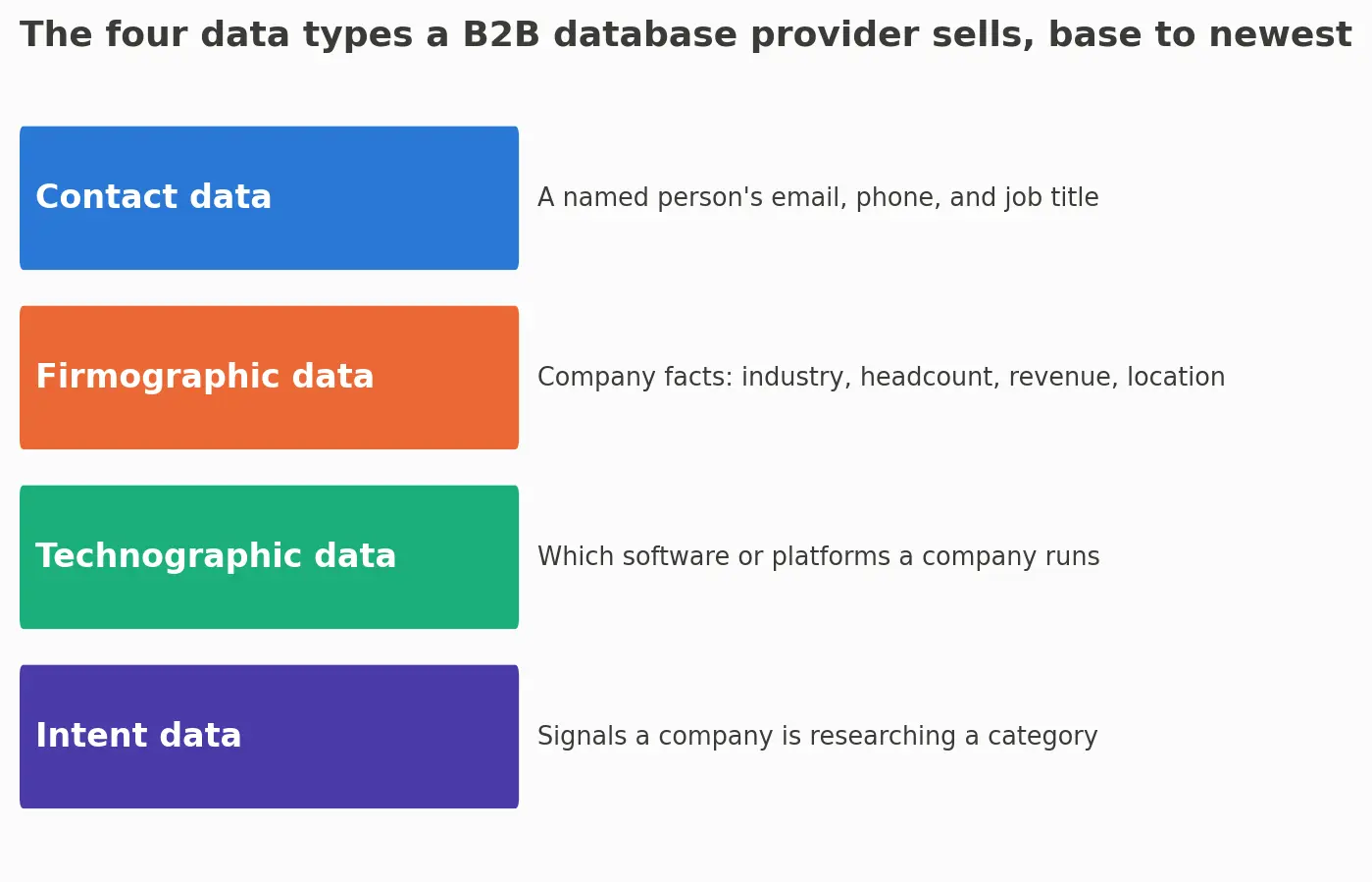
A B2B database provider sells one or more of four data types. Knowing which one you need keeps you from buying the wrong depth.
Term | Plain meaning | Why it matters |
|---|---|---|
Contact data | A named person's email, phone, and job title | What most buyers mean by database in the first place |
Firmographic data | Company facts: industry, headcount, revenue, location | Decides which companies fit your list before you contact anyone |
Technographic data | Which software or platforms a company already runs | Useful when your product competes with, or plugs into, a specific tool |
Intent data | Signals that a company is actively researching a category | Newest and least standardized of the four, and hardest to verify before you buy |
Most database data is contact and firmographic data sold together. A plain explanation of firmographic data covers how that scoring usually works.
That table covers the basics. A closer look at what a contact record actually contains, how to test whether it holds up before you pay, and what it costs to reveal a phone number versus an email, sits in what a B2B contact database actually is.
A provider leaning on intent or technographic data is usually solving a narrower problem than plain prospecting.
Buying a list once differs from a service that keeps records current. A guide to what B2B data enrichment actually involves covers that distinction, including the disclosure duty that can follow once you enrich a record and contact the person behind it.
The table stakes providers, compared
Seven providers show up across almost every roundup of this topic. None is right for every team.
Provider | Known for | Published pricing | Free tier |
|---|---|---|---|
ZoomInfo | Largest US database, intent and technographic add ons | No, contact sales | No |
Apollo.io | Prospecting plus built in outreach sequencing | Partial, behind an interactive tool | Yes, limited credits |
Lusha | Fast Chrome extension lookups | No beyond the free tier | Yes, 40 credits a month |
Cognism | Phone verified numbers, strong in Europe | No, quoted after a call | No |
UpLead | Published per seat pricing, real time verification | Yes, full pricing table | Yes, 5 credit trial |
LinkedIn Sales Navigator | Search and outreach on LinkedIn's network | Yes, full pricing table | No, though a basic account allows limited search |
Seamless.AI | Chrome extension and AI style prospecting search | Partial, free tier only | Yes, 50 credits |
Coverage claims outside the US and Europe
Every one of the seven markets global coverage, but the detail stops at continent level, with no exact contact count for India, APAC, or Latin America the way they show for the US and UK.
Ask for a country level count first if your list depends on those regions.
Why nobody's accuracy claim is independently verified
Every provider above claims accuracy somewhere on its site, usually a number in the low to mid nineties, with no named third party audit attached to the claim. That is the single biggest reason buyers hesitate.
The fix is to test before you commit.
Pull 25 to 50 contacts from your actual target list, not a sample the provider suggests.
Check each email for syntax, domain, and mailbox validity. Six methods for verifying an email address, ranked by how often each one fails covers this in detail.
Call two or three phone numbers if the plan includes them, since phone accuracy is harder to fake than an email guess.
Record the real hit rate yourself. A provider claiming 95 percent that returns 70 on your sample has told you something the marketing page never will.
That check costs a small credit allotment and about twenty minutes, and it is the only accuracy number in this process that is actually yours.
What a typical team actually pays, all in
This is the gap every table stakes provider leaves open. Checking the public pricing page for each of the seven took under a minute for two, and led to a contact form for the other five, including ZoomInfo and Cognism.
What published pricing actually looks like
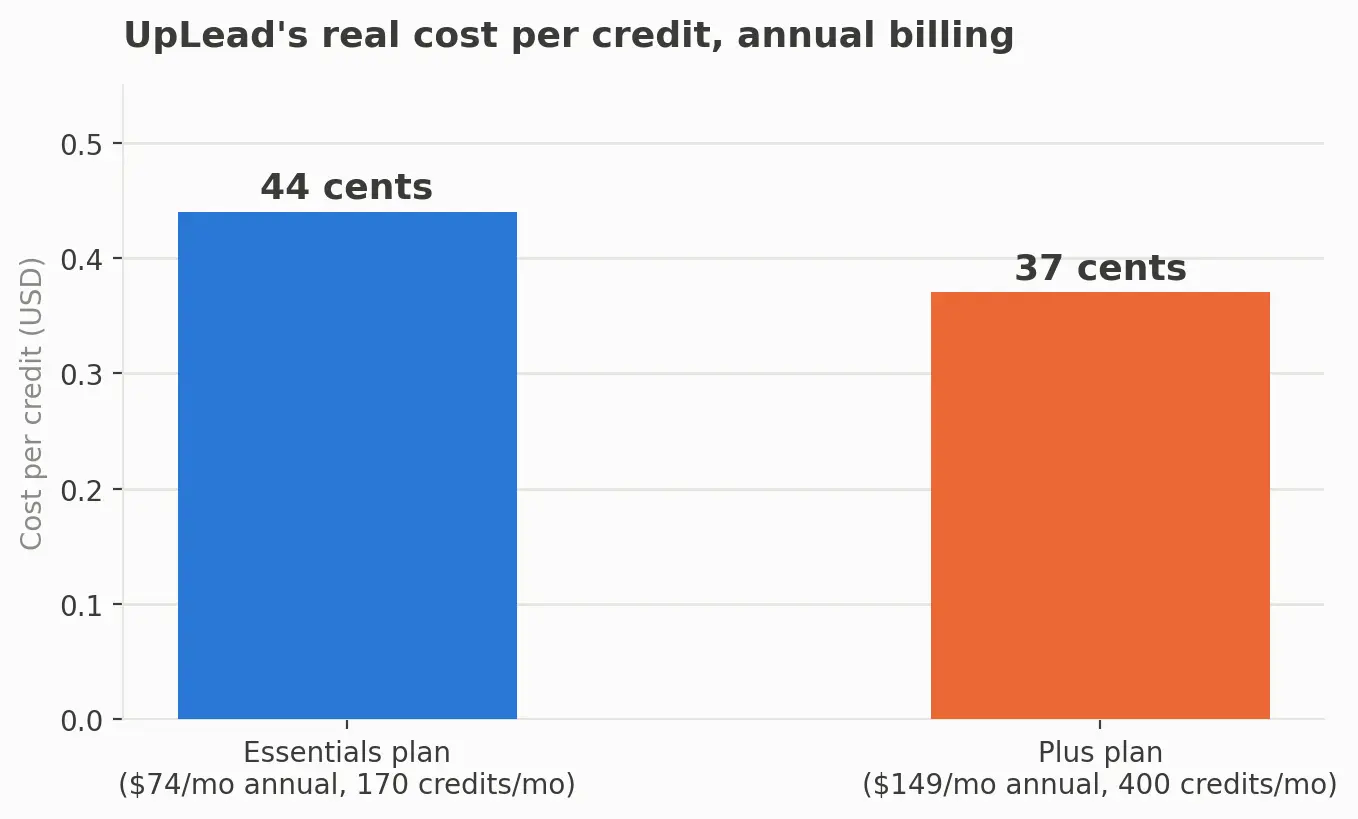
UpLead's Essentials plan runs 99 dollars a month, or 74 dollars billed annually, for 170 credits. Its Plus plan runs 199 dollars a month, or 149 dollars annually, for 400 credits.
LinkedIn Sales Navigator's Core plan is 99.99 dollars a month or 959.88 dollars a year, and its Advanced plan is 179.99 dollars a month or 1,679.88 dollars a year. Both show these numbers on the page, no account required.
The real cost per verified contact
Divide the annual UpLead Essentials price by its yearly credits and the cost lands at about 44 cents a credit. The Plus plan works out closer to 37 cents.
That per contact figure, not the sticker price, is what is worth comparing, and it rarely sits next to the plan name.
For the five gated providers, nobody outside a signed contract knows the real number, and what one team pays does not predict what another will be quoted.
Getting usable coverage on a small budget or at zero cost
A bootstrapped founder or a solo SDR does not need an enterprise contract for a working list.
What each free tier actually gives you
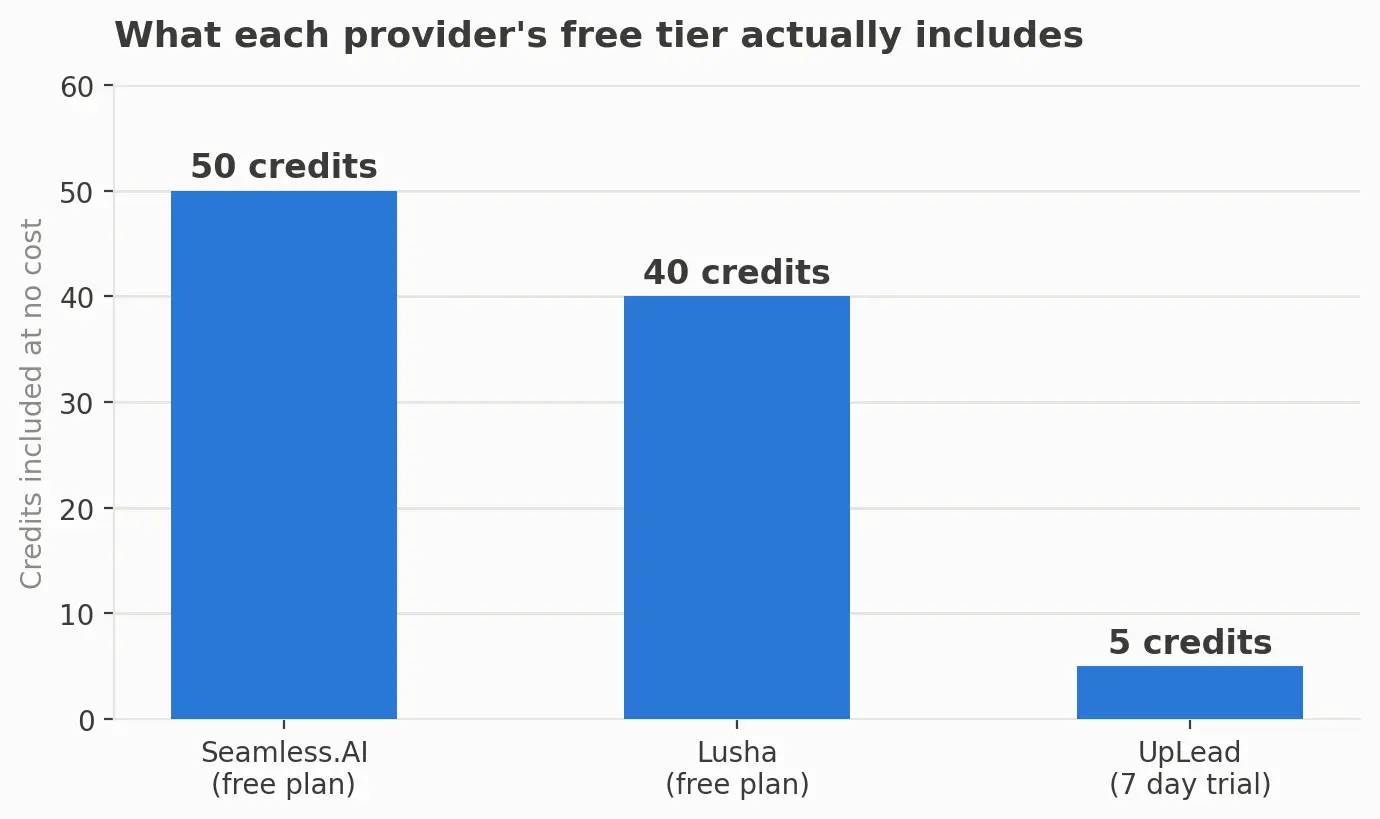
Lusha's free plan includes 40 credits a month, roughly 40 email reveals or 4 phone reveals at its 10 credit phone cost.
Seamless.AI's free plan includes 50 credits for one user.
UpLead's free trial includes 5 credits over 7 days, useful for testing accuracy before a paid plan.
A free LinkedIn account allows limited manual searching, enough to confirm a company and title before looking the contact up elsewhere.
Stacked together, that is close to 100 verified contacts a month at no cost, before counting whatever your CRM already surfaces.
What stacking free tiers cannot do
Free tiers reset monthly, so unused credits are lost. None include bulk export at real volume or phone verification beyond a handful of reveals, and checking four tools instead of one adds real time. Treat free stacking as a way to move fast, not a permanent substitute past a few hundred contacts a month.
How to stack multiple providers without wasting credits
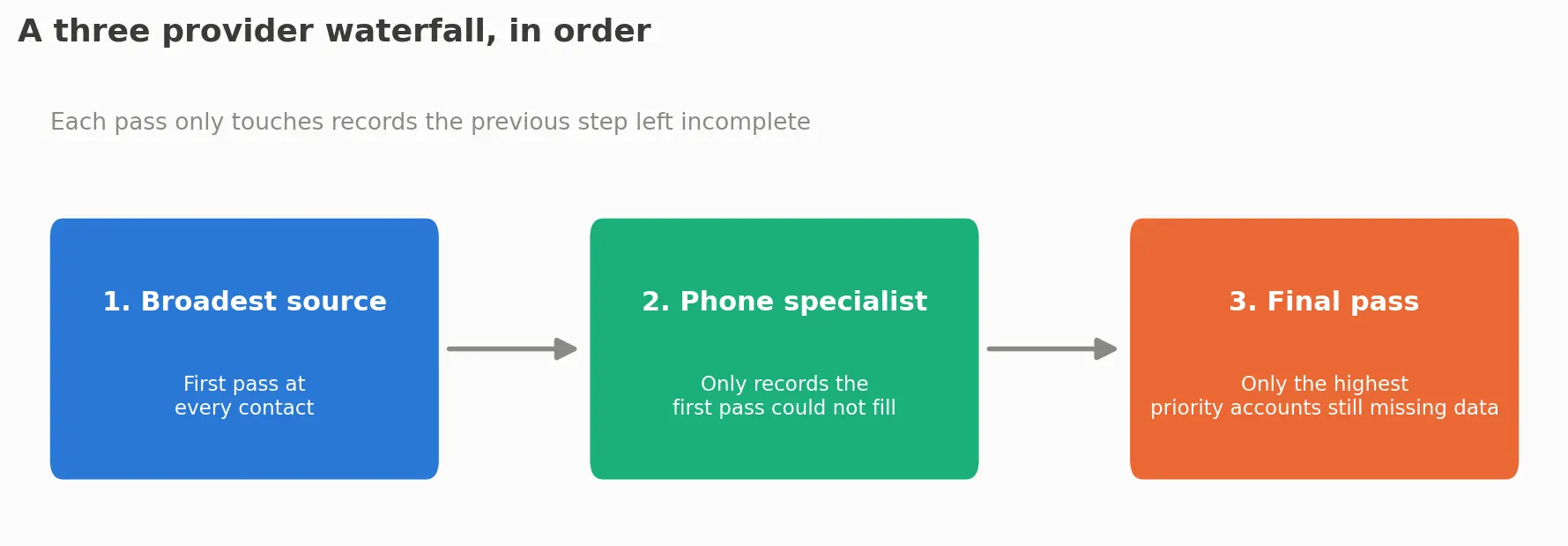
Using more than one data provider at once, called a waterfall, is a normal workflow.
The order that works
Start with the broadest, cheapest source for a first pass at every contact on your list.
Send only the records that source could not fill to a second, narrower provider, usually a phone specialist.
Reserve your most limited credits for a final pass on only the highest priority accounts still missing data.
The common mistake is running every contact through every provider instead of only the gaps, and skipping the accuracy check above on each new source before trusting it.
A one page vendor evaluation checklist
Use this before signing anything longer than a monthly plan.
Pulled a 25 to 50 contact sample from your own target list, not the provider's suggested sample.
Verified the real hit rate using at least two of the four checks: syntax, domain, mailbox, and phone.
Found the true cost per contact by dividing the annual price by the annual credit allotment.
Confirmed whether unused credits roll over or reset, in writing, not from a sales call.
Checked coverage depth for your specific target region, not the country the provider is headquartered in.
Confirmed the cancellation notice period and whether the plan renews automatically.
Checked whether the provider is registered where a state requires data broker registration, if buying in bulk.
What actually happens after you sign
Credit based plans behave similarly. Credits land monthly or annually, an export limit often applies on top of the credit count, and a new seat usually needs its own login.
Renewal is where teams get caught out: an auto renewing contract needs a cancellation notice, commonly 30 to 60 days out, set by the vendor rather than by when you remember to check.
Common mistakes and red flags that cost teams a month
Symptom | Likely cause | Fix |
|---|---|---|
High bounce rate right after import | List built from an older or scraped source, not continuously verified records | Run the accuracy check above before the first send |
Company descriptions read identically across many records | The provider resold a compiled list rather than maintaining its own source | Ask directly where the company level data originates |
No physical business address findable for the company | Sign of a shell listing rather than a real operating company | Cross check the company name against a public business registry first |
Support only reachable through a generic contact form | Common with smaller resellers, not necessarily a sign of fraud | Weigh against price as one factor, not a disqualifier |
A vendor's listing in a state data broker registry is a useful, rarely checked signal. States including California require companies that sell personal or business contact information to register annually.
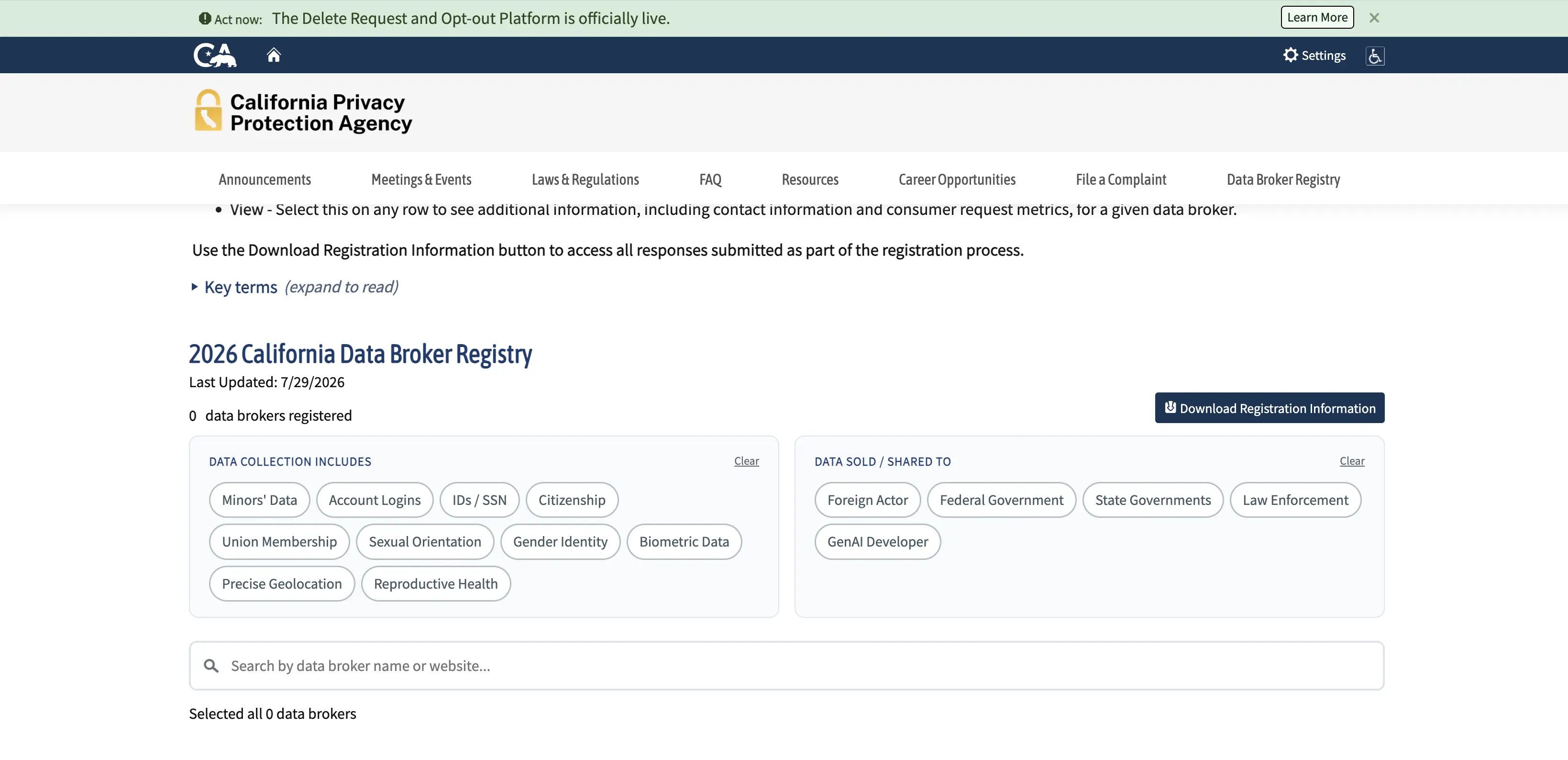
Searching a provider's name in that registry before buying takes under a minute, and either confirms the company operates in the open or tells you it does not show up at all, worth asking about directly.
FAQs
What is a B2B database or data provider?
A B2B database or data provider sells or licenses business contact and company records, most often names, emails, phone numbers, and firmographic details, for sales and marketing outreach.
Which B2B database provider is the best?
There is no single best provider. UpLead and LinkedIn Sales Navigator lead on published pricing, Cognism and Lusha on phone verified data, and ZoomInfo and Apollo.io on database size. The right pick depends on region, budget, and whether phone data matters.
What is the difference between a B2B contact database, a CRM, and a data enrichment tool?
A contact database sells new records you do not already have. A CRM stores and tracks records and deals you already own. An enrichment tool adds missing fields to records already in your CRM rather than sourcing new contacts.
What happens to unused credits if you do not use them before renewal?
On every plan checked for this guide, monthly credits reset rather than roll over, and annual plans often distribute credits monthly rather than banking a full year at once.
Can you get a refund or credit for contacts that bounce?
Some providers credit back confirmed bad contacts within a short window, often 30 days. Others treat every reveal as final. This varies enough to belong on the checklist above rather than being assumed.
Where this leaves your shortlist
Start from the four questions in the scope section, not the loudest marketing. Run the accuracy check on a real sample before any contract longer than a month, and use the true cost per contact, not the homepage price.
Sources reviewed September 2, 2026.
About the author
Michael Doyle writes about B2B sales at Leaderr. He covers prospecting, cold outreach, sales data, and pipeline building, with a focus on what actually works for SDRs, founders selling on their own, and small sales teams.