CRM data enrichment: what it costs and where accuracy claims break down
A tested guide to CRM data enrichment, covering real cost ranges, a five field accuracy test, a buy or stack worksheet, and where it breaks in real CRMs.
 Michael Doyle11 min read
CRM data enrichment fills in missing company and contact details on records already in your CRM, pulled from external sources. Poor data quality costs organizations at least 12.9 million dollars a year on average, per Gartner research.
A paid tool is not always the fix. Native CRM features you already own often close more of that gap than any vendor admits.
The overwrite question is specific to CRM work, but the compliance step behind it applies to every form of B2B data enrichment.
What you need before you start
This guide covers enriching records that already live inside your CRM. It does not cover finding brand new contacts you have never talked to, and it does not cover the split between the common types of enrichment data in full, since that groundwork is already covered elsewhere.
It also does not cover enriching a single lead the moment it fills a form. That workflow fires once, at the point of contact, and behaves differently from a record that has been sitting in your CRM for months. It gets its own breakdown elsewhere. Treat the two as separate problems with separate fixes.
What you need on hand
If the basics of how a CRM pipeline is actually structured still feel fuzzy, close that gap first. Enrichment only pays off once the record structure underneath it holds together, and three things belong on hand before you begin.
Export or read access to your CRM.
Thirty to fifty existing records you can sample by hand.
An honest look at what plan your CRM is already on.
Who this fits
This fits a solo founder running a personal pipeline, an SDR working a shared CRM, a small team of five to ten reps, or an agency handling CRM hygiene for clients.
It fits an enterprise team less well, since that buying decision usually gets made above the level of one rep.
Check what you already have before you add anything
Most teams shop for a CRM enrichment tool before checking what their current stack already does. That order is backward, and it is the fastest way to pay twice for the same field.
What your CRM already does on its own
Zoho's own Zia feature updates organization and contact fields automatically once it is turned on, matching against a name, email, or website you already have on the record.
Zoho's developer documentation confirms enrichment fields update automatically whenever Zia finds a match, meaning a record you already hold gets refreshed rather than left untouched.
Checked September 8, 2026, that same page gives no field count and no plan requirement, so confirm both against your own account before you count on the feature. Other CRMs behave differently.
A separate breakdown of enrichment tools already covers how blank field only enrichment compares to this automatic update, along with the tools most teams already pay for that cover part of this gap without anyone noticing.
What still needs a dedicated platform
Once native features and tools you already pay for are accounted for, here is what is left to weigh.
Path | What it costs | What it fills automatically | Where it breaks |
|---|---|---|---|
Your CRM's own tools | Usually included in a plan you already pay for | Fields tied to a name, email, or website match, under that CRM's own rules | Coverage stops at whatever fields that one vendor built support for |
A tool you already pay for | No added cost, since you already own it | Whatever that tool was built to enrich, often just email or phone | Most sales tools were never built to write cleanly back into a CRM |
A dedicated enrichment platform | A monthly fee or a per record credit, commonly tens to hundreds of dollars a month | Broader coverage across contact, company, and technology fields, often pulled from several sources at once | Cost climbs fast once your record count or refresh frequency grows |
What CRM data enrichment actually costs
None of the three paths above are free once you count the time behind them.
The two paths that look free
Native tools cost nothing extra, but only reach as far as one CRM vendor built them to reach. Stacking two or three tools you already pay for also costs nothing extra, yet nobody specifically owns the job of keeping those records current, so the habit tends to slip within a quarter.
The one path that adds a real bill
A dedicated platform adds a real line item. That range commonly lands between thirty and five hundred dollars a month, depending on how many records you touch and how often you refresh them. The figure worth holding onto is the one from earlier: poor data quality costs organizations at least 12.9 million dollars a year on average, according to Gartner, and that cost shows up as lost deals long before it shows up as a line item anyone budgets for.
Test the accuracy before you trust it
Every vendor in this category claims high accuracy. None of them show their work on the exact record set you are about to pay to enrich, so test it yourself before you sign anything longer than a month.
Pick a sample, not the whole list
Thirty to fifty records is enough. Pull them from different sources, not just your newest leads, since freshly captured records enrich more easily than ones that have aged in your CRM for a year.
What passing actually looks like
Field type | How to check it | What counts as accurate |
|---|---|---|
Run the sample through a send or a verification check | Under 5 percent hard bounces, in line with common deliverability guidance | |
Phone | Call or text ten numbers from the sample | At least seven should reach the right person or business |
Job title and company size | Cross check against the person's own profile or the company website | Title matches within one level, company size within one banded range |
Industry and technology | Cross check against the company's own site or a public listing | At least eight of ten should match without you needing to guess |
A tool that clears these thresholds on your own sample is worth a longer trial. One that does not is not worth arguing about, no matter what the sales page claims.
A worksheet to decide if a dedicated tool is worth it
For a one or two person team, the honest question is not which tool to buy. It is whether to buy one at all yet.
Score yourself against these six questions. Three or more no answers usually means stacking what you already have is the better starting point for now.
Do you touch more than two hundred CRM records a month.
Do you refresh the same records more than once a quarter.
Have you already hit the ceiling on two or more free tiers.
Does a missing field cost you a specific, countable deal, not just a vague sense of messiness.
Does someone other than you own the job of keeping records current.
Can you name the exact fields you are missing, rather than a general feeling that the data feels stale.
Four or more yes answers is a reasonable signal that the math has flipped in favor of paying for something dedicated.
Work out the real ROI before you commit
Here is a worked example, not a promise, since your own numbers will differ. A team of three reps holds four hundred contact records that have gone stale. Researching each one by hand takes about six minutes. Enriching them through an existing tool cuts that to under a minute of review per record.
At an hourly cost of thirty five dollars per rep, six minutes of manual work runs about three dollars and fifty cents a record.
Five minutes saved per record across four hundred records works out to roughly twenty three hours of rep time returned in a month, worth close to eight hundred dollars at that same hourly rate.
Run your own numbers against whatever the tool actually costs before you sign anything. If the math does not clear on paper, it will not clear in practice either.
Is agent based enrichment actually different
Agent based enrichment works differently from a single lookup call. Instead of matching one record against one static database, a tool built this way runs its own search across several public sources, compares what each source returns, and writes back whichever value its process ranks highest, all before a person reviews it. That is a real difference in method, not just newer language for an old lookup.
The cost is that a ranked guess across several sources is harder to audit than one source with one answer, since the page a number came from is not always shown next to it.
Ask to see the source behind any field before you trust an agent based result, the same way you would ask a new hire to show their work rather than just their conclusion.
Where CRM data enrichment breaks in practice
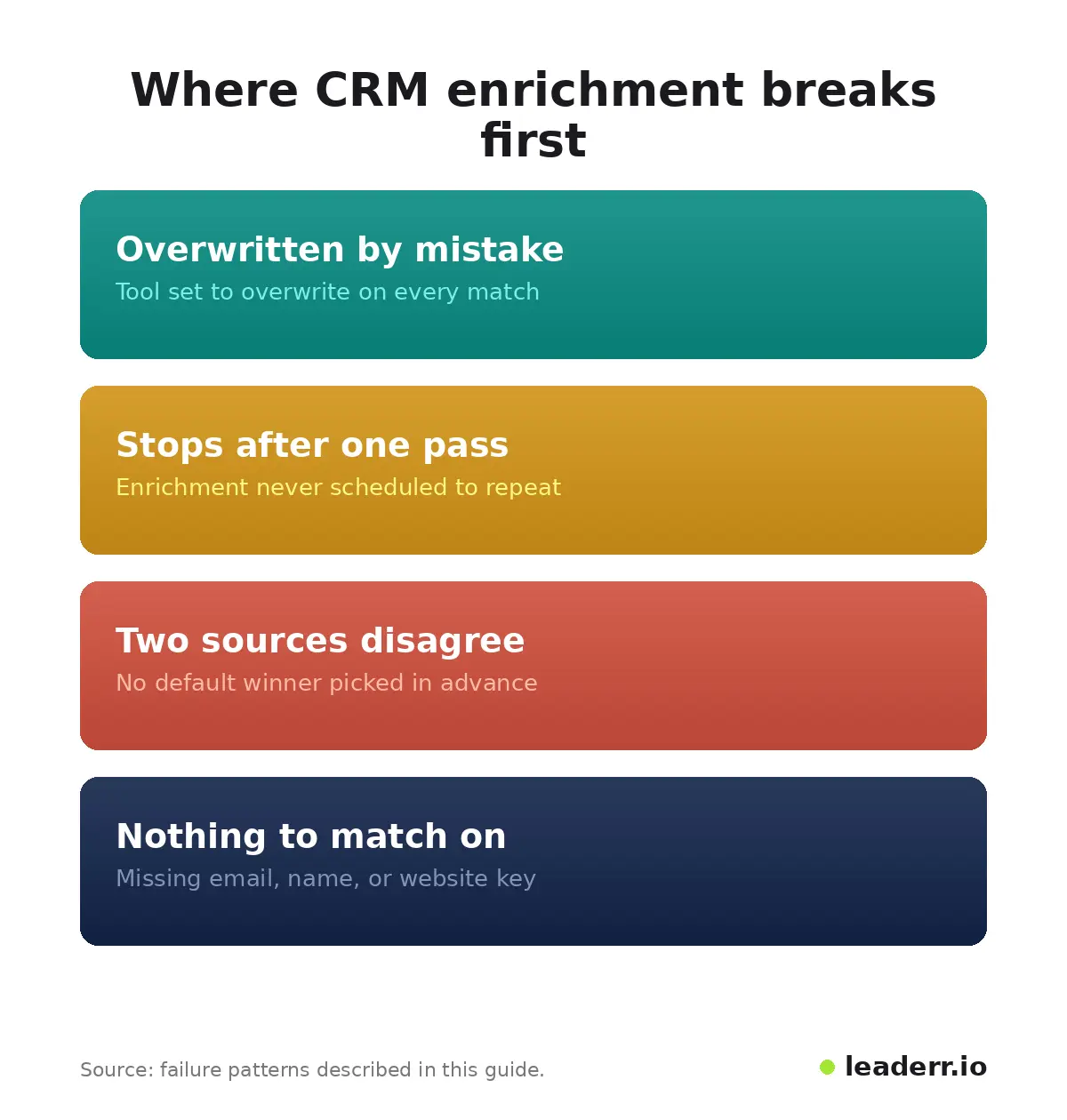
These four cover most of what goes wrong once enrichment is actually running against a live CRM.
The four patterns
What you see | Why it happens | What fixes it |
|---|---|---|
A field a rep entered by hand gets replaced with something wrong | The tool is set to overwrite on every match instead of filling blanks only | Check the overwrite setting before the first run, not after |
Records stop updating after the first pass | The tool enriches new records only, not ones already touched once | Confirm whether refresh is scheduled or one time before you rely on it |
Two team members argue about which answer is correct | Two sources disagree and nothing in the setup resolves which one wins | Pick one source as the default winner in writing, before the disagreement happens |
Enrichment quietly skips part of the list | Records missing an email, name, or website have nothing for the match to key off | Fix the match key fields first, since enrichment cannot start without one |
What one budget conscious thread already asked
A Hacker News thread from last year raised a version of this same budget question out loud, asking whether the market needed a free, self hosted alternative to paid per record enrichment platforms.
Three replies weighed in, and the general take was skeptical: a self built version would struggle to match the source coverage of an established paid provider, even if it saved money up front.
FAQ
How often should you re enrich CRM records?
Most teams see meaningful drift within ninety days, so a quarterly refresh is a reasonable default. Records tied to fast changing roles, like sales and recruiting contacts, decay faster and are worth checking monthly instead.
Is CRM data enrichment the same as lead enrichment?
No. Lead enrichment usually fires once, at the moment a form gets filled or a cold list gets built. CRM enrichment applies to records that already exist inside your CRM and usually runs on a schedule rather than a single trigger.
Does CRM enrichment work with Salesforce and HubSpot specifically?
Both support enrichment, though the mechanism differs by platform and sometimes by plan tier. Zoho's own Zia feature updates fields automatically once turned on, while some other CRMs fill blanks only and leave existing values untouched. Confirm the exact behavior on your own plan before relying on it.
Does CRM sync get gated behind a pricing tier?
Sometimes. Several platforms cap how many records sync or refresh on a free or entry plan, then charge for higher volume. Check the sync limit on your specific plan rather than assuming the advertised feature list applies at every tier.
What is the difference between data enrichment and data enhancement?
The two terms get used interchangeably in most vendor copy, and no industry standard splits them apart. Where a distinction gets drawn at all, enhancement sometimes means formatting or standardizing data that already exists, while enrichment means adding data that was missing. Treat the split as marketing language rather than a firm rule.
The check that comes before any of this
One habit outranks every tool comparison in this guide: write down which fields you are actually missing, on which records, before you open a single pricing page. Enrichment closes gaps once you know where they sit.
Knowing which gap actually costs you a deal takes a person looking at the pipeline, not a tool, and no vendor has built a shortcut for that part yet. That part stays yours.
Sources reviewed September 8, 2026.
About the author
Michael Doyle writes about B2B sales at Leaderr. He covers prospecting, cold outreach, sales data, and pipeline building, with a focus on what actually works for SDRs, founders selling on their own, and small sales teams. Connect with him on LinkedIn.