B2B lead generation best practices: Where to start and what a lead should cost
B2B lead generation best practices start with a cost ceiling: work out what one lead can cost, pick two channels and check the US and UK sending rules.
 Michael Doyle14 min read
Pick two channels, one outbound and one inbound, and set the most one lead can cost before you spend. Example: a $30,000 customer, a 60% margin and 4 in 100 leads buying gives a $720 ceiling. The FTC applies its email rules to business email too, so read the sending rules before you send.
What you need before you start
Gather three numbers and one name before you pick a channel. A marked guess is fine for any number you don't have yet.
Customer value: what one customer pays you in total over the time they stay.
Your gross margin on that customer, as a percent.
The share of your leads that become paying customers. Use your past deals if you have them.
The name of one person who answers every lead.
Your situation changes the first move, so find your row.
Situation | Start with | Judge it by |
|---|---|---|
Solo founder or tiny team, no budget | One outbound channel you run by hand, then one inbound channel after the first replies | Replies and booked calls |
Small business with a budget | One paid channel and one outbound channel | Cost per qualified lead against your ceiling |
High customer value | A short list of named accounts and personal outreach | Meetings with the right person at each account |
Sending to UK addresses | The same channels, plus a check on each address | Whether the address belongs to a company or a person |
This guide covers US and UK sending rules. It doesn't cover cold calling, Canada or EU countries.
Stage 1: Set the most one lead can cost
What happens: You work out a ceiling for one lead from your own numbers, then compare it with published lead costs.
Where the usual lead cost numbers come from
HubSpot collects figures from three outside reports on its cost per lead page, updated in 2026. The page shows no sample size for any of them.
These are the figures for the whole business, from the first two reports.
Source | What it counts | Cost per lead |
|---|---|---|
Market Research Future, 2025 | Average B2B lead, all channels | $84 |
First Page Sage, 2026 | B2B SaaS, organic and paid together | $237 |
First Page Sage, 2026 | Cybersecurity, organic and paid together | $406 |
First Page Sage, 2026 | Financial services, organic and paid together | $653 |
Market Research Future's $84 is an average across channels. The other three are industry figures. They count different things, so they don't conflict.
None of them is split by customer value, so your own ceiling matters more than any of them.
The ceiling in four steps
Take an example business: a payroll service that sells to small construction firms. Every number below is made up for the example.
One customer pays $30,000 in total over the time they stay.
The business keeps 60% of that after costs. 60% of $30,000 is $18,000.
4 in every 100 leads become customers. 100 divided by 4 is 25, so 25 leads bring one customer.
4% of $18,000 is $720. That is the most one lead can cost.
All four numbers fit on one card.
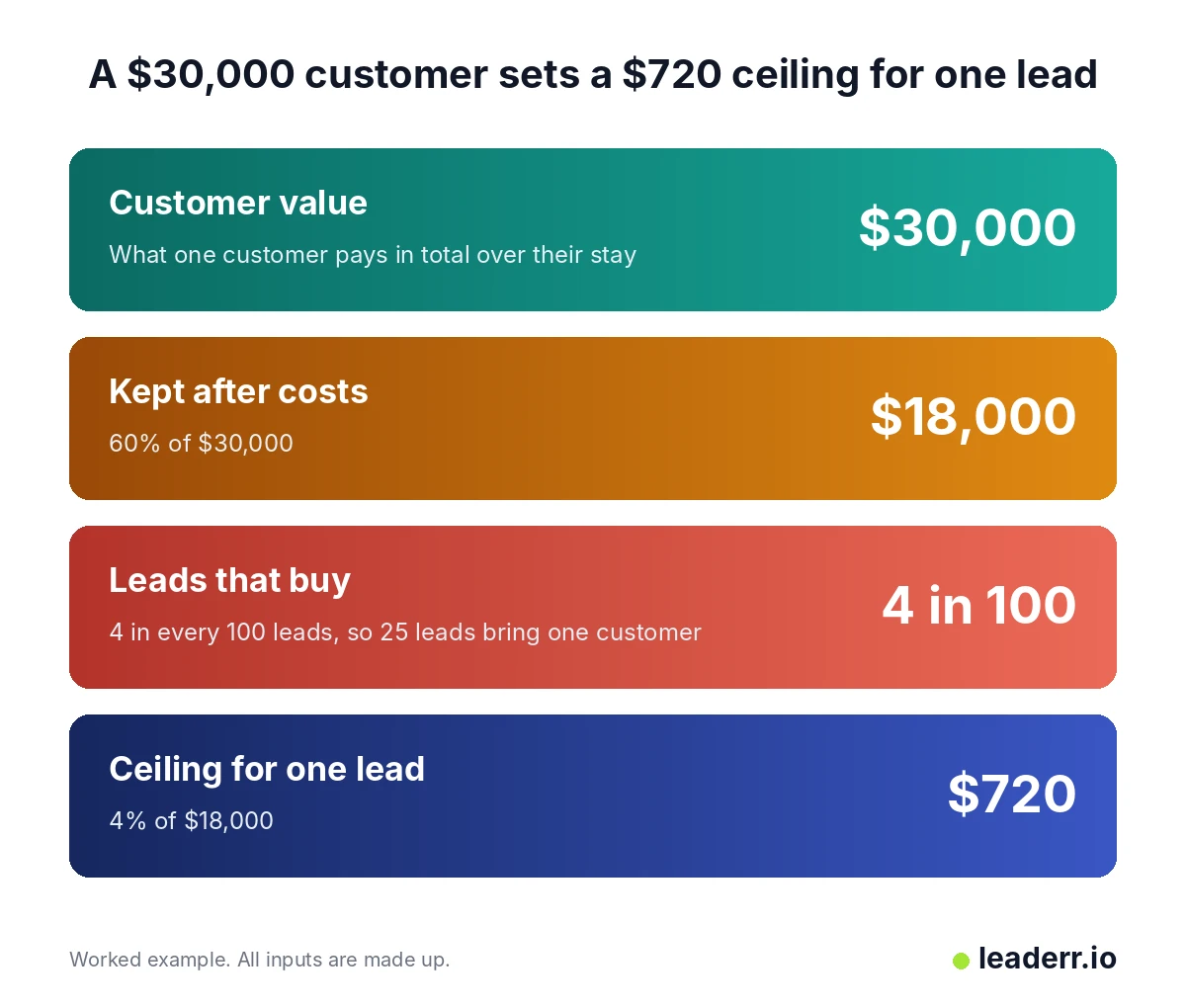
Change any of the three inputs and the ceiling moves with it.
Now check the result the other way. 25 leads at $720 each cost $18,000.
The customer brings back the same $18,000 after costs. At $720 a lead, the business only breaks even, so I'd aim well under the ceiling.
Done when: You have one dollar figure for the most one lead can cost, and every guessed input is marked.
Stage 2: Pick two channels your ceiling can pay for
What happens: You set your ceiling against what each channel charges for a lead. Then you keep one outbound channel and one inbound channel that fit.
Channel costs set against the $720 example
LeadSpot's cost ranges, shown on the HubSpot page, cover two kinds of lead: early stage and late stage. The last column sets the $720 example ceiling against the late stage range.
Channel | Early stage lead | Late stage lead | The $720 ceiling against the late stage range |
|---|---|---|---|
Email marketing | $25 to $75 | $150 to $300 | Above the whole range |
Content syndication | $65 to $95 | $200 to $400 | Above the whole range |
Webinars | $75 to $150 | $250 to $500 | Above the whole range |
Google Ads | $100 to $175 | $300 to $750 | Inside the range |
LinkedIn Ads | $150 to $250 | $350 to $800 or more | Inside the range |
Keep a channel when your ceiling sits above its range. Be careful when the ceiling sits inside the range, because some leads will cost more than you can pay.
Drop the channel when the ceiling sits below its whole range.
Match the column to how you count a lead. If your 4 in 100 counts only people who asked for a call, use the late stage range.
Cold email sent by hand and LinkedIn outreach have no row in the table. Your cost there is your own time, plus any list and sending tools you pay for.
HubSpot's page shows the full LeadSpot table.
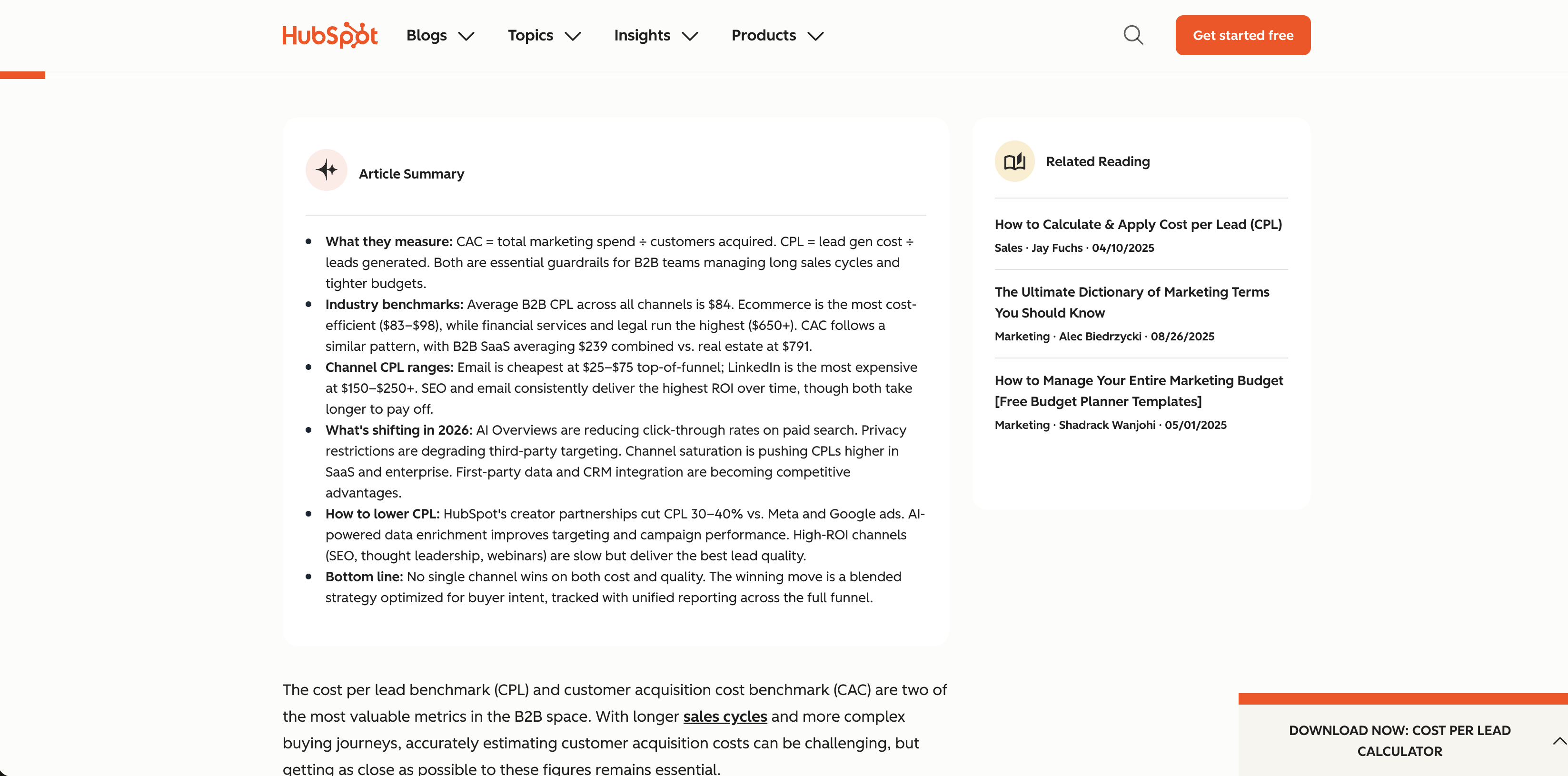
Check the page for newer ranges before you plan around these.
How long each channel takes to show a first result
Cost is one limit and waiting time is the other. A separate guide has a table of how long each channel takes to show a first result, split by price point.
Plan your first 90 days around the slowest channel you pick.
If one of your two takes months, make sure the other gives early signs of life.
What a $3,000 test budget buys
Say you set aside $3,000 to test one paid channel.
Google Ads late-stage leads cost $300 to $750 each. $3,000 buys 4 to 10 of them.
Email marketing late-stage leads cost $150 to $300 each. $3,000 buys 10 to 20 of them.
At 4 in 100 leads buying, 20 leads bring 0.8 of a customer. A test this size can't show you your real close rate.
Use it to learn what a lead costs and whether the leads are any good.
If each customer is worth a lot
A bigger customer value lifts the ceiling fast. Take a $300,000 customer with the same 60% margin and the same 4 in 100 share. 60% of $300,000 is $180,000, and 4% of $180,000 is $7,200 for each lead.
At that level, you can pay for hours of research on each account. Read how to size a short list of target accounts before you buy volume.
Done when: You've kept one outbound channel and one inbound channel, and the cost of each fits your ceiling.
Stage 3: Set up outbound and learn the sending rules
What happens: You build a short list, set up a sending domain and mailboxes, and check the rules before the first message goes out.
Steps for a sending domain, mailboxes, and a first message sit in the full cold email process. The rules below come first.
United States: no business exemption
The FTC says the CAN-SPAM law makes no exception for business to business email. A cold email to a company address falls under it.
Check these before every send:
Your valid physical postal address is in the message.
The subject line matches what the message says.
You honor an opt out within 10 business days.
The opt out link keeps working for at least 30 days after you send.
You know you stay responsible for email that an agency or tool sends for you.
The guide lists penalties of up to $53,088 for each email that breaks the law.
It notes that the maximum is adjusted for inflation, so check the current figure before you rely on it.
Gmail and Yahoo limits
Google announced on 3 October 2023 that Gmail would change its rules from February 2024. Senders of more than 5,000 messages a day to Gmail addresses must authenticate their email.
They must also offer one-click unsubscribe and process unsubscribes within two days.
Yahoo states its spam rate line in plain words: "Keep your spam rate below 0.3%." The page gives no volume line for who counts as a bulk sender.
This table sets the two sets of rules side by side.
Rule | Gmail, announced 3 October 2023 | Yahoo, sender best practices page |
|---|---|---|
Who it covers | More than 5,000 messages a day to Gmail addresses | Bulk senders, with no volume line given |
Authentication | Authenticate your email | SPF and DKIM, plus a DMARC policy of at least p=none |
Unsubscribe | One click, processed within 2 days | One click supported, honored within 2 days |
Spam rate | A clear threshold, with no number on that page | Below 0.3% |
Use 0.3% as your limit on both, since it's the only number either page gives.
United Kingdom: companies and sole traders differ
Under PECR, the ICO says the consent rule for email doesn't apply to corporate subscribers: companies and limited liability partnerships.
Sole traders and some partnerships are individual subscribers. You need their consent unless the soft opt-in applies.
If you can't tell which kind an address belongs to, the ICO advises you to treat it as an individual's.
An address that names a person at a company is still personal data under UK GDPR, even when that person acts for work.
That page also says the guidance is under review because of the Data (Use and Access) Act, so check it before you send. This is general information, not legal advice.
Done when: You've ticked every check, and you know whether each address belongs to a company or a person.
Stage 4: Start one inbound channel and name who follows up
What happens: You pick one inbound channel from Stage 2 and send every lead to one person.
Pick the inbound channel
Choose the inbound channel whose late-stage range sits under your ceiling. If none fits, write content yourself, since your cost is then time and not ad spend.
Keep the offer narrow: one problem for one type of buyer. Send each lead to one named person, so no lead sits in a shared inbox.
Count the cost for each qualified lead
A form fill isn't a qualified lead until someone checks it. The checks are in how to qualify a lead before it counts.
Say you spend $1,500 and get 5 qualified leads. $1,500 divided by 5 is $300 for each qualified lead. That sits under the $720 example ceiling.
Done when: Every lead has one owner, and you can name what a qualified lead costs.
Copy this one-page lead plan
Copy this into a document and fill it in. Mark each guess with a G.
CEILING
Customer value (total paid over their stay): $____
Gross margin: ____%
Share of leads that become customers: ____%  (G if a guess)
Ceiling for one lead: customer value x margin x share = $____

CHANNELS
Outbound channel: ____________  Expected cost for one lead: $____
Inbound channel: ____________   Range from the table: $____ to $____

SENDING CHECKS
Postal address in every email: yes / no
Subject line matches the message: yes / no
Opt out honored within 10 business days: yes / no
Spam rate read before every large send: yes / no
Company or person checked for UK addresses: yes / no

OWNER
Person who answers every lead: ____________

REVIEW DATES
Day 30: ________  Day 60: ________  Day 90: ________
What happens in the first 90 days
This table lists what to check at each point. Every check uses numbers from your own plan.
When | Check | Keep going if | Change something if |
|---|---|---|---|
Day 30 | Spam rate in Google Postmaster Tools | It stays below 0.3% | It reaches 0.3%: pause sending, then fix the list and the setup |
Day 30 | Cost for one lead, for each paid channel | It sits under your ceiling | It sits over: narrow the audience or drop the channel |
Day 60 | Cost for each qualified lead | It sits under your ceiling | It sits over: change what counts as a lead, or change the offer |
Day 90 | Share of leads that became customers | It's near your guess | It's far from your guess: recalculate the ceiling with the real share |
Say the real share turns out to be 2 in 100 and not 4. 2% of $18,000 is $360, so the ceiling falls from $720 to $360.
A channel that fit before may not fit now. A long sales cycle can push the day 90 check later. Move the date, not the check.
Common mistakes and how to fix them
These four problems show up in the numbers first.
Symptom | Cause | Fix |
|---|---|---|
Leads cost more than the ceiling | The channel's range sits above your ceiling, or the offer is weak | Narrow the audience or drop the channel, then check the ceiling inputs |
Plenty of leads and no customers | Leads are counted before anyone checks them, or the share that buy was a guess | Qualify each lead before you count it, and replace the guess at day 90 |
Emails land in spam | The spam rate is at 0.3% or higher, or authentication and unsubscribe are missing | Pause sending, fix SPF, DKIM and DMARC, add one click unsubscribe, clean the list |
Five channels and no clear result | Time and budget are split too thin to read any one result | Cut to one outbound channel and one inbound channel |
A Gartner Peer Community thread asked what works for a small company with a weak brand that needs qualified leads. The thread has four answers.
A marketing director at an IT services company gave the same fix as the last row: narrow the ideal customer, then run one or two high-intent channels well.
A software marketing VP wrote that paid ads work in the short term and content builds organic leads over the long term.
Yahoo's sender page states the spam line in its own words.
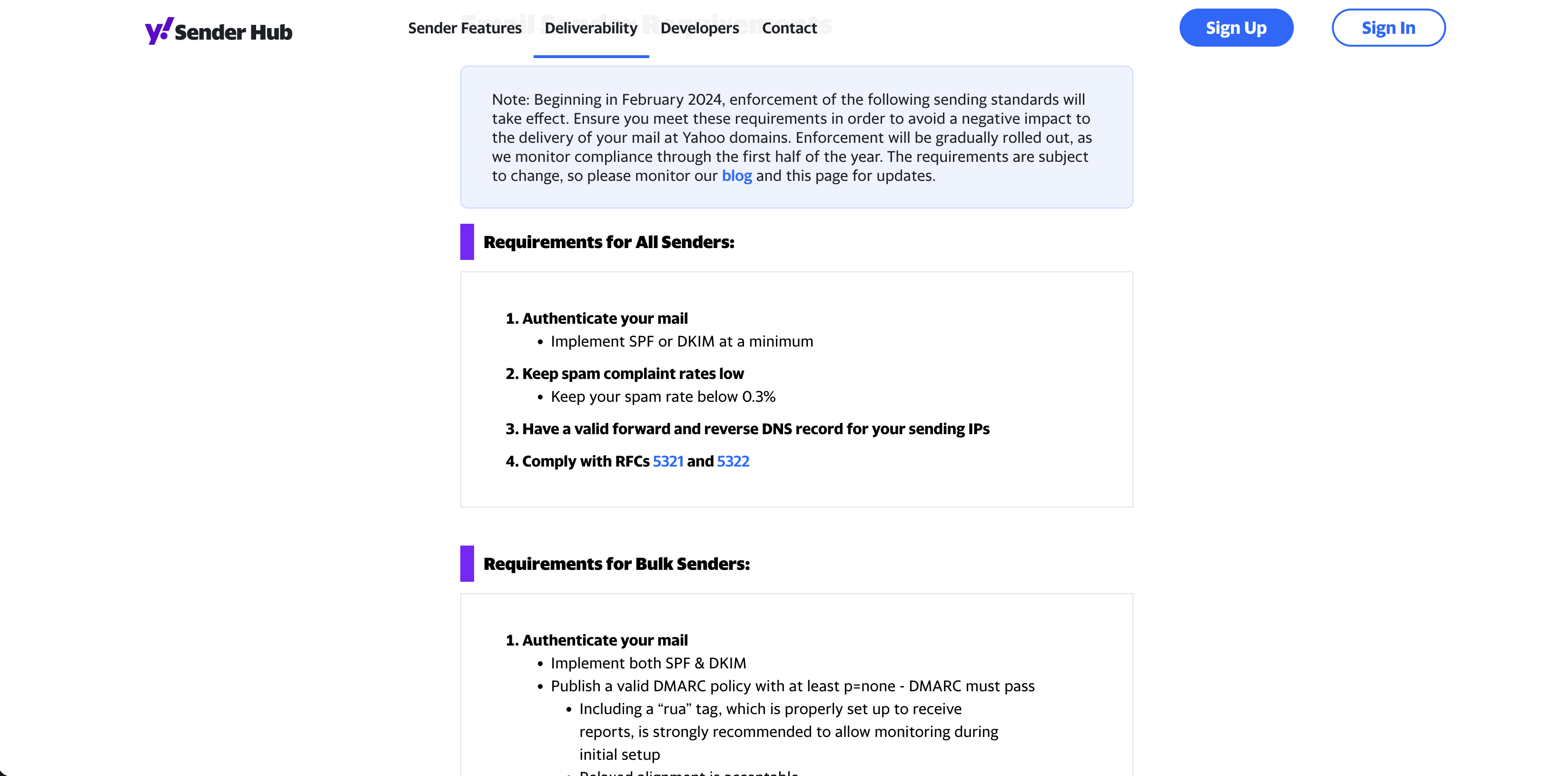
Read your own spam rate against that line before every large send.
Frequently asked questions
How long does B2B lead generation take to work?
No independent study sets a standard time. Run each channel for 90 days and judge it against your own ceiling and your own counts of replies and qualified leads.
How much should a small business spend on B2B lead generation?
Spend an amount you can afford to lose. Divide it by your cost for one lead to see how many leads it buys. Check that the count is large enough to learn from.
Is cold email legal if the recipient is a business?
In the US, yes, if you follow the CAN-SPAM rules, because the FTC says the law makes no exception for business email.
In the UK, the consent rule for email doesn't apply to companies, but it does apply to sole traders and some partnerships.
What should a solo founder do first with no budget?
Work out your ceiling, then send by hand to a short list you built yourself. Add one inbound channel only after you get replies.
Inbound or outbound, which is better?
Neither wins by default. Test one of each against the same ceiling and keep the one whose leads cost less than it.
Replace each guess with a real number
Your ceiling is only as good as its three inputs, and until day 90 one of them is a guess. Replace it with a real number as soon as you have one, then run the channel table again.
If you can't fill in the three inputs today, get them first and hold your spend until you do.
These rules cover US and UK sending only, and the cost ranges come from outside reports that show no sample size.
Guidance reviewed 12 October 2026.
About the author
Michael Doyle writes about B2B sales at Leaderr. He covers prospecting, cold outreach, sales data, and pipeline building, with a focus on what actually works for SDRs, founders selling on their own, and small sales teams. Connect with him on LinkedIn.