B2B email list: What the accuracy claim leaves out before you pay
A b2b email list guide comparing accuracy claims to real coverage, platform rules that block purchased lists, and what a thousand contacts actually cost.
 Michael Doyle12 min read
A b2b email list is a set of business contact records used for outreach. A June 2026 test of fourteen email finding tools found real coverage between 71 and 87 percent, below the accuracy figures most vendors lead with.
Lists come as a one time file, a live database subscription, or a list built through opt ins.
Buying a ready made file is one route to a list and building it yourself with a finder is the other, with the main sales prospecting tools compared side by side if you want to weigh that option.
What you need before you buy
This applies whether you are a founder sending your first outbound batch, an SDR working inside a small team, an agency buying data on a client's behalf, or a small team stretching a data budget across more than one campaign. It assumes less than most buying guides do.
You do not need a vendor picked yet. You do need three things ready first.
A sending domain, separate from your main company inbox if you can manage it. A way to run a verification check on a batch of addresses before you send to any of them.
A narrow enough target list, specific enough that the word targeted means more than a job title and a country. That is the short list.
There is a fourth thing almost nobody checks first. It decides more than the vendor's sales page does, and it comes before you even open a pricing tab.
Look at the platform you plan to send from. Most mainstream email marketing platforms put a purchased list clause directly in their terms of use, not buried in a support article.
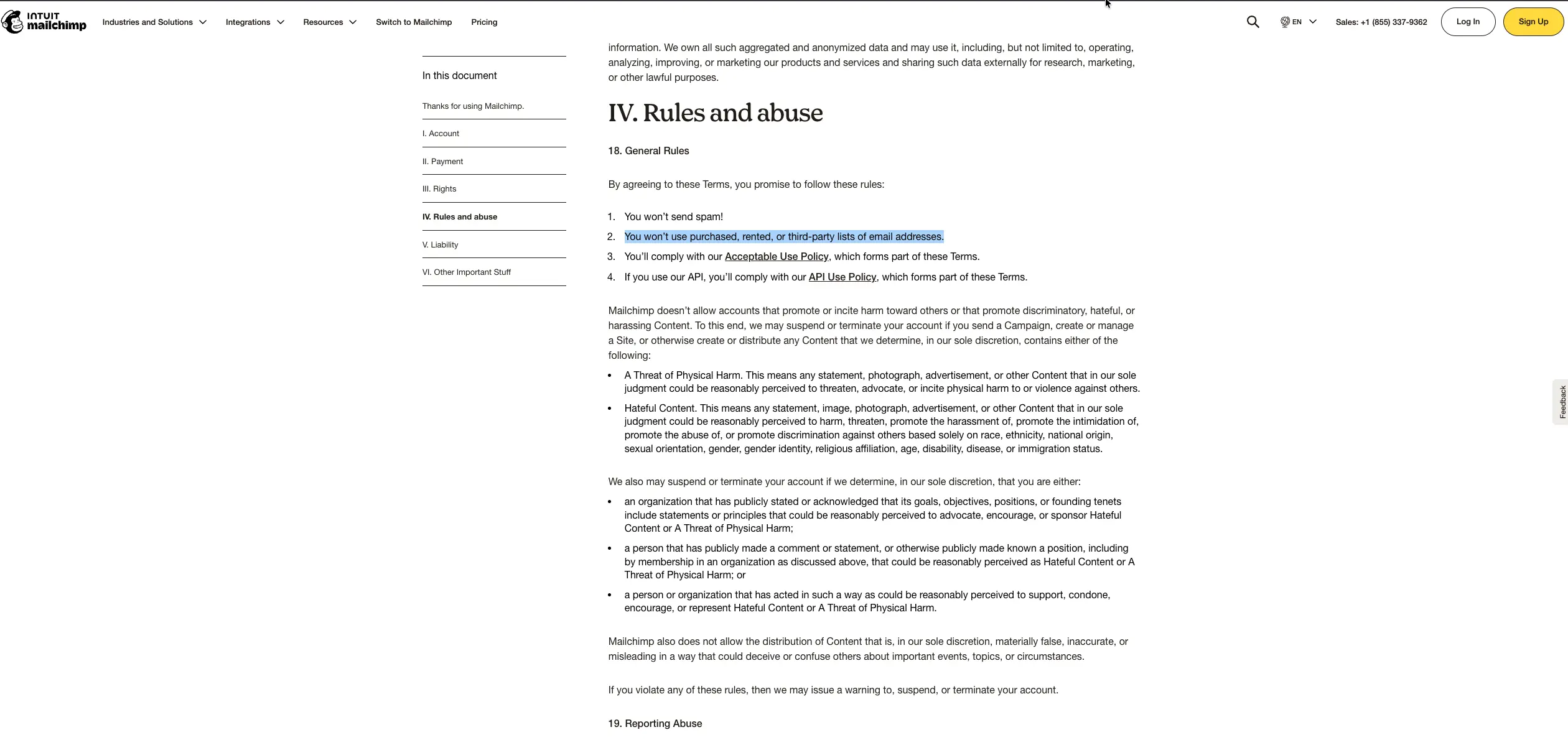
That single line is why a purchased file that looks clean on paper can still get a sending account flagged before the first campaign finishes going out. More on exactly what that means further down.
Which b2b email list actually solves your problem
Three different things get called a b2b email list, and picking the wrong one wastes the whole budget before a single email goes out.
What people call it | What it actually is | How fresh it stays | Best fit |
|---|---|---|---|
One time file | A file of records sold once, delivered as a spreadsheet or export | Frozen the day it arrives, then starts decaying right away | A single short campaign with a fixed deadline |
Database subscription | Ongoing access to a vendor's live records, pulled as needed | Refreshed on the vendor's own schedule, anywhere from weekly to a few times a year | Continuous prospecting where the target list keeps changing |
Opt in list | Contacts who gave their own address in exchange for something of value | Stays accurate because people update it themselves when it changes | Long term relationship building, not one round of cold volume |
A one time file suits a single push, like following up after an event. A subscription suits a team that prospects every week, since the vendor is the one keeping the underlying records current.
An opt in list grows slower but keeps working long after a purchased file has gone stale. For a closer look at how a live database differs from a one time export, what a b2b contact database actually is walks through the test worth running on either one.
Most people asking about "a b2b email list" actually mean the first two. The rest of this piece treats both the same way, since the gap between what gets promised and what gets delivered shows up in both.
The number that never sits next to the accuracy claim
Every vendor page quotes an accuracy figure in the mid to high nineties. Coverage almost never gets mentioned next to it, even though the two numbers answer entirely different questions.
What accuracy actually measures
Accuracy asks a narrow question. Of the email addresses a tool hands back, how many of them are real is all it tells you, and it says nothing about how many of your original contacts got an address in the first place.
What coverage actually measures
Coverage asks the question a buyer actually cares about. Of the contacts you asked for, how many came back with a usable email is the real number. A tool can post a near perfect accuracy score while quietly skipping a third of the list it was asked to find. That gap rarely makes it onto a pricing page.
An independent benchmark published in June 2026 tested five thousand real B2B contacts across fourteen email finding tools, checking every result against three separate verification services rather than trusting each tool's own reported number.
The gap between the two numbers is the whole finding. Real coverage across the tools tested landed in a 71 to 87 percent band, even while several of those same tools publish accuracy claims above 95 percent on their own pages.
Metric | What it actually measures | What the June 2026 test found |
|---|---|---|
Accuracy | Of the emails returned, how many are real | Several tools claim above 95 percent |
Coverage | Of the contacts requested, how many got an email at all | Landed between 71 and 87 percent across the tools tested |
Usable rate on an older file | Coverage combined with how current the file already is | Lower than either number once a file is not freshly pulled |
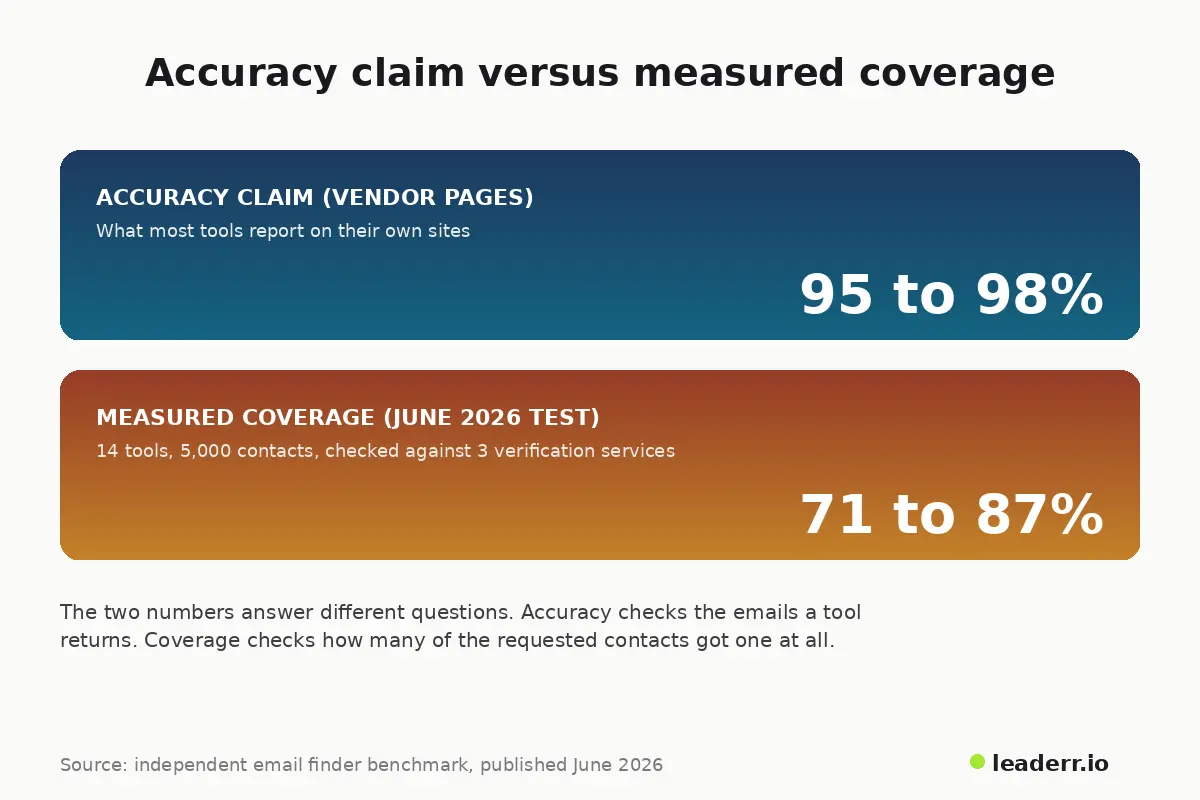
That gap matters because it changes what you are actually paying for, which is the next thing to work out before you approve an order.
The rule that blocks the list before it blocks a single reply
The clause on the Mailchimp terms page is not an outlier. It is close to standard among mainstream email marketing platforms, and it catches more buyers than the pricing page ever warns them about.
What counts as sending
A support thread on HubSpot's own community forum shows how the restriction plays out in practice. Someone asked whether an eight to ten thousand contact list of potential partners could be imported for a calling campaign, worried about database clutter.
A community member pointed to the policy against emailing purchased, rented, or borrowed lists. The warning was blunt: violating it risks losing access to marketing email tools entirely.
What still works without emailing anyone
The same reply drew a real distinction: the restriction is about email campaigns specifically. Uploading records for a phone campaign, or into a CRM for manual review, sits in a different bucket, though the responder still recommended checking the exact use case against the written policy before assuming it is safe.
For the full country by country legal picture on top of the platform rules, the compliance breakdown here covers CAN SPAM, GDPR, and CCPA in more depth than fits in one section.
Nothing about this is a workaround. A platform that blocks a send is not being difficult. It is protecting every other sender who shares its shared sending infrastructure from a list nobody has tested yet.
What a thousand targeted contacts actually gets you
Put the coverage number from earlier next to a real order and the total cost of a purchased file looks different than the sticker price suggests.
Contacts requested | Usable emails at 71 percent coverage | Usable emails at 87 percent coverage |
|---|---|---|
1,000 | 710 | 870 |
5,000 | 3,550 | 4,350 |
10,000 | 7,100 | 8,700 |
At the low end of that band, paying for 1,000 contacts means paying full price for roughly 290 records that never turn into a usable email address at all, before a single one of them has a chance to bounce or reply.
None of that shows up on an invoice. It only shows up once the file has been checked.
The real total cost of a purchased list is the price on the invoice, plus a verification pass on every record, plus the sending domain and warmed inboxes needed to send safely, plus whatever share of the file never converts to a usable address in the first place.
Vendors quote the first number. Almost nobody adds up the rest.
What actually arrives when the file lands
A vendor's description of what a list contains and what a buyer actually receives are not always the same document.
Format and exclusivity
Files usually arrive as a spreadsheet export with name, title, company, and one or more contact fields. What rarely arrives with it is any confirmation of exclusivity.
You usually have no way to know how many other buyers received the same file this month, which matters if a hundred other sellers reach the same inbox in the same week.
What a refund usually covers
Refund and replacement terms tend to cover hard bounces only, and only within a short claim window, often thirty days. A soft bounce, a spam complaint, or a contact who never responds at all is treated as a normal outcome, not a defect, regardless of how the accuracy claim on the sales page was worded.
How the leading providers compare on exactly these terms is worth reading before signing with any one of them.
How to test a sample before you commit to the rest
Run this before approving the full order, not after the invoice is paid.
Ask for a sample of 50 to 100 records before buying the full file, never after.
Run every sample address through a verification check and record the split between valid, catch all, and invalid results.
Send the sample from the exact domain you plan to use for the real campaign, not a throwaway one.
Wait 48 hours and log hard bounces separately from soft bounces and spam folder placements.
Compare the sample's real numbers against what the vendor quoted, in writing, before approving the rest of the order.
A vendor that resists a sample request before a full purchase is telling you something about how confident it actually is in its own numbers.
For the exact checks a verification pass should run against each address, how to verify an email address covers the six methods worth knowing.
The first week after the file lands
What happens in the first few days decides whether the rest of the list is worth sending to at all.
The three things to check first
Run the entire file through a verification pass before it touches a sequencer, not after the first batch goes out. Load only the valid and catch all rows into a send that respects your existing suppression list.
Hold new contacts to a conservative volume for the first week and watch the daily bounce number rather than waiting for a weekly report.
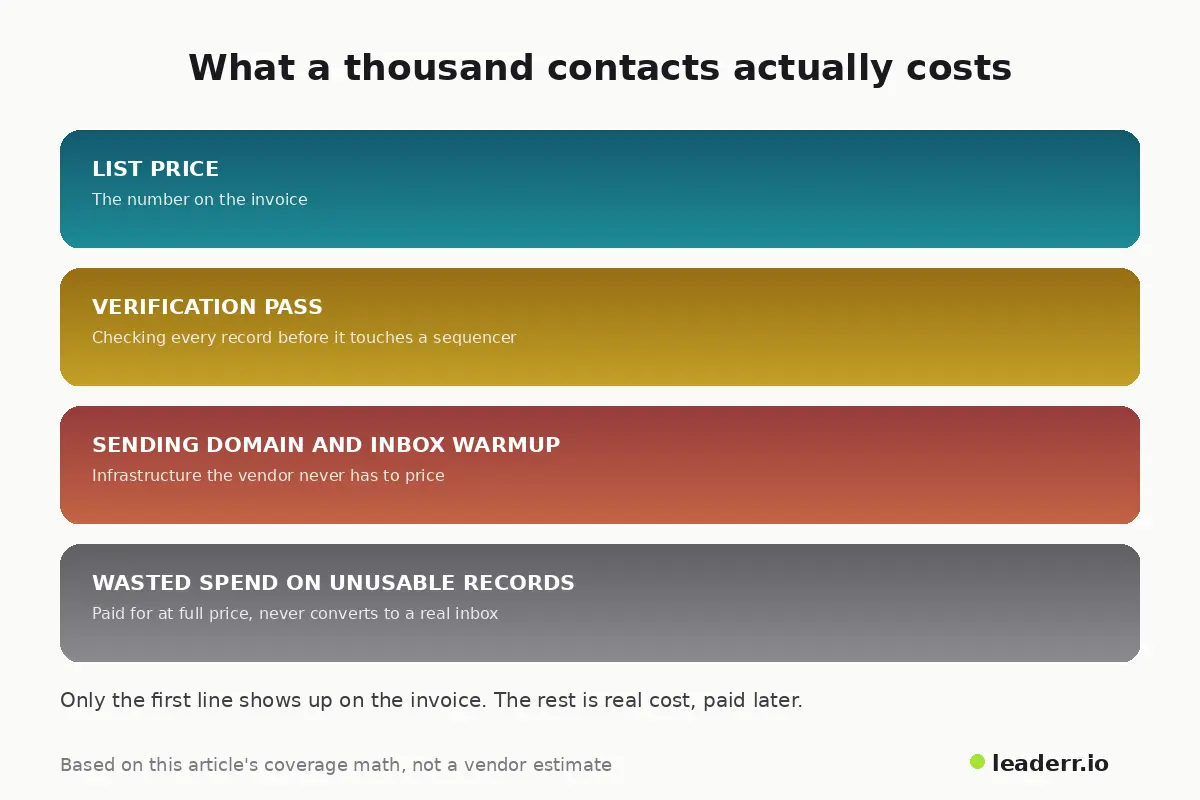
That last line item, the wasted spend on records that were never going to convert, is the one every sales page leaves off the price tag.
When the numbers do not match what you were told
A file that looked fine in the sample can still go wrong once the full batch goes out.
Symptom | Likely cause | What to do |
|---|---|---|
Bounce rate climbs past 5 percent right after sending | The file is older than it looked, or coverage was padded with guessed addresses | Pause the send, re verify the remaining contacts, and ask for the accuracy guarantee in writing |
A large share of addresses come back catch all | The domain accepts all mail, so no single inbox can be confirmed | Treat catch all rows as unverified, send them last, and in smaller batches |
The same contacts show up in more than one file you bought | The file was sold without any exclusivity guarantee | Deduplicate against your CRM before every send, not after |
Replies mention a different name or role than the record shows | The record was not refreshed since the person changed jobs | Recheck job titles against a live source before a second touch |
One more warning sign belongs on this list. A thread on Hacker News, started by someone asking whether to outsource building a cold outreach list, drew a short but pointed reply: reconsider handing off that step, since the person who sources the list is the one who ends up understanding the target account.
The thread only pulled three replies and a single point, a weak signal on its own. Still, the caution it raises matches the pattern above. The step people are most tempted to skip is checking what a vendor actually delivered against what they promised. That check is the one that catches problems before they reach a real inbox.
FAQ
Is it legal to buy a b2b email list?
In the United States, CAN SPAM allows commercial email to a purchased list as long as it carries a working opt out link and an accurate sender address. The UK, the EU, and Canada set a higher bar that leans toward requiring consent before you send at all, which changes the calculation for any list with international contacts.
Can you upload a purchased list to Mailchimp or HubSpot even if you cannot email it?
Both platforms restrict sending email campaigns to a purchased or third party list. A HubSpot Community thread shows the nuance: the restriction covers email sends specifically, and a non email use case, like a calling list, may fall outside it, though the safest move is checking the exact use case against the written policy first.
What bounce rate should you expect from a purchased list?
One major email platform treats 1 to 2 percent as normal. Above 2 percent is a signal to check your data, and above 5 percent means stop sending and re verify the list before continuing.
How fast does a b2b email list go stale?
A 2025 verification dataset covering more than eleven billion addresses found close to one in four turning invalid or risky within a year. Six months is long enough to lose a meaningful share of a file's original accuracy.
The sample is the real pitch
A vendor's homepage can claim almost any accuracy figure it wants. A sample, checked with your own tools, cannot. Ask for it before the invoice is final, and let the real numbers make the decision instead of the sales page.
Guidance reviewed September 14, 2026.
About the author
Michael Doyle writes about B2B sales at Leaderr. He covers prospecting, cold outreach, sales data, and pipeline building, with a focus on what actually works for SDRs, founders selling on their own, and small sales teams. Connect with him on LinkedIn.