

Data hygiene is the ongoing work of keeping the records already in a CRM or prospect list accurate, deduplicated, and current, not a one time cleanup.
It differs from data enrichment, which adds new information you did not already have.
Real B2B contact data decays at roughly 12 to 26 percent a year when it is measured directly, not the 30 percent figure that gets repeated most.
What you need before you start
This covers cleaning and maintaining sales and CRM records you already have: fixing duplicates, standardizing formats, checking that emails and phone numbers still work, and setting a schedule so the list does not go bad again.
It does not cover finding new companies or contacts, filling in fields you never collected, or building a list from nothing. For that, see What is B2B data enrichment.
What you need depends on who is doing the work.
Who this is for | What you need | Done when |
|---|---|---|
Solo founder or a one to three person team | No budget, a spreadsheet, about an hour a quarter | Duplicates are gone and every record follows one format |
An SDR or AE handed someone else's list | 15 minutes before the first call or send | You know which records are safe to touch today |
RevOps or whoever owns the CRM | Admin access and buy in on a cadence | A written schedule exists, and one person owns it |
How fast your data actually decays
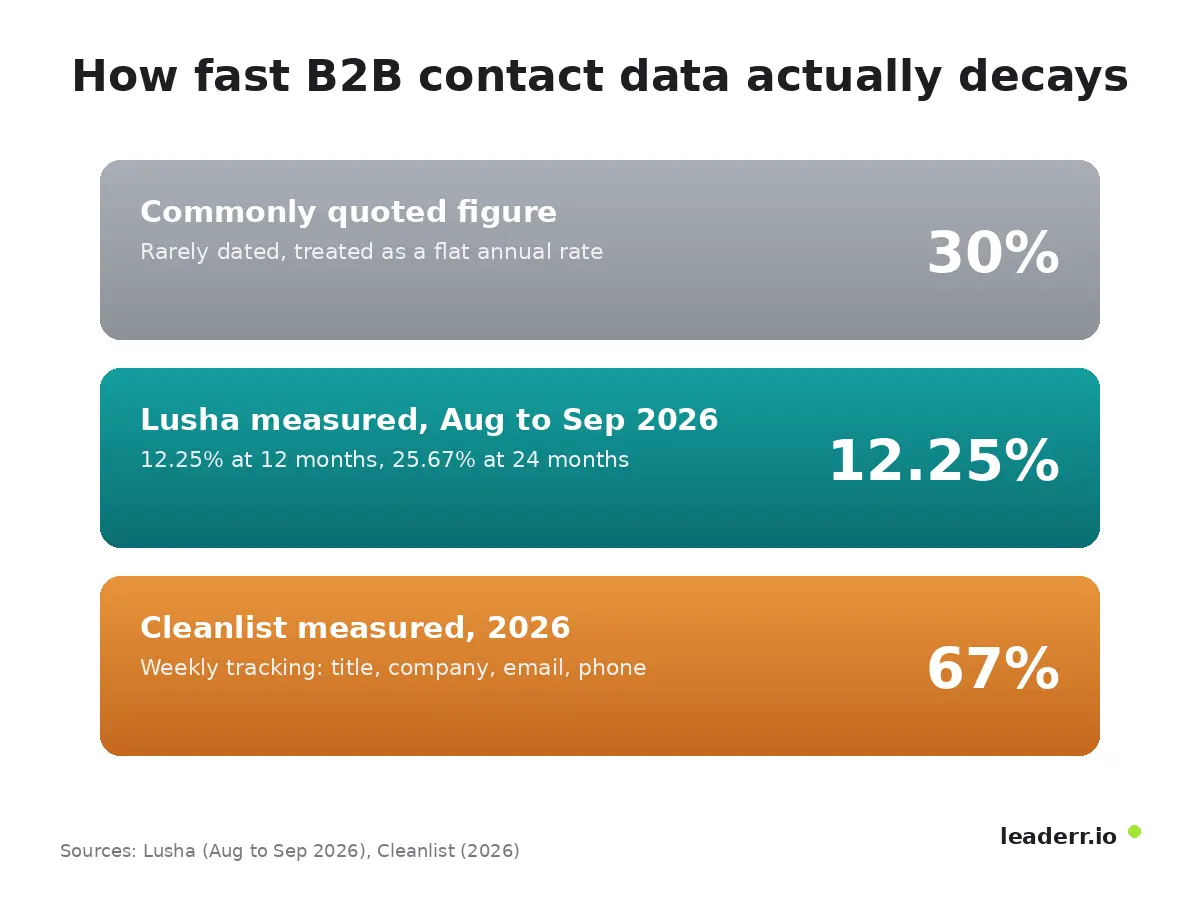
The figure that gets repeated most for how fast B2B contact data goes bad is 30 percent a year. That number is not wrong so much as misapplied.
The 30 percent figure, corrected
A direct measurement across 140,284 US sales leaders at the VP and C suite level found 12.25 percent changed roles within 12 months, and 25.67 percent within 24 months (Lusha, measured August to September 2026).
The 30 percent figure most people quote turns out to be closer to a two year rate than a one year one.
A wider measurement, and a stale cost figure to retire
A separate 2026 study tracked 5,000 contacts weekly for 13 weeks and counted a wider set of failures: job title, company, email validity, and phone connectivity together, not job changes alone.
That measurement found a steady 1.8 to 2.4 percent weekly decay, compounding to roughly 67 percent a year (Cleanlist, 2026).
The two numbers are not in conflict. They are answering different questions: how many people changed jobs, versus how many fields in a record stopped being true in some way.
The honest answer to "how often should you check" depends on which of those two questions matters to you.
The first pass through a list you did not build
If you have just been handed a list, whether from a previous rep, a purchased file, or a merger, you do not need a governance program before your first call.
You need to know what is safe to touch today.
Sort by last activity date, not alphabetically. Records with no activity in over a year carry the highest chance of a dead email or a changed role.
Pull exact duplicate emails first. This alone usually removes 5 to 15 percent of a list before you touch anything else.
Check the domain on a sample of 20 records. A free personal email address on a supposedly B2B contact, or a domain that no longer resolves, is a fast tell that the record is stale.
Flag, do not delete, anything you are unsure about. A record with a missing phone number is still usable for email; a record with no verified email or phone is not usable for either channel today.
Send or call the newest 20 percent first. Fresh records carry the lowest decay risk, and an early response tells you whether the rest of the list is worth the time.
None of this replaces a real cleanup. It buys you a safe starting point while one happens.
A cleanup routine that costs nothing
A small team does not need a paid platform to run this on a schedule. Most CRMs already hold the fields this routine touches; every tool used in this routine is a free add on, not a replacement.
The routine
Export the list or open it directly in Google Sheets.
Select the data range, then use Sheets' own Data, Data cleanup, Remove duplicates menu. It is a free, built in feature: pick the columns to check, confirm whether the sheet has a header row, and click Remove duplicates.
This step alone only catches exact matches, so it will miss "John Smith" and "Jon Smith" at the same company.
Run a second pass with a free fuzzy matching tool such as Datablist's duplicate finder, which normalizes emails, phone numbers, and names before comparing them, so near matches get caught too.
Standardize formats you can see at a glance: phone numbers in one format, company names without "Inc" in one row and "Incorporated" in the next, job titles matched to a short list instead of free text.
Spot check 20 records for a working email and a working phone number. If more than one or two fail, the whole list needs a verification pass before it goes back into active use.
Put a recurring date on the calendar. Quarterly is enough for most small lists; a list that gets new records added weekly needs a monthly pass instead.
Step 2 lives inside a menu most spreadsheet users have never opened.
That single menu is the free, native starting point every list in this routine should run through first.
What this does not replace
This routine takes under an hour for a list of a few thousand records once the steps are familiar, and none of it requires a paid seat.
It does not replace ongoing email and phone re-verification at real volume, which is the gap a dedicated paid tool actually closes.
Data hygiene, data cleansing, and data quality, compared
These three terms get used for different things, and the mix up causes real confusion when a team is deciding what to actually schedule.
Term | What it covers | How often it happens |
|---|---|---|
Data cleansing | A single pass that fixes what is already wrong: duplicates, bad formats, dead records | Once, usually before a migration or a large send |
Data hygiene | Cleansing plus the checks that keep records from going bad again | On a set schedule: monthly, quarterly, or before every send |
Data quality | The measured state of the data against a set of dimensions | An ongoing score, not a finished task |
The UK government's official data quality guidance defines six dimensions used to measure that last row, including that accurate data "reflects reality," and unique data appears only once in a set.
Data integrity is a related but separate idea: whether data stays intact as it moves between systems, not whether it was accurate to begin with.
Data enrichment sits outside all three; it adds information a record never had, which is why it gets its own cost and accuracy questions once the record is already clean.
What these tools actually cost
Before paying for anything, check what the CRM already does. Most mainstream platforms include native duplicate detection and basic field validation at no extra cost; the gap they usually leave is fuzzy matching across differently formatted records, and scheduled re-verification of email and phone data over time. That gap is what a dedicated tool is actually solving.
What is actually free
A spreadsheet plus a free fuzzy matching tool, run on a quarterly schedule, covers a list of a few thousand records without a subscription.
It does not cover ongoing email and phone re-verification at scale; that is where a paid option starts to earn its price.
What the paid tools cost
Tool | What it does | Price (checked September 2026) |
|---|---|---|
A dedicated CRM data care service | Ongoing dedupe and standardization run against your CRM | Around 500 dollars a month |
A credit based enrichment and cleaning platform | Pay per record processed, scales with volume | Free tier, then roughly 150 to 800 dollars a month depending on volume |
A dedicated cleansing suite | Batch cleaning by record volume purchased upfront | Roughly 40 dollars for 10,000 records up to 16,000 dollars a year unlimited |
Enterprise dedupe platforms | Full deduplication and merge tooling for large databases | Custom pricing, sales conversation required |
The spread is wide enough that record volume, not team size, should decide which row fits. A one thousand record list rarely justifies the enterprise row; a five hundred thousand record database rarely gets clean on a spreadsheet.
Where hygiene breaks in practice
Common failure patterns
What you see | Likely cause | Fix |
|---|---|---|
Two records for the same company with different spellings | Manual entry with no standardization rule | Match on a normalized name and domain, not exact text |
A contact with a working email but a dead phone number | Partial decay; only one channel was reverified | Check and refresh channels separately, not as one pass or fail |
Duplicate records reappear a few weeks after a cleanup | The intake form or import process has no dedupe check | Add a duplicate check at the point of entry, not only after the fact |
Reports and automation give results that do not match reality | Bad records feeding downstream tools without a check | Treat cleanup as a recurring input step, not a one time fix |
Why this is showing up more now
That last failure pattern is showing up more as teams connect CRM data to automated and AI-driven tools.
A May 2026 Indie Hackers discussion on why AI agents fail drew 23 comments making the same point from a different angle: tools built on top of messy source data compound the mess rather than correcting it, whatever the tool is.
FAQ
What causes CRM data to decay?
People change jobs and companies, email addresses and phone numbers go inactive, and records get entered by hand with no standard format.
Any one of these on its own is a small problem; together, across a database of thousands of records, they compound into decay rates well above what a single annual snapshot would suggest.
What tools help automate data hygiene?
A spreadsheet with a fuzzy matching add on covers small lists. Larger databases lean on a dedicated dedupe and standardization service, a credit based cleaning platform, or a batch cleansing suite, priced by volume rather than by seat.
Check what your CRM already does natively before adding any of them.
Is data hygiene related to data security?
Only indirectly. Clean data is not the same as secure data, but a database full of duplicate and unverified records is harder to audit for access and retention, which does make security and compliance reviews slower and less reliable.
The routine matters more than the tool
A quarterly pass with a free spreadsheet, run on schedule, does more for a small list than an expensive platform used once and forgotten.
Pick the routine size that matches how big the list actually is, put a date on the calendar, and treat the next cleanup as already scheduled rather than something to get to eventually.
Guidance reviewed 28 September 2026.
About the author
Michael Doyle writes about B2B sales at Leaderr. He covers prospecting, cold outreach, sales data, and pipeline building, with a focus on what actually works for SDRs, founders selling on their own, and small sales teams. Connect with him on LinkedIn.