LinkedIn Sales Navigator pricing: What you pay and what you lose if you cancel
LinkedIn Sales Navigator pricing for Core and Advanced, the one month trial rule, 7 day refund window and what cancelling deletes, checked on 11 October 2026.
 Michael Doyle13 min read
Sales Navigator Core costs $119.99 a month, or $1,079.88 if you pay for the whole year.
Advanced costs $159.99 a month, or $1,799.88 for the year. The free trial turns into a paid plan one month after it starts.
When you cancel, LinkedIn removes your saved leads, saved accounts, and messages.
Prices are as of 11 October 2026.
What you need before you start
You need a LinkedIn account and a rough idea of what one new client or deal is worth to you. Prices are in dollars unless a currency sign says otherwise.
This guide covers price, the trial, cancelling, InMail credits, and what the plan leaves out. For the list itself, read B2B list building.
What Sales Navigator costs by plan and currency
What happens: You read the price for each plan on LinkedIn's compare plans page, then pick monthly or yearly.
What Core and Advanced cost
LinkedIn lists the Core and Advanced prices in five currencies. The dollar prices follow.
Core costs $119.99 for each user, each month. Paying for the whole year costs $1,079.88.
Advanced costs $159.99 for each user, each month. Paying for the whole year costs $1,799.88.
Advanced Plus has no listed price. LinkedIn says that price depends on your team's size, CRM connection, and training needs, and it asks you to request a demo.
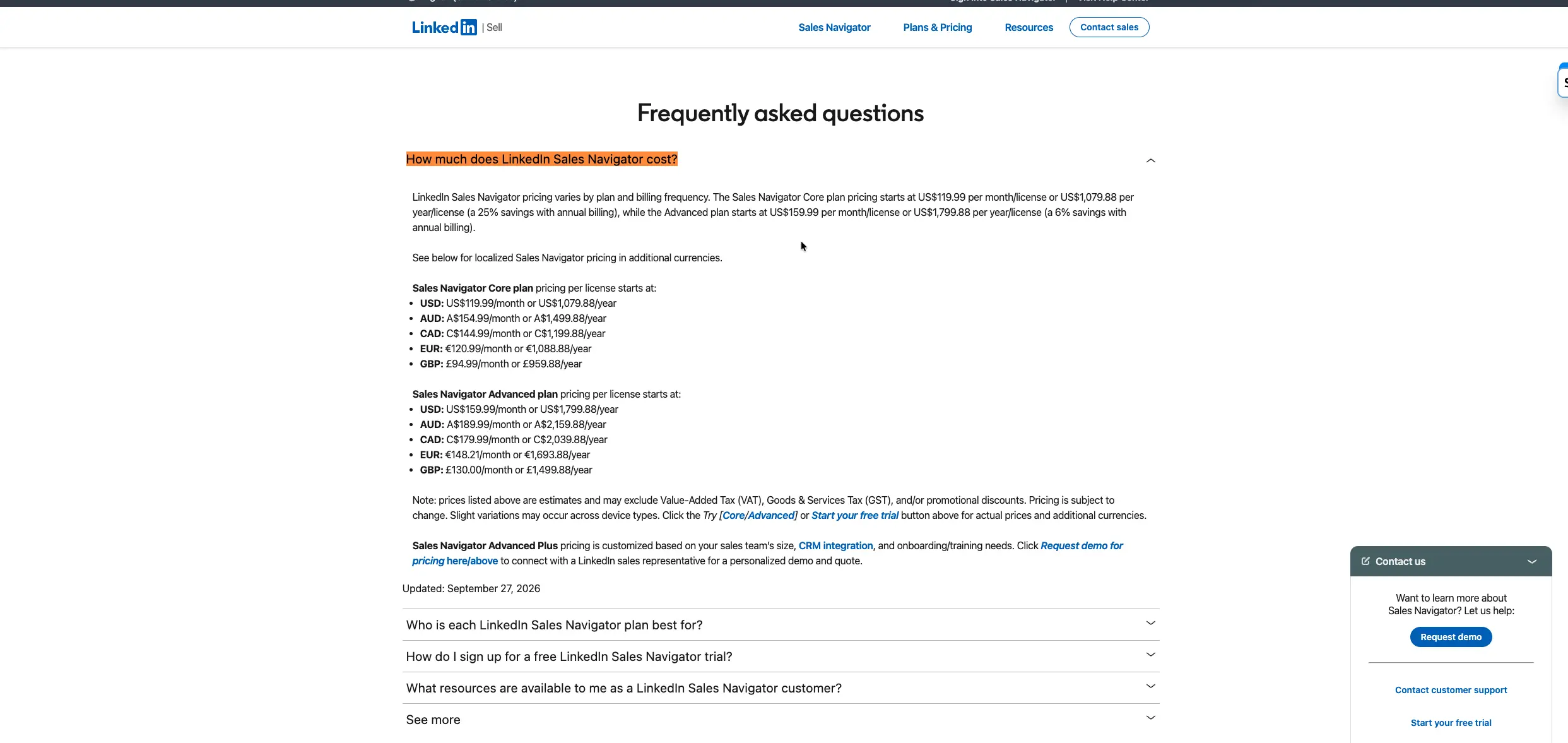
The answer carries an update date of 27 September 2026.
Monthly or yearly: what you save in each currency
The table compares 12 months at the monthly Core price with the whole year price for Core, in each currency LinkedIn lists.
Currency | 12 months at the monthly price | Whole year price | You save | Saving as a share |
|---|---|---|---|---|
Dollars | $1,439.88 | $1,079.88 | $360.00 | 25.0% |
Euros | €1,451.88 | €1,088.88 | €363.00 | 25.0% |
Pounds | £1,139.88 | £959.88 | £180.00 | 15.8% |
Australian dollars | A$1,859.88 | A$1,499.88 | A$360.00 | 19.4% |
Canadian dollars | C$1,739.88 | C$1,199.88 | C$540.00 | 31.0% |
LinkedIn's page states a 25% saving on Core. That holds in dollars and euros. In pounds, you save 15.8%.
On Advanced, in dollars, 12 months at the monthly price is $1,919.88. The whole year is $1,799.88. The savings are $120.00, or 6.25%.
Done when: You know your plan's price in your currency and whether you will pay monthly or for the whole year.
Which plan fits one seller or a team
What happens: You compare the Premium plans and the Sales Navigator plans on price, InMail credits, and who each one fits.
LinkedIn states that a Sales Navigator subscription includes Premium Business features. The table shows the starting price and monthly InMail credits for each plan.
Plan | Starting price | InMail credits a month | Who LinkedIn says it fits |
|---|---|---|---|
Premium Business | From $69.99 a month | 15 | Business leaders and owners building their brand and network |
Premium All-in-One | From $89.99 a month | 30 | Small business owners and founders who handle sales, marketing and hiring |
Sales Navigator Core | From $119.99 a month | 50 | Individual sellers |
Sales Navigator Advanced | From $159.99 a month | 50 | Sales teams |
One seller: Core or Premium
Core carries 50 InMail credits a month, the most of any LinkedIn plan. Premium Business has 15, and Premium All-in-One has 30.
If you move from Sales Navigator to a Premium plan, you lose sales search, buyer alerts, TeamLink, and CRM links.
If you are still learning the process, Sales prospecting lays out the steps before you pay for any tool.
A team: Core, Advanced or Advanced Plus
LinkedIn describes Core as the plan for individual sellers and Advanced as the plan for sales teams.
It describes Advanced Plus as the plan for teams that use one of the CRMs named on its page and want deeper CRM links.
Done when: You picked a plan, or you decided to stay on free LinkedIn or a Premium plan.
What a team pays each year
What happens: You multiply the plan price by the number of users for 12 months.
Take Advanced and 12 months.
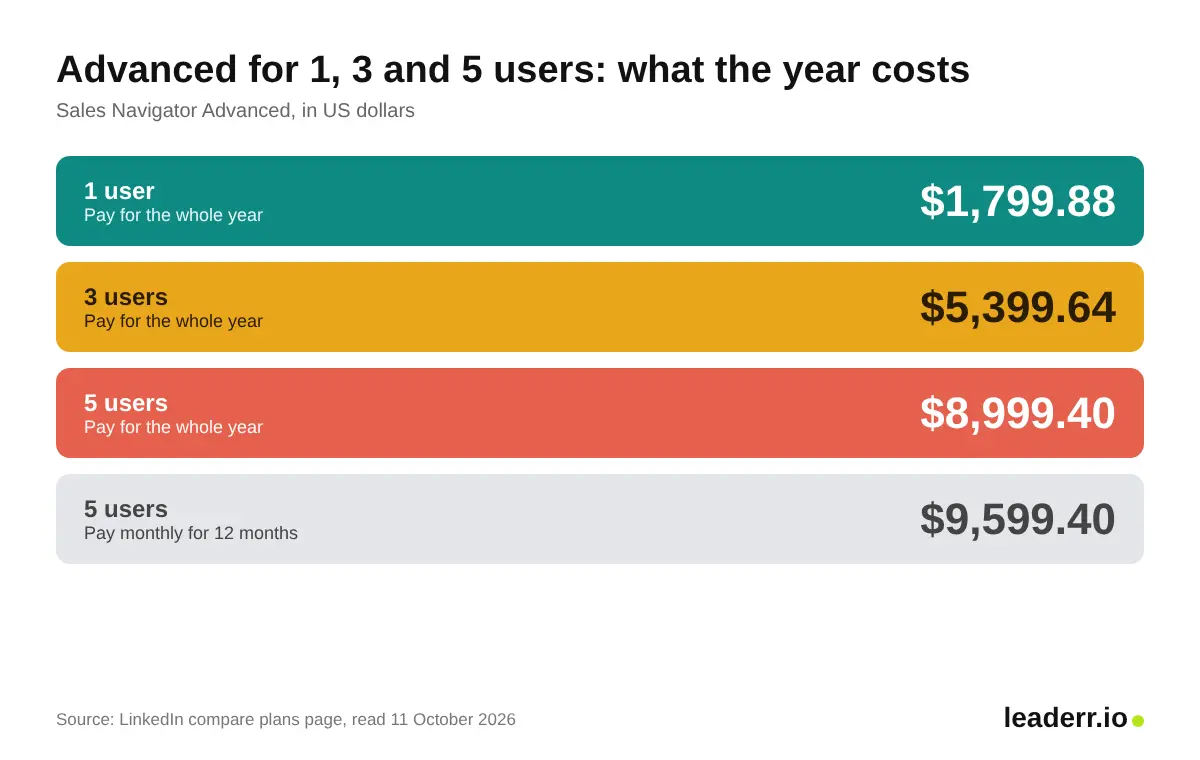
Advanced costs $159.99 for each user, each month. For 5 users over 12 months, that is $9,599.40.
If you pay for the whole year, Advanced costs $1,799.88 for each user. For 5 users, that is $8,999.40.
Paying for the whole year costs $600.00 less for 5 users.
The table shows Advanced for 1, 3, and 5 users.
Users | Pay for the whole year | Pay monthly for 12 months | You save |
|---|---|---|---|
1 | $1,799.88 | $1,919.88 | $120.00 |
3 | $5,399.64 | $5,759.64 | $360.00 |
5 | $8,999.40 | $9,599.40 | $600.00 |
How many users you can buy online
You can start or buy Advanced for up to five users online from a desktop. On the iOS or Android app, you can buy for one user.
Advanced Plus goes through LinkedIn's sales team.
An admin then assigns the other users in LinkedIn Admin Center.
Done when: You have a yearly total for your team size.
How the free trial turns into a charge
What happens: You start a trial, LinkedIn takes your payment details, and the trial turns into a paid plan on a set date.
The trial clock
LinkedIn lists these rules for a trial started on LinkedIn.com:
The trial turns into a paid plan on the billing date, one month after you started it.
LinkedIn asks for payment details at sign-up, and you can cancel for any reason before the trial ends to avoid the charge, according to the compare plans page.
LinkedIn sends a reminder email to your primary LinkedIn email address seven days before the end, according to the compare plans page. Android buyers get none.
To avoid the next charge, cancel at least one day before the renewal date.
Update old billing details within five days of the renewal date, or LinkedIn downgrades the account to a free Basic account.
You can read the renewal date in LinkedIn Admin Center.
Who gets a free trial?
A free trial is open to members with no paid LinkedIn plan who have not used a LinkedIn free trial in the past 365 days.
LinkedIn adds that trial availability can differ by plan and region.
Done when: You know the renewal date and the last day to cancel.
What cancelling removes
What happens: You cancel in LinkedIn Admin Center, and the account ends when the billing period ends.
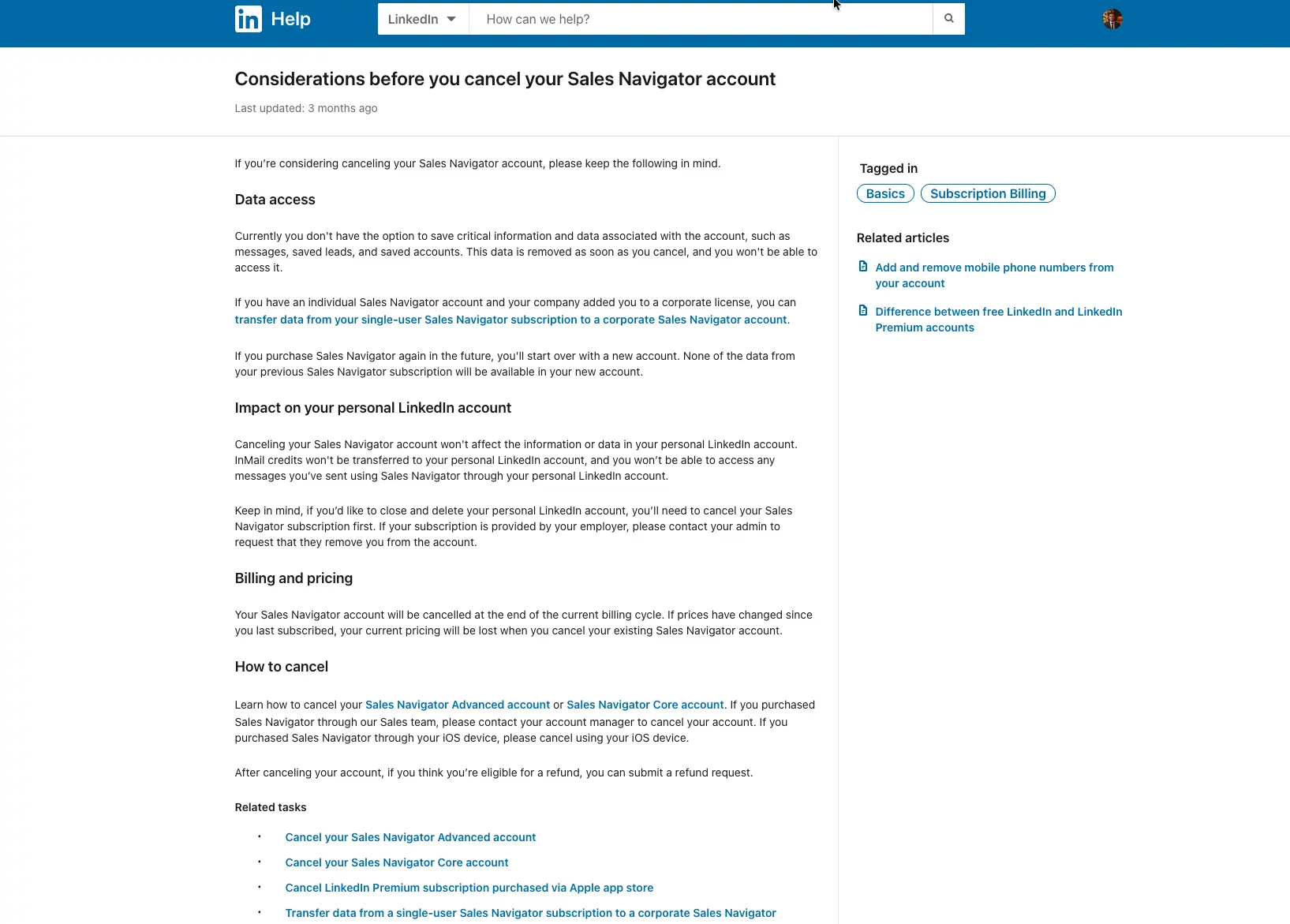
What LinkedIn deletes when you cancel
LinkedIn states that your messages, saved leads, and saved accounts are "removed as soon as you cancel". The page gives no way to save that data first.
Saved leads, saved accounts, and messages are removed, and a later purchase starts a new account with none of that data.
Your current price is lost if prices have changed since you subscribed.
Your InMail credits do not move to your personal LinkedIn account.
You cannot open the messages you sent in Sales Navigator from your personal account.
The page does not say if you keep access until the billing period ends. Copy the names you need by hand before you press Cancel.
The account ends at the end of the billing period. On an annual plan, that is the end of the paid year.
On a monthly plan, it is the end of the current month, according to the compare plans page.
Where to cancel, by how you bought
The table shows where each kind of plan is cancelled.
How you bought | Where to cancel | Who can cancel |
|---|---|---|
Online, Core | LinkedIn Admin Center, under Purchases | Core users, in their own billing |
Online, Advanced | LinkedIn Admin Center, under Purchases | Only a purchaser admin |
Through LinkedIn's sales team | Your account manager | You, by contacting the account manager |
On an iOS device | The settings on your iOS device | You, through Apple |
Steps to cancel Core online
Sign in to your LinkedIn account.
Click the icon in the upper right corner, then click Settings & Privacy.
Click Account Preferences, then scroll to Subscriptions & payments.
Click Manage Premium account, then Manage Subscription. LinkedIn Admin Center opens.
Click Purchases, then select the subscription.
In the Actions section, click Cancel free trial or Cancel subscription, then follow the on-screen steps.
Steps to cancel Advanced online
Sign in to Sales Navigator.
Click Admin in the top menu, then Admin Center.
Click Purchases, then select the subscription in the Active tab.
In the Actions section, click Cancel free trial or Cancel subscription, then follow the on screen steps.
The 7-day refund window
LinkedIn states that Sales Navigator may be refundable within 7 days from the date the subscription is charged, without Premium usage.
A previous refund can affect your eligibility. Apple handles refunds for iOS purchases.
Citizens of the European Union who buy for themselves, not for a business, are entitled to a full refund in the first 14 days.
Those 14 days start on the first day of a free trial, so a trial leaves no fees to refund.
Done when: You cancelled before the renewal date, or you know your refund window.
How InMail credits work
What happens: LinkedIn adds credits on the first day of each month, and replies return some of them.
LinkedIn lists these rules for Core, Advanced, and Advanced Plus:
Each plan gets 50 InMail credits a month.
Credits arrive on the first day of each month in UTC time, whatever day you bought.
You can hold up to 150 credits. Unused credits carry into the next month and must be used within 90 days.
A reply within 90 days returns the credit. Auto replies count, including "Not interested".
Credits do not transfer if you cancel or change plan.
Example: say you send 50 InMail messages in a month and 12 get a reply, auto replies included.
LinkedIn returns 12 credits. Your next month starts with 50 new credits plus 12 returned credits, so you have 62.
Done when: You know how many messages you can send in a month and what brings credits back.
What the plan leaves out
What happens: You check what people expect from the plan: email addresses, a bulk export and browser extensions.
Email addresses and exports
LinkedIn's feature list for Sales Navigator names filters, InMail, alerts, team tools and CRM links. It lists no email address field and no bulk export.
To find an email another way, read about finding an email on LinkedIn.
Browser extensions that scrape LinkedIn
LinkedIn states that it does not permit third party tools that scrape or automate activity on LinkedIn, including browser extensions.
Members who use them risk restricted or closed accounts, and the tools can stop working without notice.
Done when: You know which jobs the plan does not do.
A break-even check and a calendar note you can copy
Break-even check
Take the Core price for the whole year, $1,079.88, and divide it by what one new client pays you.
The answer is how many clients cover the year.
The table uses three example client values, not results anyone got.
One new client pays you | $1,079.88 divided by that amount | Clients needed to cover the year |
|---|---|---|
$2,000 | 0.54 | 1 |
$500 | 2.16 | 3 |
$250 | 4.32 | 5 |
Calendar note
Copy this note into your calendar before you enter your card.
Sales Navigator trial note
Trial start date: [date]
Renewal date: [copy it from LinkedIn Admin Center]
Reminder email due: [renewal date minus 7 days]
Last day to cancel: [renewal date minus 1 day]
Billing details current: [yes or no]
Plan if I keep it: [Core or Advanced]
Yearly cost if I keep it: [price from the compare plans page]
Example dates: a trial that starts on 3 November 2026 renews on 3 December 2026. The reminder email is due on 26 November 2026. The last day to cancel is 2 December 2026.
Before you pay
[ ] You know what one new client or deal pays you.
[ ] The last day to cancel is in your calendar.
[ ] You copied the names you need before any cancel.
Where it goes wrong
A freelance consultant asked on the Jeff Bullas community in July 2025 whether Sales Navigator is worth it for a one-person business.
One reply said it pays off only with a high-value service and a daily routine. The thread shows no vote counts.
The table lists four failures tied to LinkedIn's own rules.
What you see | Why it happens | What to do |
|---|---|---|
A charge after the trial | The trial renews one month after it starts, and Android buyers get no reminder email. | Cancel at least one day before the renewal date, then ask for a refund within 7 days of the charge. |
You cannot cancel an Advanced plan | Only a purchaser admin can cancel an Advanced plan bought online. | Ask the purchaser admin, or contact your account manager if LinkedIn's sales team sold it. |
A higher price when you return | Cancelling drops your current price, and a new purchase starts a new account. | Read today's price on LinkedIn's compare plans page before you cancel. |
No free trial button | A paid plan is active, or you used a free trial in the past 365 days. | Check your subscriptions in LinkedIn Admin Center and wait out the 365 days. |
FAQ
Is Sales Navigator free?
No. Sales Navigator is a paid plan, and the free part is the trial. LinkedIn also offers a free account with basic search filters.
The trial asks for payment details and renews after one month unless you cancel.
Does Sales Navigator include LinkedIn Premium?
A Sales Navigator subscription includes Premium Business features, according to LinkedIn. LinkedIn lists Premium All-in-One as a separate plan from $89.99 a month.
Does Sales Navigator show email addresses?
LinkedIn's feature list for Sales Navigator lists no email address field, so plan on finding emails elsewhere.
Why is my checkout price different from the page?
LinkedIn states that its listed prices are estimates. They may leave out VAT, GST or promotional discounts, and they can vary slightly by device. The trial button shows the actual price.
Is Sales Navigator worth it for one person?
It pays off if a few new clients cover the year. The break even table shows how many clients cover Core at three client values.
Your cancel date matters more than your plan
Write the renewal date in your calendar on day one. Read the price for your plan and your currency on LinkedIn's page. If one new client does not cover the year, stay on free LinkedIn or a Premium plan.
If one does, start the trial and cancel on the last day if you are still unsure.
About the author
Michael Doyle writes about B2B sales at Leaderr. He covers prospecting, cold outreach, sales data, and pipeline building, with a focus on what actually works for SDRs, founders selling on their own, and small sales teams. Connect with him on LinkedIn.