Social selling index: How to check your score and know if it is good
Check your social selling index, understand a good SSI score, handle access problems, and choose useful habits while tracking replies, meetings, and sales.
 Michael Doyle10 min read
The social selling index (SSI) is LinkedIn's score from 0 to 100 for social selling activity.
Open your SSI dashboard while signed in to check it, if your account has access.
Use the four component scores to find neglected habits, then judge sales progress through replies, meetings, and won deals.
What you need before you start
Social selling means building relationships with possible buyers through social networks. This guide covers LinkedIn's score, access problems, and a worksheet for reviewing your activity.
It does not cover Instagram scores or software comparisons.
Before reviewing your SSI, have these ready:
Sign in to the LinkedIn account you use for selling.
Describe the people you want to reach, including their roles and company types.
Open a spreadsheet or customer relationship management system, called a CRM, for recording conversations.
Keep the dates of your outreach and replies available for comparison.
If you have not defined your audience, start with the stages of sales prospecting. Prospecting means finding possible buyers and contacting them.
A score cannot tell you whether you chose suitable people.
How to check your social selling index
What happens: You open LinkedIn's score page and record what your account displays.
Sign in to LinkedIn using the account you want to review.
Open the SSI dashboard linked above in the same browser.
If a score appears, record the total, component scores, and comparison ranks shown.
If an access notice appears, read it before changing subscriptions or settings.
Done when: You have either your current numbers or the exact access notice for your account.
Is the social selling index still free?
Universal free access is not confirmed for every current account type. Avoid buying a plan based only on an old free access promise.
An access notice concerns your account's eligibility. It does not, by itself, mean your profile is weak.
If you are considering a paid subscription, compare Sales Navigator plans and pricing against the prospecting features you need.
What the four SSI pillars measure
LinkedIn divides the score into four areas, often called pillars. Its published scoring overview assigns up to 25 points to each area. Together, they make the total out of 100.
A strong total can still hide a weak component.
Establish your professional brand
Your professional brand is how you present your work and experience. LinkedIn's documented brand signals include profile completeness, media and endorsements.
Read your profile as a possible buyer would. Explain who you work with, what problem you address, and how someone can contact you.
Remove claims you cannot support. A complete profile should answer a visitor's questions about your work.
Find the right people
This pillar concerns how you search for and research prospects. LinkedIn lists searches, profile views, and saved leads among its prospecting signals.
Start with the buyer description you prepared. Search for suitable roles and companies, then check whether each person fits.
Opening many unrelated profiles gives you little useful information about who might need your service.
Engage with insights
Engaging with insights means sharing useful information and joining relevant conversations. LinkedIn's engagement inputs include messages sent and their response rate, alongside reactions and comments.
Choose conversations connected to your buyers' work. Add an explanation, answer a question, or share a relevant example.
A reply that develops the discussion has a clearer purpose than a comment written only to register activity.
Build relationships
This pillar includes your connections and the acceptance rate of your connection requests. Acceptance rate means the share of requests people accept.
Review who you are inviting and why a connection makes sense. Continue useful conversations after someone accepts.
A large network alone does not tell you whether its members match your audience or want to discuss a business problem.
What is a good social selling index?
LinkedIn's 18 January 2017 guidance described a score above 70 as high. That is a dated benchmark. It does not establish how many useful conversations or sales you should have today.
The original wording places the number in its historical context.
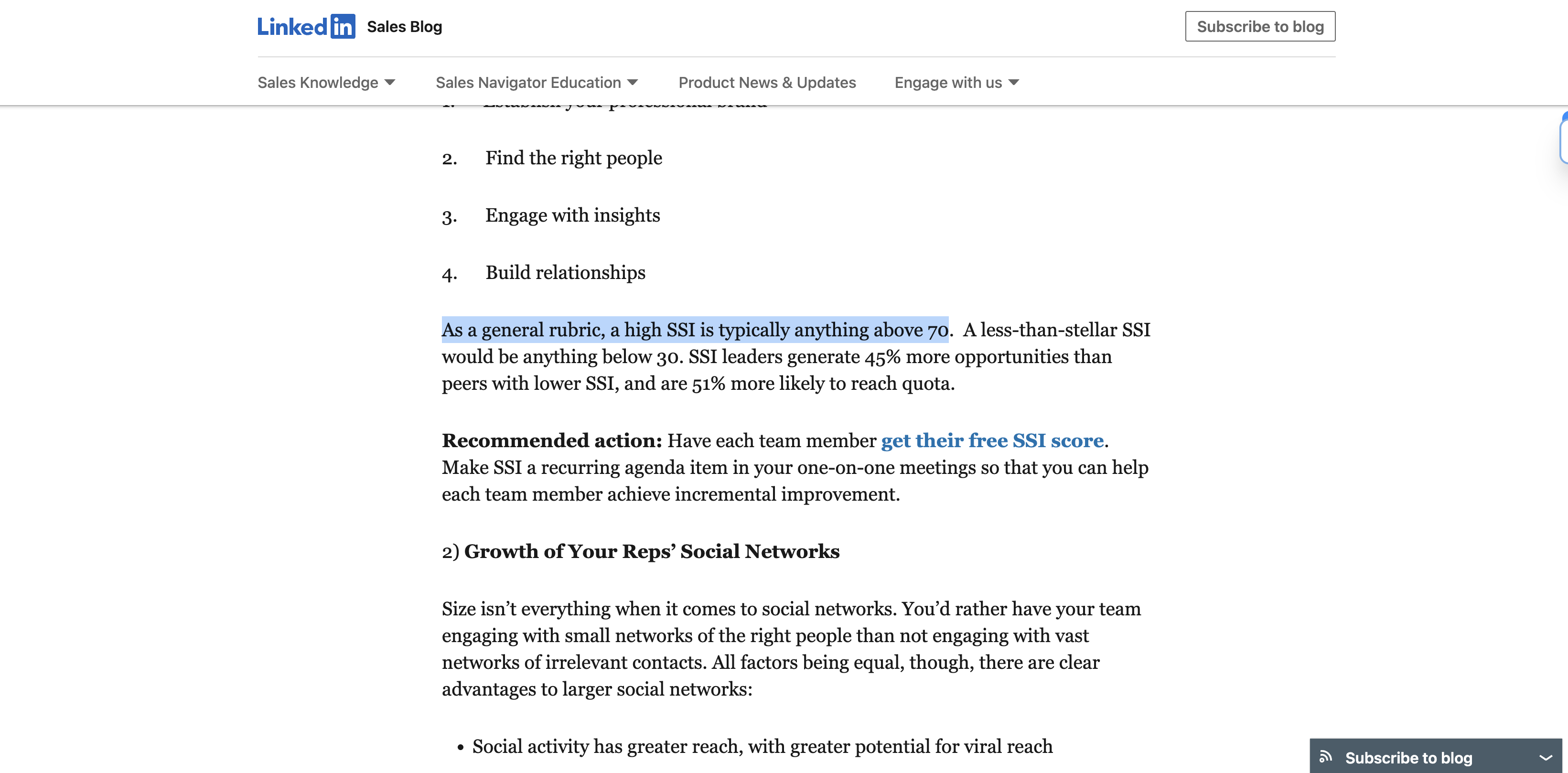
Treat the number as a reference, then look at the comparison ranks your dashboard shows.
Industry rank compares you with industry peers. Network rank compares you with people in your network.
These answer a different question from the total: how your score compares with a particular group.
For sales decisions, pair those comparisons with what happened after outreach. A rising SSI and no relevant replies deserve a closer look at your audience and message.
Review your score alongside sales results
What happens: You compare LinkedIn activity with responses from the same group of people.
Copy this worksheet into your notes. Leave the SSI fields empty if your account has no access; you can still review your sales activity.
Review date:
People first contacted between:
Replies counted through:
Target buyer description:
SSI total and component scores, if available:
People first contacted:
People who replied:
People who showed relevant interest:
People who attended a meeting:
Open sales conversations:
Won deals linked to this group:
Habit or message to change:
Reason for that change:
Next review date:
Calculate results from a matching group
Example: Suppose you first contacted 40 people during your chosen period. By your review date, 8 replied, 4 showed relevant interest, and 2 attended meetings.
These calculations describe that example group:
Measure | Calculation | Result |
|---|---|---|
Reply rate | 8 divided by 40, multiplied by 100 | 20% |
Interested reply rate | 4 divided by 40, multiplied by 100 | 10% |
Held meeting rate | 2 divided by 40, multiplied by 100 | 5% |
Count people consistently. Do not divide replies from older contacts by only this period's new contacts. Record the review date because some people will respond later.
Done when: You can name the group, the response window, and the calculation behind each rate. These example results are not targets or a formula for SSI points.
How to improve your SSI score
What happens: You choose one relevant habit to improve, using the component breakdown as a starting point.
Match the action to the weak component
Use this table to choose an action and a separate way to assess it.
Weak component | Action to take | Outcome to review |
|---|---|---|
Professional brand | Clarify your audience and offer on your profile | Whether visitors understand what you do |
Finding people | Check roles and company fit before contacting anyone | Whether replies come from suitable buyers |
Engaging with insights | Join discussions about problems your buyers face | Whether useful conversations develop |
Building relationships | Give each invitation a clear reason | Whether suitable people accept and continue talking |
Avoid changing everything together
Keep a note of what you changed and when. If you rewrite your profile, change audiences, and replace every message together, you cannot isolate the useful change.
You can assess a new habit without promising a score increase. LinkedIn publishes scoring inputs, but no exact conversion from an action to a point increase.
Done when: You have one change to make and a relevant outcome to review alongside it.
Who can see your SSI score?
Your company account matters when you assess privacy. LinkedIn's Advanced and Advanced Plus usage reporting guidance includes SSI visibility for admins and teammates.
The usage reporting row identifies both the shared score and the subscription types.
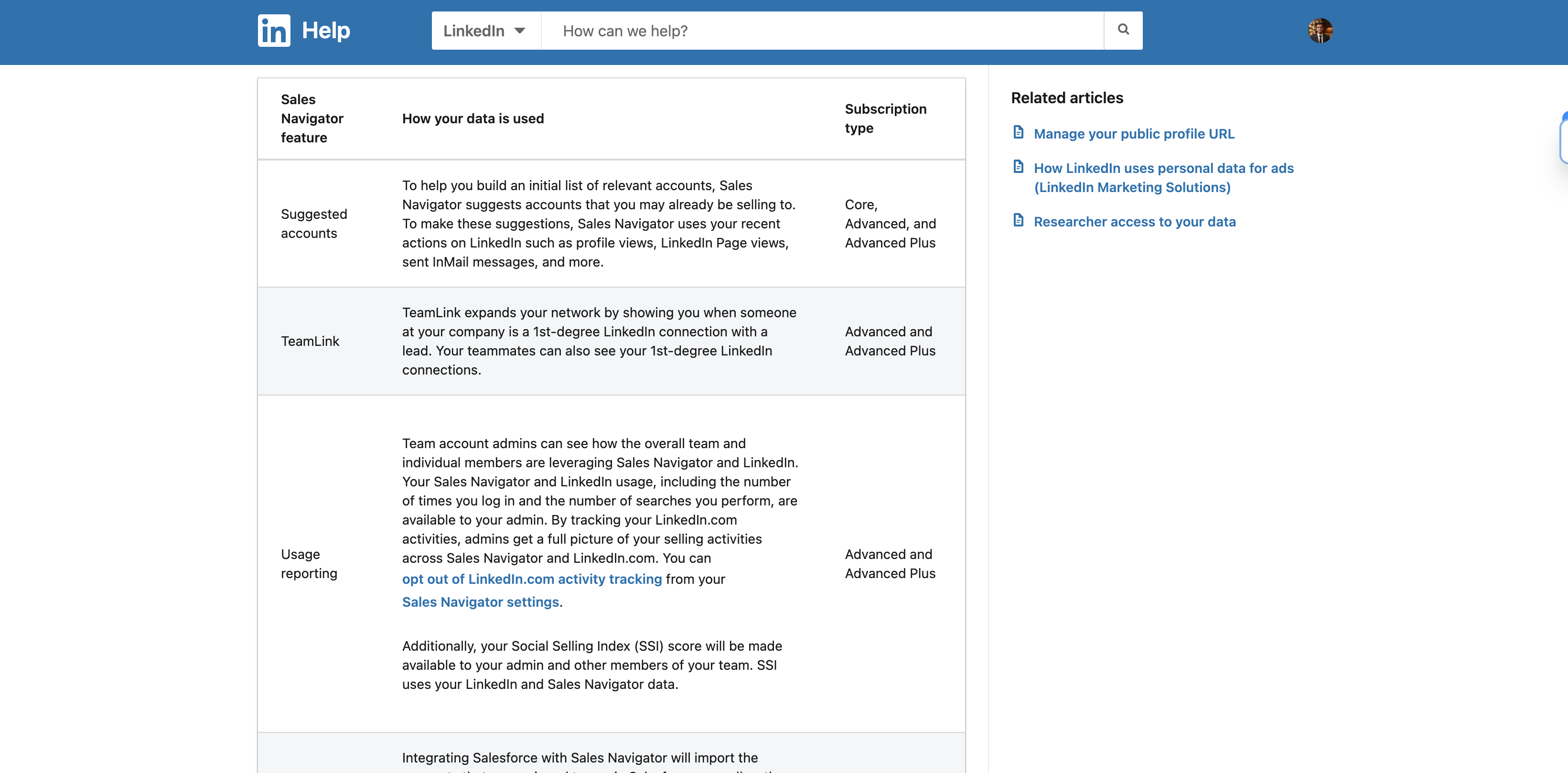
If your employer provides Sales Navigator, check your team arrangement before assuming only you can see the number.
Ask how your manager uses SSI in reviews and which sales results are assessed separately.
SSI and ROI Reporting answer different questions
ROI means return on investment: what a business gets for its spending. Sales Navigator's separate ROI Reporting feature requires Advanced Plus admin access and CRM Sync. CRM Sync connects CRM records with Sales Navigator.
An eligible admin requests the report through a LinkedIn representative.
The setup also requires access to CRM opportunity records, which hold information about possible deals. Core and Advanced do not include this feature.
Use SSI to discuss platform activity. Use your sales records, and eligible reporting where available, to examine closed business.
What happens after you change your habits?
LinkedIn's learning centre refers to daily SSI updates. That describes an update schedule, not a promise that today's action earns points tomorrow.
Set a review date that fits your selling process. Record the same components and sales measures each time.
Keep older groups open long enough to record later replies and meetings.
The current SSI resource page uses the phrase “Less scoring, more selling.” Its guidance warns that a high score does not always reflect sales effectiveness.
Continue a habit because it serves your buyers or improves your work, rather than because a score moved.
Common SSI problems and fixes
An SSI problem can concern access, interpretation or the results of your outreach. Separate those before changing your routine.
Problem | What you can establish | Next action |
|---|---|---|
No score appears | Your account has no visible score in that session | Confirm the signed-in account and read any access notice |
SSI rises but useful replies do not | Activity and sales responses are moving differently | Review buyer fit and message relevance |
A score falls despite more activity | Activity volume alone does not explain the calculation | Compare components and response rates before increasing volume |
Members in a public discussion about changing SSI access reported different experiences. One commenter could still open the score while others discussed losing access.
Those reports explain the confusion, but do not establish eligibility for your account.
If you can still see your SSI, record the component that changed. Avoid treating a lower total as proof that your outreach has become less effective.
FAQs
How often does the social selling index update?
LinkedIn's learning centre describes daily SSI updates. A daily update does not identify which action changed the score or guarantee that each useful action increases it.
Has LinkedIn discontinued the social selling index?
LinkedIn still links to an SSI dashboard from its public resource page. However, universal access is not confirmed, and its current guidance places less emphasis on the score.
Read the notice displayed for your account.
Is there a social selling index calculator?
The official SSI is calculated by LinkedIn. A separate calculator cannot reproduce the score from public information because exact action weights are not published. Use the official dashboard when your account has access.
Can I check SSI in the LinkedIn app?
Use the official SSI web address in a browser while signed in. No current app menu route is confirmed here. A browser access notice still applies to that account.
Does a high SSI improve post reach or help me get hired?
Do not treat SSI as a promise of either result. It describes selling activity, and the cited documentation establishes no direct effect on hiring decisions or feed reach.
Assess those goals through relevant profile and content results.
Choose your next action
If you can view SSI, choose a weak component that matches a useful habit. Record the change alongside replies and sales conversations. If you cannot view SSI, continue recording those outcomes.
You can decide whether your outreach is working without a composite score.
Guidance and sources reviewed 2 November 2026.
About the author
Michael Doyle is the pen name Leaderr's B2B sales guides are published under. Each guide is built from official platform documentation, published research and worked examples, with every source dated.