Google contacts alternative: Which type you actually need
Outgrown Google Contacts? See its real limits, what contact management software costs a team of three, and which fix fits your problem. Checked October 2026.
 Michael Doyle15 min read
According to Google Contacts Help, Google Contacts has a limit of 25,000 contacts or 20 MB of data, whichever you reach first. Below that limit, if you work alone, stay. If you have a team, you need to see which person is in charge of each contact and how far along each sale is. In that case, move to a CRM. A CRM is software that stores your contacts and tracks your sales.
People look for a Google Contacts alternative when one of five things goes wrong.
Duplicates pile up
A team cannot share one list
There is nowhere for notes and follow-ups
Contacts may also sit in several accounts
The list may hit a limit.
Storing contacts and finding new ones are two different jobs.
If you have no contacts yet, start with sales prospecting tools, which find new contacts.
What you need before you choose
Gather three facts first.
How many contacts you have today, and whether many of them carry long notes.
Whether you need to see a deal stage, or only need to find people fast.
Which apps you already pay for that may do this job.
Who this fits, and who it doesn't
Solo founders and freelancers who need one list, not a sales pipeline.
Teams of two to ten people whose contacts sit in a phone, an inbox, and a spreadsheet.
Not a fit: teams that already run a full sales platform, because contact storage comes with it.
Not covered here: privacy focused and open source address book apps, and phone apps that name callers or block spam.
Which fix matches your problem
Find your situation in the first column.
Your situation | The usual fix | Why |
|---|---|---|
You work alone with fewer than 2,500 contacts | Stay on Google Contacts | Google's limit is 25,000 contacts, so you are far from it |
A team of 2 to 5 shares a Google Workspace account | Ask your admin about the shared directory, then price a CRM | The directory lists shared contacts in Gmail but does not track sales |
You have over 25,000 contacts, or long notes on many | Move to a CRM plan with a higher limit | Google stops at 25,000 contacts or 20 MB |
Your contacts sit in Google, iCloud and other accounts | Use a sync app, not a CRM | Google's duplicate tool works only inside one Google Account |
You need follow up reminders and deal stages | Move to a CRM | An address book stores details but does not track a sale |
Which type of contact management software you actually need
Lists of contact software mix two different products under one label. Picking the wrong one wastes a signup and a file export.
Two products share one name
An address book stores a name, phone number, email, company, and notes. Google Contacts and iCloud contacts are address books. Neither one is built to track a sale.
A sales contact manager, also called a CRM, keeps the same details and adds a pipeline. A pipeline is a board that shows every deal and its stage, for example, new, talking, or won.
HubSpot CRM, Zoho CRM, Copper, Bigin, Freshsales, and Less Annoying CRM work this way. For more on this group, read what a CRM does in sales.
One question sorts the two groups. Do you need to know which stage a person is at in a sale?
If yes, pick a CRM. If not, an address book costs less and takes far less setup.
Address book or sales CRM: how the two compare
This table lines up the differences that decide which one fits.
What matters | Address book | CRM |
|---|---|---|
Tracks deals and pipeline | No | Yes |
Setup | Quick, because it syncs with your phone and email | Longer, because you map fields and import a file |
Free limit | 25,000 contacts or 20 MB on Google Contacts | 500 to 5,000 records on the free plans listed below, and none stated for Freshsales |
Best for | Personal or small team lists of people | Any team that quotes, closes or follows up on sales |
Once a team must answer where a deal stands, an address book stops being enough.
How close are you to the Google Contacts limit?
Google sets more than one limit. The one you hit first depends on how long your notes are.
The numbers Google sets
Google Contacts Help puts the main limit in one line: "You can save up to 25,000 contacts or 20 MB with photos not included." It lists four smaller limits on the same page, shown in the table.
Limit | Number | In plain words |
|---|---|---|
Contacts in one account | 25,000 | The most contacts you can save |
Total size | 20 MB, photos not counted | The most data your contacts can use. A megabyte (MB) is a unit of stored data |
Size of one contact | 128 KB | A kilobyte (KB) is a smaller unit. One MB is about 1,000 KB |
Fields in one contact | 500 | A field is one slot, like a phone number or an email address |
Characters in one field | 1,024, except Notes | A character is one letter, number or symbol |
Google shows all five numbers together on one page.
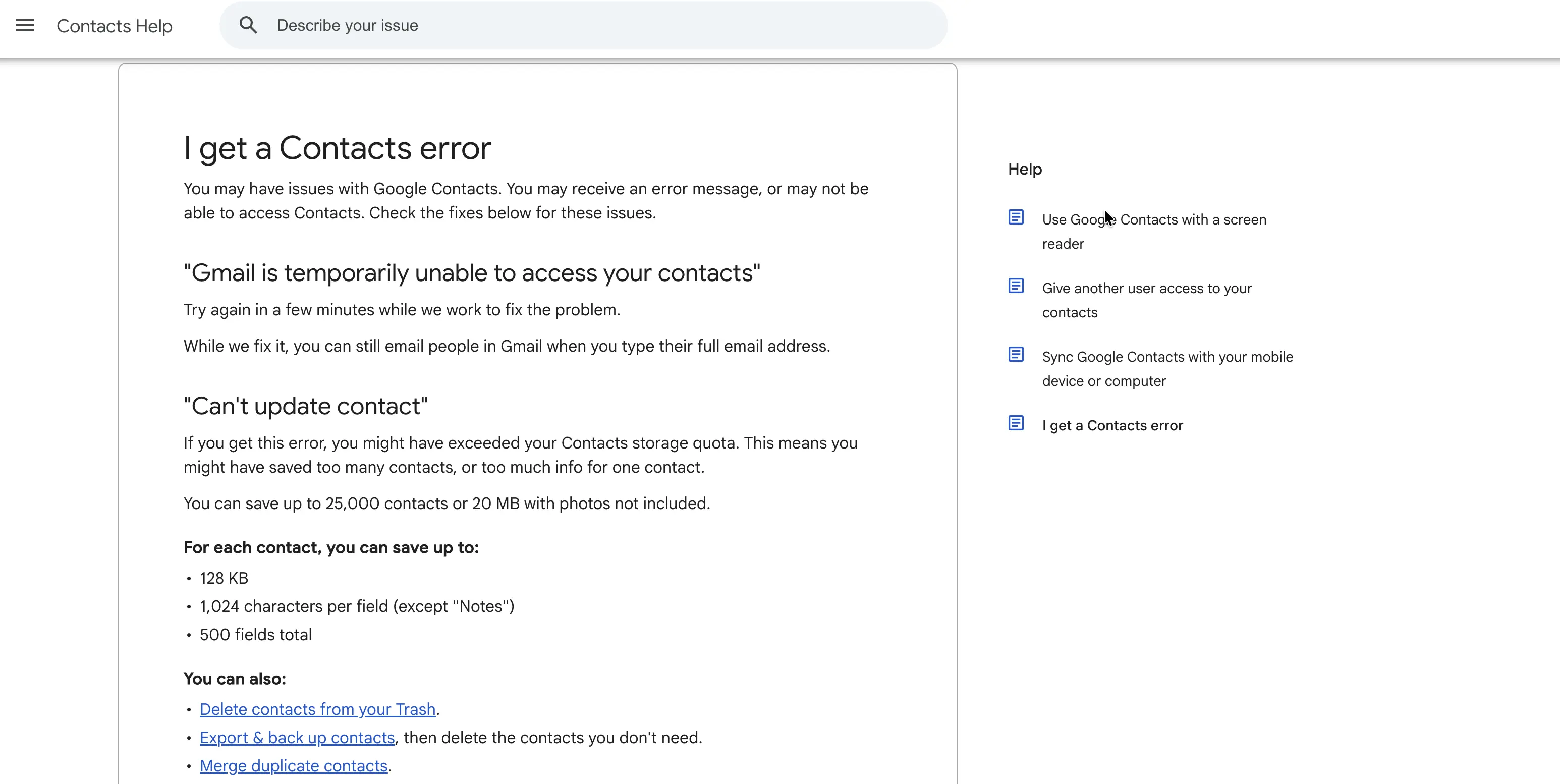
Of these five numbers, total size is the one to watch if your contacts carry notes.
Why the 20 MB limit can come first
Example: you have 8,000 contacts, and each has about 3,000 letters of notes. A byte is a tiny unit of storage, and each letter takes about 1 byte.
So 8,000 times 3,000 is 24,000,000 bytes, which is about 24 MB. That is over the 20 MB limit, with only 8,000 contacts.
Now turn it around. 20 MB is about 20,000,000 bytes. Divide that by 25,000 contacts, and you get 800 bytes for each contact.
If Google counts a megabyte as 1,048,576 bytes, you get about 839. Either way, a list reaches 25,000 contacts only if the average contact is small.
Google does not say how it counts the 20 MB. Treat these sums as a rough guide, not a rule.
Can a Google Workspace admin share contacts with the whole company?
Yes, within limits. Google Workspace is the paid business version of Gmail, Calendar, and Drive. An admin is the person who manages the company's Google account.
What the shared directory holds
An admin can add shared external contacts to the company directory. External means people outside the company, like clients and suppliers.
The limit is 200,000 contacts or 40 MB, whichever comes first, says Google Workspace. Google updated that page on 1 October 2026.
Staff see these contacts when they type an address in Gmail. The contacts do not show in Cloud Search, which is Google's search across company files.
Google's admin page states the limit in plain text.
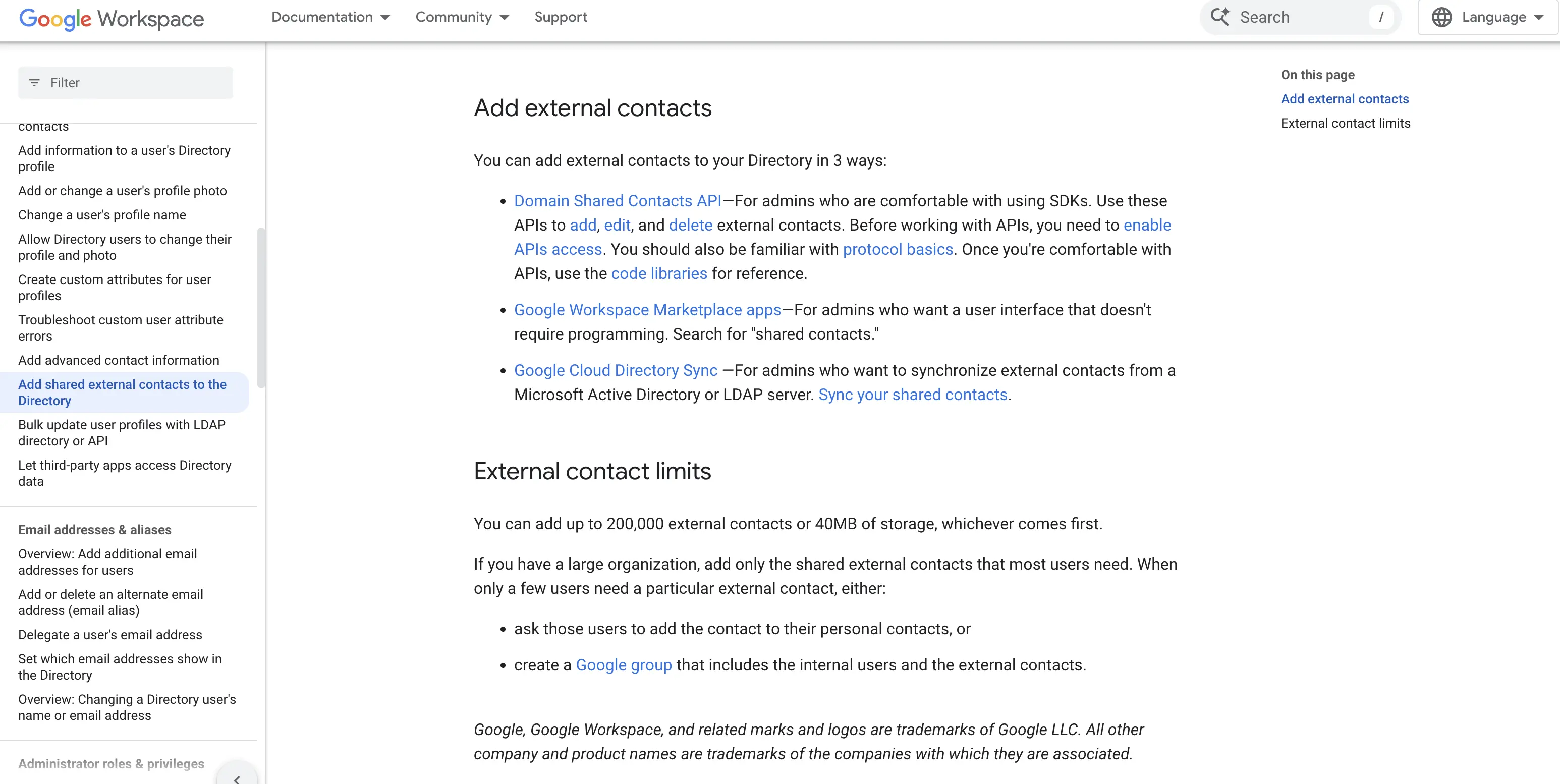
A shared directory helps everyone find a contact. It does not record who spoke to them or what comes next.
Three ways an admin adds shared contacts
Google lists three ways to add shared contacts, and the table shows who each one suits.
Method | Who it suits | What it is |
|---|---|---|
Domain Shared Contacts API | An admin who is comfortable with code | A way for a program to add, edit and delete contacts. API means a way for programs to talk to each other |
Google Workspace Marketplace apps | An admin who wants screens to click through | Apps you find by searching for "shared contacts" |
Google Cloud Directory Sync | A company that keeps its staff list in Microsoft Active Directory or LDAP | A Google program that copies contacts from that staff list into Google |
Free limits side by side
Free plans stop at different points. A record is one stored item. Some tools count companies and deals as records, so a limit of 5,000 records holds fewer people than a limit of 5,000 contacts.
The limits in one table
Tool | Plan | Limit |
|---|---|---|
Google Contacts | Free | 25,000 contacts or 20 MB |
iCloud contacts | iCloud | 50,000 contact cards and 48 MB of card text |
Contacts+ | Free | 1,000 contacts |
Contacts+ | Premium | 25,000 contacts |
Contacts+ | Teams | Unlimited contacts |
HubSpot | Free, up to 2 users | 1,000 contacts |
Zoho CRM | Free, up to 3 users | 5,000 records across all parts of the CRM |
Freshsales | Free, up to 3 users | No limit stated |
Bigin | Free, 1 user | 500 records |
Bigin | Express | 50,000 records |
Copper | Basic | 2,500 contacts |
Copper | Professional | 15,000 contacts |
Less Annoying CRM | One plan | No strict limit, with advice to stay below 50,000 |
Where each number comes from
Apple lists iCloud's limits on a page published on 25 September 2025 by Apple Support.
Zoho says its free CRM stores up to 5,000 records in all parts of the CRM, so a pipeline full of deals uses that number faster than a plain contact list.
The free Freshsales plan is for up to three users, says Freshworks, and the page states no contact limit.
Ask Freshworks for the limit in writing before you plan around it.
What it costs for a team of three
Example: three people share 2,500 contacts and track sales. A user is one person with a login. Prices were checked on 5 October 2026.
The prices in one table
Tool and plan | One user | Three users | Limit to know |
|---|---|---|---|
Google Contacts | $0 | $0 | 25,000 contacts or 20 MB |
HubSpot Starter | $7 a month if you pay for the whole year, or $20 month by month | $21 or $60 a month | HubSpot Free stops at 1,000 contacts |
Bigin Express | $7 a month if you pay for the whole year, or $9 month by month | $21 or $27 a month | 50,000 records |
Copper Basic | $23 a month if you pay for the whole year, or $29 month by month | $69 or $87 a month | 2,500 contacts |
Copper Professional | $59 a month if you pay for the whole year, or $69 month by month | $177 or $207 a month | 15,000 contacts |
Less Annoying CRM | $15 a month | $45 a month | No strict limit |
Contacts+ Teams | $17.99 a month, or $155.88 for the year | $53.97 a month, or $467.64 for the year | Unlimited contacts, up to 50 members |
How the numbers add up
HubSpot says its free plan covers up to 2 users and 1,000 contacts, so a team of three with 2,500 contacts needs the next plan. Three users at $7 is $21. Three users at $20 is $60.
The gap is $39 a month for the team, or $13 for each user. Another HubSpot page says Starter starts at $15 for new customers.
Starter's own contact limit is not confirmed here, so check it before you buy.
Copper Basic holds 2,500 contacts, exactly the size of this example, so any growth moves the team to Professional, says Copper.
Bigin also has two higher plans, which hold 100,000 records and 1 million records.
Less Annoying CRM says there is no strict limit and gives a rule of thumb: stay below 50,000 contacts and companies in total.
A list that costs $0 on Google Contacts costs $21 to $69 a month for three users once it needs a CRM.
What happens to your contacts when you move
Export your contacts from Google
Open contacts.google.com.
Click the box next to each contact you want. To pick all of them, open Selection Actions, then choose All.
Click More actions, the three dots at the top right, then click Export.
Choose Google CSV. A CSV is a plain table file that opens in a spreadsheet.
Click Export to save the file.
Done when: the file is in your downloads folder and opens in a spreadsheet. These steps come from Google Contacts Help.
If your contacts sit in more than one account
Google's Merge & fix tool finds and merges duplicate contacts.
It cannot merge contacts saved in different Google Accounts, says Google Contacts Help. A copy in each account stays a copy.
A sync app is software that keeps the same contacts up to date across several accounts. Contacts+ syncs 1 account on its Free plan and 5 accounts on Premium.
Premium holds 25,000 contacts, the same as Google. It costs $13.99 a month, or $119.88 for the year. Divide $119.88 by 12 months, and you get $9.99 a month.
What to check after you import
Import five contacts first, then look for these four things.
Labels: confirm each label became a tag, a group or a list.
Notes: confirm the full note text is still attached to the contact.
Phone numbers and emails: confirm none were dropped or joined together.
Duplicates: confirm no contact now appears twice.
Test how a tool handles duplicates before you trust a claim
Most contact tools say they merge duplicates. Few say how, so a small test is worth running. Keeping a list clean is a routine, not a one time job, as what data hygiene means explains.
Why exact matching misses near copies
Example: row one reads Jon O'Neil, JON@example.com. Row two reads Jon ONeil, jon@example.com. A tool that compares the text exactly sees two people. A tool that compares the email in lower case sees one.
The matching method decides whether you end up with one contact or two.
A five minute test to run before any demo
Take 20 real contacts from your list.
Copy 8 of them into new rows.
Change each copy a little: a capital letter, an extra space, a nickname or a missing apostrophe.
Import the file into the tool.
Count the contacts left.
Twenty contacts plus 8 copies is 28 rows. A tool that merges every copy leaves 20. Each copy it misses leaves one more. If it merges 5 copies, you see 28 minus 5, which is 23.
Done when: you have a number between 20 and 28. The closer it is to 20, the better the tool matches near copies.
What goes wrong after you import your list
Google lists a limit error on its import help page. The table covers that error and the problems people report most after a move.
Common problems and fixes
What you see | Likely cause | Fix |
|---|---|---|
"You reach the limit of 25,000 contacts." | The account already holds 25,000 contacts | Remove or move some contacts, or move the list to a tool with a higher limit |
The same contact appears two or three times after a sync | Two systems copy changes both ways, and one creates a new record instead of matching the old one | Turn off copying in one direction. Match on email before you turn it back on |
Duplicates stay after Merge & fix | The copies sit in different Google Accounts | Use a sync app that merges accounts, or export both accounts and combine the files |
A deleted contact comes back | The tool syncs again from an inbox or phone that still holds the old entry | Delete the contact at its original source |
A real report of extra copies
A HubSpot Community post from 13 May 2026 reports 923 contacts synced from HubSpot to Salesforce. Salesforce made three extra copies of each contact, and only for the contacts of two sales reps.
The thread has 8 posts and no answer marked as the fix. You can read it on HubSpot Community.
FAQs
Is Google Contacts enough, or do I need a CRM?
Google Contacts is enough if you work alone, hold fewer than 25,000 contacts and need no deal stages. Move to a CRM when a team must share one list with notes and follow ups, or when you need to see where each sale stands.
Is there a free alternative to Google Contacts?
Yes, four CRMs have a free plan. HubSpot covers 2 users and 1,000 contacts. Zoho CRM covers 3 users and 5,000 records. Freshsales covers 3 users and states no limit. Bigin covers 1 user and 500 records.
How many contacts can Google Contacts hold?
Google Contacts holds 25,000 contacts or 20 MB, whichever comes first. One contact can take up to 128 KB. A list with long notes can reach 20 MB before it reaches 25,000 contacts.
Can a Google Workspace admin share contacts with the whole company?
Yes. An admin can add up to 200,000 shared external contacts, or 40 MB, to the company directory. Staff see them when they type an address in Gmail.
Which CRMs work inside Gmail?
Copper and Streak both work inside Gmail. Copper says you can add leads and track conversations in Gmail and Google Calendar. Streak says it is built directly into Gmail.
Start with the limit you are closest to
Count your contacts and check how long your notes are. Compare both with the limits above. Then decide whether anyone needs to see a deal stage.
If both answers are no, stay on Google Contacts. If a deal stage matters, price a CRM for your number of users. If your contacts sit in several accounts, fix that first with a sync app.
Guidance Reviewed 5 October 2026.
About the author
Michael Doyle writes about B2B sales at Leaderr. He covers prospecting, cold outreach, sales data, and pipeline building, with a focus on what actually works for SDRs, founders selling on their own, and small sales teams. Connect with him on LinkedIn.