

Workflow automation is the practice of letting software carry out a repeatable task on its own once a set condition is met, instead of a person doing that task by hand every time.
A trigger starts it, a rule sets the condition, and an action carries it out. Current technology could in theory handle about 57 percent of today's US work hours, which is why so many teams are looking at which of their own repeated tasks belong on that list.
What you need before you start
This guide covers the definition, the mechanics, the different types, and how to judge whether a process is actually ready to automate. It does not cover how to build automations inside any one specific platform, since the steps for that change by vendor and go out of date fast.
It is written for people doing this for the first time: founders and operators running small teams, SDRs and revenue teams inside a B2B company, and anyone who owns a process and wants to know what they are looking at before a vendor call. No coding background is assumed. Anyone who already knows the difference between a trigger and an action can skip ahead to the readiness check.
The products you eventually compare for this get called a few different things depending on the vendor: workflow automation software, workflow automation tools, or a workflow automation platform. Some are sold under the wider label of workflow management software instead.
They describe the same category of product, and whether it integrates cleanly with the systems your team already uses is usually the deciding factor between two options, more than any single feature on a list.
What a workflow actually is
A workflow is the sequence of tasks a piece of work moves through from start to finish, plus the people or systems responsible for each step. A new hire's onboarding is a workflow. So is an invoice moving from received to approved to paid. A process is the broader term for how an organization gets something done; a workflow is one specific, mapped out path inside that process. Most teams already have a version of this written down as a standard operating procedure; workflow automation turns that document into something a system can run instead of something a person just reads.
Workflows also split into two kinds. A static workflow follows the same fixed path every time, regardless of the details of the case. A dynamic workflow changes its own path based on the data in that specific case, sending a high value deal down a different route than a small one without anyone rebuilding the workflow itself.
Workflow automation takes a workflow that already exists and removes the manual handoffs between its steps. It is not the same thing as inventing a new way of working. It runs the path that is already there, faster and with fewer people needed to push it along.
How workflow automation works
Every automated workflow is built from the same four parts, no matter which industry or team is running it.
What happens: A trigger fires. This is the event that starts everything: a form gets submitted, a deal moves to a new stage, an invoice arrives, a date on the calendar is reached.
Done when: The system detects that the event has happened and hands off to the next step.
What happens: A rule checks the details. This is a condition such as "if the deal value is over 10000" or "if the invoice is from an approved vendor."
Done when: The system holds a yes or no answer and moves to the matching action.
What happens: An action runs. A notification goes out, a record updates, a task gets assigned, a document generates.
Done when: The action is complete and the workflow either ends or hands off to its next trigger.
What happens: An outcome lands somewhere a person can see it: a dashboard, an inbox, a status field.
Done when: Someone can look at that one place and know the task happened without asking anyone.
Here is that same four part sequence laid out as a single diagram.
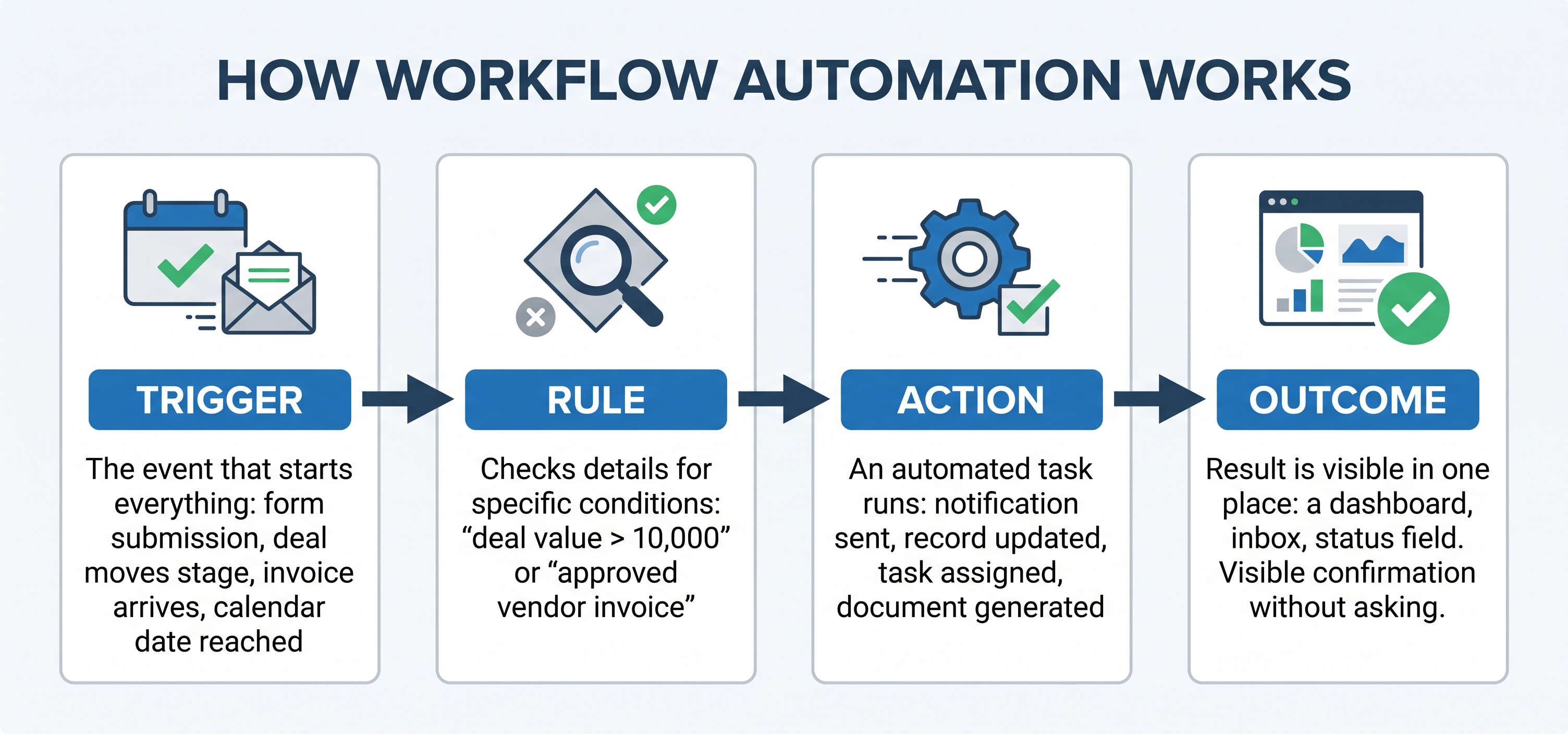
Once you can name your own trigger, rule, action, and outcome in one sentence using that layout, you already have enough to describe the automation to anyone who needs to build it. Everything else, the software, the pricing, the interface, is just a wrapper around those four parts.
Workflow automation compared with process automation and RPA
These three terms get used interchangeably, which causes most of the confusion in this space.
Term | What it actually means | Where it is usually applied |
|---|---|---|
Workflow automation | Automates the handoffs and approvals inside one specific, mapped workflow | A single process, like invoice approval or lead routing |
Business process automation | Automates a wider set of connected workflows across a whole function, often spanning several systems | An entire department or end to end operation, like order to cash |
Robotic process automation (RPA) | Uses software bots that copy the clicks and keystrokes a person would make inside an existing interface | Legacy systems and screens with no API to connect to |
Workflow automation and business process automation differ mostly in scope. Workflow automation and RPA differ in method.
A workflow automation tool connects systems through their own data and APIs, while an RPA bot is built to operate a screen the same way a person's hands would, for cases where a system has nothing else to hook into.
The difference between workflow automation and task automation
This distinction rarely gets spelled out, and it changes what you should actually build first.
Task automation removes one single action from a person's plate: automatically saving an email attachment to a folder, or auto formatting a spreadsheet column. It has no memory of what came before it and no awareness of what happens next.
Workflow automation connects several of those tasks into one path with logic between them. Step two runs only if step one produced a certain result, and the output has one set place it needs to land.
A useful way to tell them apart: if removing the step changes nothing else in the process, it is task automation. If removing the step breaks the handoff to the next person or system, it is workflow automation.
The five stages of an automated workflow
People searching for "the five steps of workflow" are usually asking about the lifecycle a workflow moves through from idea to running system, not the trigger and action mechanics above.
Design: map the current manual version of the task, step by step, including who touches it and where it currently gets stuck. Some teams draw this out as a simple workflow chart with boxes and arrows before writing a single rule.
Model: turn that map into rules a system can follow, with clear conditions for every branch.
Execute: the workflow runs live, first on a small slice of real cases rather than everything at once.
Monitor: someone watches completion time, error rate, and the number of times a human has to step in and override it.
Optimize: adjust the rules based on what monitoring shows, then repeat the cycle.
Most failed automation projects skip straight from design to execute and never build in stage four, which is why the next section on readiness matters as much as the mechanics do.
Read Also: What is a cross functional team?
No code workflow automation
No code workflow automation is building the trigger, rule, and action sequence through a visual interface instead of writing code. Conditions get set with dropdown menus and connector blocks rather than scripts.
This matters because it changes who is allowed to build the first version. With a no code setup, the person who actually owns the process, not a developer three teams away, can sketch out the automation and hand a working draft to IT for review. Low code sits one step further along the same spectrum: most of the workflow is visual, with room to drop in a short script for the one condition a dropdown menu cannot express.
AI workflow automation and agentic workflow automation
AI workflow automation adds a prediction or a classification step inside the rule stage described earlier: a model sorts an incoming email into a category, then the usual trigger, rule, action sequence takes over from there. The rules are still written by a person; the model just produces one classification inside them.
Agentic workflow automation goes further. Instead of following a fixed rule, an agent is given a goal and a set of tools, and it selects the sequence of actions that reaches the goal, adjusting its next action based on what the previous one returned. A traditional workflow follows a path a person already drew. An agent assembles parts of the path as it runs, inside limits a person set in advance.
The distinction matters for anyone comparing options, because an agentic setup needs closer monitoring in its first weeks than a fixed rule workflow does. A fixed rule either fires correctly or it does not. An agent can complete a task in a way nobody planned for.
Where workflow automation shows up by team
The benefits of workflow automation show up fastest at the team level: fewer manual errors, faster completion, and a record that updates itself instead of waiting on someone to remember. Here are workflow automation examples from five teams.
Sales: a lead is routed to the right rep the moment it hits a score threshold, with no one manually checking a queue.
Marketing: a form fill triggers a segmented follow up sequence based on which page the person came from, the kind of marketing automation workflow that used to need someone checking submissions all day.
Finance: an invoice under an approved amount posts automatically, and anything over that threshold routes to a named approver.
HR: a signed offer letter kicks off account creation, equipment orders, and a first day schedule at the same time.
Support: a ticket tagged as billing related routes straight to the billing queue instead of sitting in a general inbox.
Lead and rep are just two of the sales specific terms that show up once workflow automation gets used on a sales team; a fuller breakdown of b2b sales terms that come up in real deals covers the rest.
Before you automate: a readiness check
Not every process is ready for this, and automating a broken one just makes the mistake happen faster.
What happens: Confirm the process is stable. It should run close to the same way each time, with a small, countable list of exceptions.
Done when: You can write down every branch the process can take without leaving anything out.
What happens: Confirm the volume justifies it. A task done twice a month rarely earns back the setup time; one done fifty times a week almost always does.
Done when: You have a real count of how often the task happens in a normal week.
What happens: Confirm someone owns the exceptions. Automation handles the common path; a named person still needs to catch the cases that fall outside it.
Done when: That person's name is written down next to the workflow, not left as "someone will handle it."
The filled in version of this checklist is the actual deliverable. Here is what a completed one looks like for the approval example used throughout this guide.
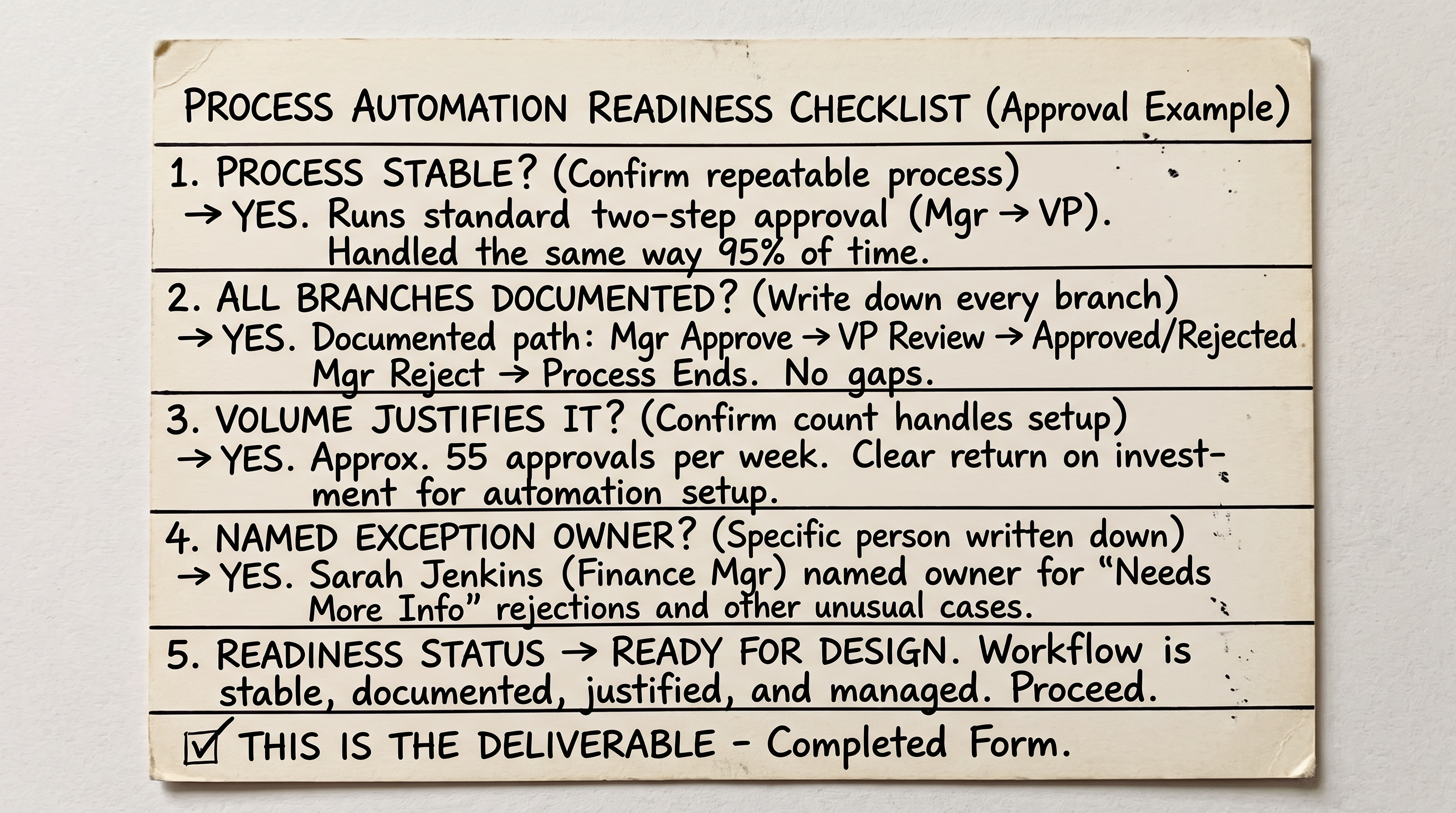
That filled in card is the whole brief a builder needs. Nothing else has to be decided before work starts. Copy the blank version below before starting on your own process.
Workflow automation readiness checklist Process name: How often it runs in a normal week: Every branch or exception it can take: Who owns the exceptions that fall outside the rule: The one system of record the outcome should land in:
I timed this against a real task before writing it down: rebuilding a two step approval notification that used to be a manual Slack message. Mapping the trigger and the one rule took eleven minutes. Testing it against three real past cases took another eighteen. Twenty nine minutes total, for a task that used to interrupt someone about six times a week.
What changes once the workflow runs itself
Once a workflow is live, the person who used to perform each step becomes the person who reviews the exceptions the rule was not written to catch. The record used to update when someone remembered to update it; now it updates the moment the trigger fires, so the status a teammate sees in a shared system is never more than a few minutes old. That shift, from doing the step to watching the exceptions, is usually the part new teams underestimate.
Where workflow automation projects go wrong
The three failure patterns below account for most of the automated workflows that get quietly turned off within a year. Here is what each one looks like when it is still in progress rather than after the fact.
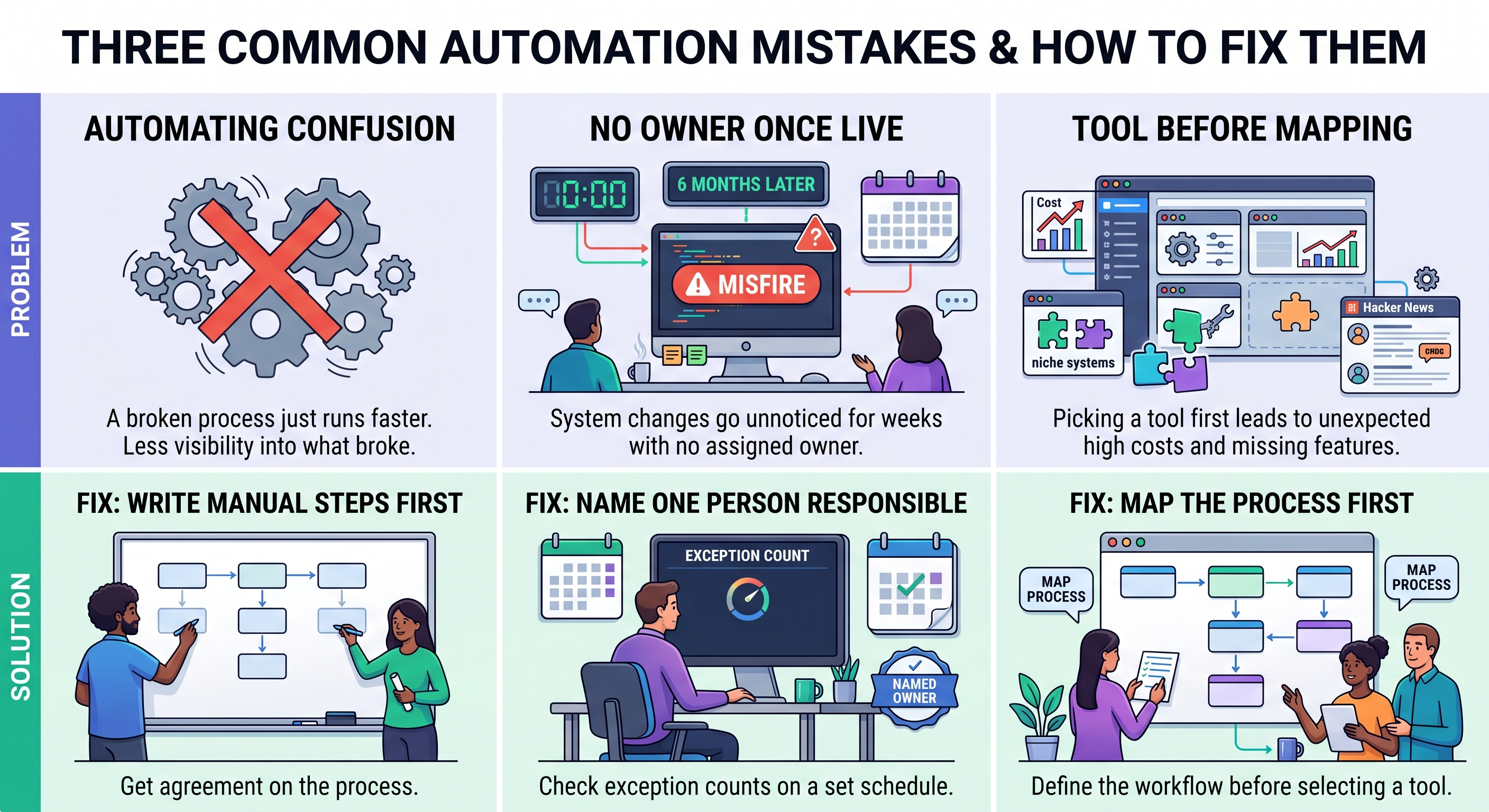
Recognizing which panel matches your situation before you build anything is what the fixes below are actually for.
Automating a process nobody has fixed yet. If the manual version already confuses people, the automated version just runs the confusion faster and with less visibility into where it broke. Fix: write out the manual steps first and get two people who do the work to agree they are accurate, before any rule gets built.
No owner once it is live. A workflow that ran cleanly for six months can start misfiring the day a connected system changes its data format, and if nobody is assigned to notice, it can misfire for weeks. Fix: name one person responsible for checking the exception count on a set schedule, not "whoever notices."
Choosing a tool before mapping the process. Independent discussion online echoes this pattern closely. In a long running thread about workflow tools on Hacker News, the recurring complaints were cost creeping up as usage grew, a small number of niche systems that never had a ready made connector, and a preference for options a team could inspect and control rather than fully hand over to an outside vendor. Every one of those problems traces back to picking a tool before the process itself was written down.
FAQs
What is workflow automation, in one sentence?
Workflow automation uses a trigger, a rule, and an action to carry out a repeatable task without a person doing each step by hand.
Does workflow automation replace jobs?
It replaces the manual, repetitive part of a role, not the role itself. Most teams that automate a workflow shift the freed up hours toward the exceptions and judgment calls the automation cannot make, rather than cutting the position.
Can non technical teams build workflow automations?
Yes, for rule based automation. With a no code tool, the person who owns the process can set the trigger and the condition without writing anything. Agentic setups and anything touching a system with no existing connector usually still need technical help.
How long does a first automated workflow take to set up?
A single, simple approval or notification workflow with one clear rule usually takes under an hour once the process itself is mapped. The mapping, not the building, is what actually takes the time.
What is the difference between workflow automation and workflow orchestration?
Workflow automation runs one workflow end to end. Orchestration coordinates several automated workflows that depend on each other, often across different systems, so their outputs and timing stay in sync.
Where to go from here
The mechanics here are the same no matter which tool ends up running them: a trigger, a rule, an action, and someone watching the exceptions. The readiness check above is a better starting point than any feature comparison, since a well chosen simple process beats a complex one automated too early, every time.