Contact management software: which type you actually need
Michael Doyle compared 6 contact management software tools on free contact caps, real monthly cost, and a duplicate detection test to find which type fits.
 Michael Doyle13 min read
Contact management software splits into two different products. A shared address book, like Google Contacts or Folk, stores names and numbers for a team to search and edit together.
A sales contact manager, like HubSpot's free CRM, does that plus tracks deals, and its free plan still caps out at 1,000 contacts.
Pick based on whether you track a pipeline.
Storing contacts and finding them are two separate purchases, so if the problem is that you have nobody to store yet, start with the sales prospecting tools that find contacts in the first place.
What you need before you choose
Gather three things first. How many contacts you actually have today, whether you need to track a deal stage or just find people fast, and which apps you already pay for that might already do this job.
Who this fits, and who it doesn't
Solo founders and freelancers who need one shared list, not a sales pipeline.
Small teams of two to ten people juggling contacts across a phone, an inbox, and a spreadsheet.
Sales teams that need to see where a contact sits in a deal, not just their phone number.
Anyone in real estate, legal, or nonprofit work whose contact list doubles as a client or donor record. Specialist tools exist for each of those, worth a search once you know which group below fits.
Not a fit for a team already running a full sales platform. Contact storage there is a feature already owned, not a separate purchase.
Which type of contact management software you actually need
Every list of contact list software mixes two different products under one label. One label, two products. Picking the wrong one wastes a signup and a CSV export.
Two products share one name
A shared address book stores contact details: name, phone, email, company, notes. Google Contacts, Folk, Dex, Covve, and Monica all work this way. None of them track a sales stage. There is no deal amount field anywhere in the product.
The second group stores the same details, then adds a pipeline on top. Nothing else changes about the contact record itself.
Five tools work this way: HubSpot CRM, Zoho CRM, Pipedrive, Copper, and Streak. A contact becomes a lead, then an opportunity, then a closed deal, and the software tracks that movement the whole way.
One question sorts the two groups quickly. Do you need to know which stage a person sits at in a sale? If yes, pick from the second group.
If you just need their number and your last few messages, the first group does that job for less money and far less setup.
Check what you already have first
Check what already covers this job first. Gmail, Outlook, and a phone all ship with a contact list at no extra cost.
Google's own support page states the account wide limit plainly. No guessing needed.
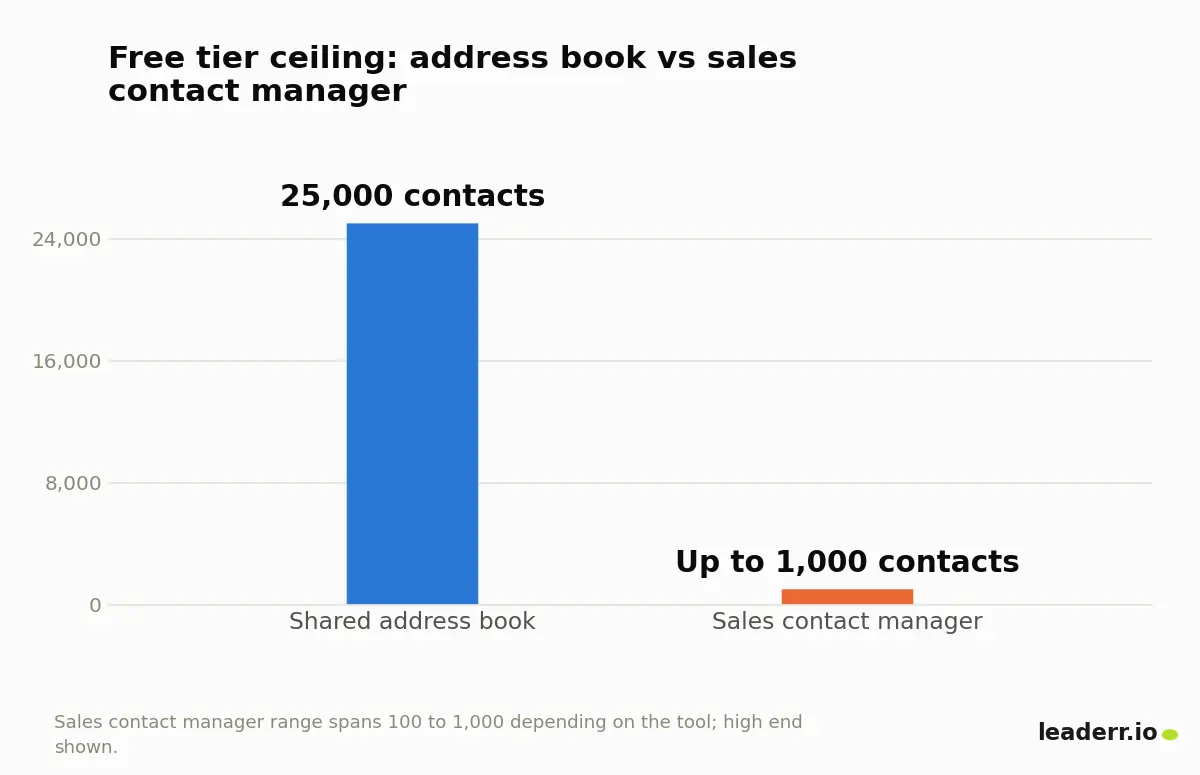
Twenty five thousand contacts, free. No paid tool needed to get there. A solo founder or a five person team rarely gets near that number.
When a list only needs to be searched and called, not scored or staged, that ceiling alone can end the search right here.
Some vendors label the same product contact list software and some call it a contact manager, but the split that matters is whether it tracks deals or only stores names.
What a shared address book covers, and where it stops
One list, always current. A shared address book keeps it that way across a team. Someone updates a phone number once, and everyone sees the change.
Most sync with a phone's native contacts app, so a saved number shows up there within minutes.
None of them track revenue. There is no stage field, no deal amount, no forecast. Add a sales process later, and the list gets exported into something else entirely.
Who a shared address book fits
A small team that shares vendor and client contacts but does not sell to them.
A single founder replacing a shared spreadsheet with something searchable from a phone.
A recruiter or consultant tracking relationships rather than a sales pipeline.
Anyone who wants existing Google or Outlook contacts to sync automatically, instead of retyping names into a second system.
What a sales contact manager adds
A sales contact manager keeps the same contact record, then attaches a pipeline to it.
Six tools do this: HubSpot CRM, Zoho CRM, Pipedrive, Copper, Streak, and Freshsales.
Each ties a contact to a deal, a task, or an email thread.
Once a shared list grows past a few hundred names across a sales team, the record itself often needs more structure than a personal address book provides.
Scale changes the requirement. What it needs looks closer to a full company wide contact record than a personal list ever gets.
Airtable sits between the two groups. It is a flexible database a team configures into either shape, plain contact list or lightweight pipeline, depending on how the columns get built.
Who a sales contact manager fits
A sales team that needs a contact's deal stage visible without opening a second tool.
A founder selling directly who wants follow up reminders tied to each conversation.
A team living in Gmail daily that wants pipeline tracking built into the inbox. Streak and Copper both build their product inside Gmail rather than syncing to it.
A team already committed to one vendor's tools, such as Google Workspace, where the contact manager needs to sit inside tools already paid for.
Address book or sales CRM: how the two actually compare
Two products, different jobs. The table below lines up the differences that actually decide which one fits.
What matters | Shared address book | Sales contact manager |
|---|---|---|
Deal or pipeline tracking | Not included | Built in |
Typical setup time | Minutes, syncs from existing contacts | An hour or more to map fields and import |
Free tier ceiling | Up to 25,000 contacts on Google's free plan | 100 to 1,000 contacts, depending on the tool |
Best for | Personal or small team relationship lists | Any team quoting, closing, or following up on sales |
Learning curve | Low, works like a phone contacts app | Moderate, involves stages, tasks, and reports |
Once a team needs to answer where a deal actually stands, the address book stops being enough. Price has nothing to do with it.
What the free plan actually caps, tool by tool
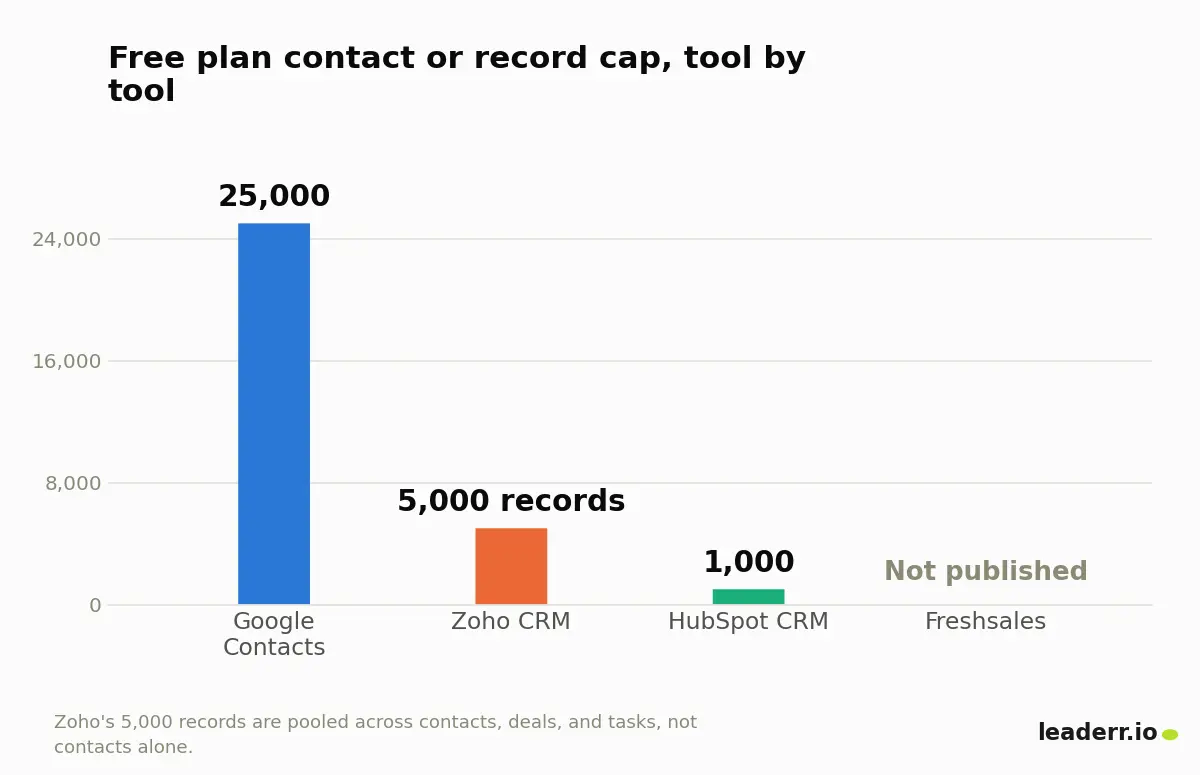
The advertised number rarely holds. HubSpot's own free CRM page states its plan plainly: up to two users, and a cap of 1,000 contacts, confirmed live in September 2026.
Tool | Free users | Free contact or record cap |
|---|---|---|
Google Contacts | Not seat based | 25,000 contacts |
Zoho CRM | Up to 3 | 5,000 records, shared across contacts, deals, and tasks |
HubSpot CRM | Up to 2 | 1,000 contacts |
Freshsales | Up to 3 | No cap published on its current pricing page |
Zoho draws its line differently. Zoho's free CRM page allows three users but pools contacts, deals, and tasks into one 5,000 record ceiling, so an active pipeline eats into that number well before 5,000 people ever get added.
Freshsales lists three free users too, though its current page states no contact cap at all, so the real ceiling there depends on a support conversation rather than a published figure.
The real monthly cost once you outgrow the free tier
Picture one scenario. A three person team, 2,500 contacts, an active pipeline. That single scenario prices out differently across the four tools above.
Tool | Monthly cost for 3 seats | Why |
|---|---|---|
Google Contacts | 0 dollars | Well under the 25,000 contact ceiling, and no seats to license |
Freshsales | 0 dollars, unconfirmed | Free tier allows 3 users, but no published contact cap to test the scenario against |
Zoho CRM | Roughly 42 dollars | 2,500 contacts plus deal records likely crosses the pooled 5,000 record free limit, forcing the 14 dollar per user Standard tier |
HubSpot CRM | 60 dollars on monthly billing, 21 dollars on an annual plan | 2,500 contacts exceeds the 1,000 contact free cap, forcing the Starter tier at 20 or 7 dollars per seat |
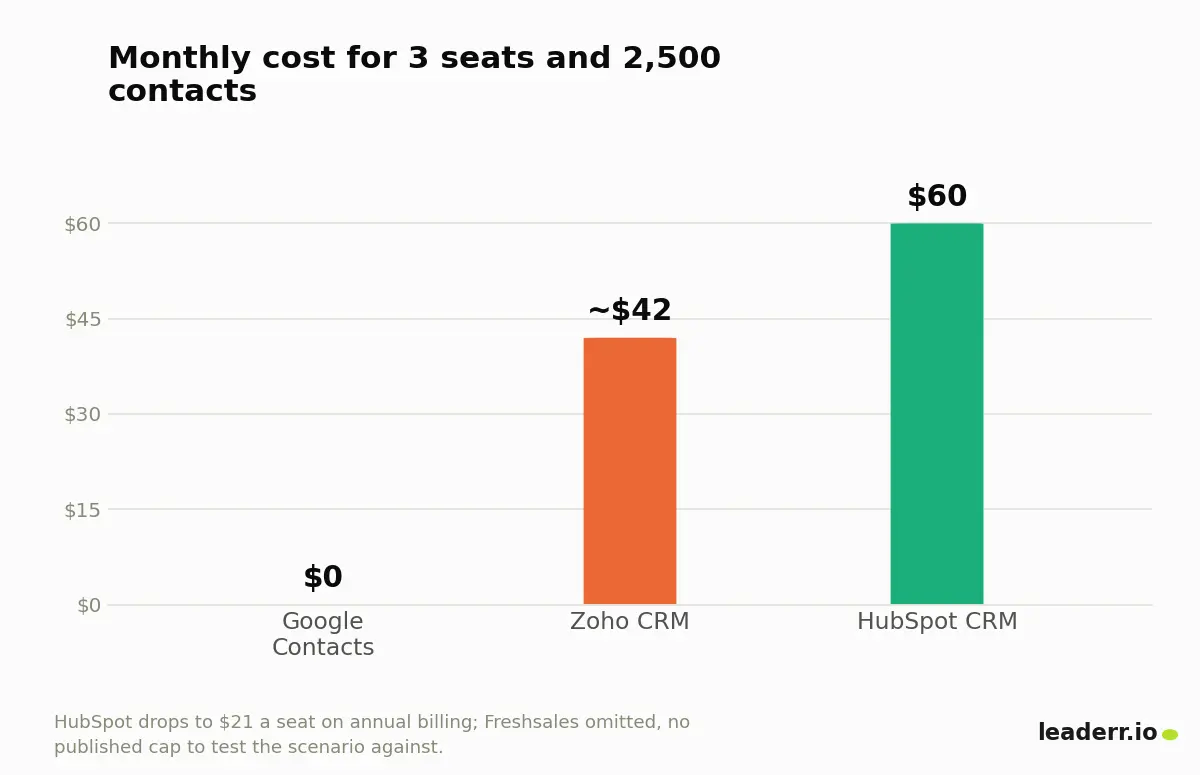
Zero dollars. Sixty dollars. The gap has nothing to do with features. It comes entirely from which side of a contact cap a list happens to sit on.
The same math shows up on the sales data side too. Scale does not change the pattern.
Once a team moves from personal contacts into buying company records, per seat pricing hides a similar jump once the free tier runs out there as well.
A short list before you sign up for anything
Work through these first. Do it before creating an account with any tool from either group.
Count the current contact list, and check it against the free caps above, not a "free forever" headline.
Decide whether a sales stage needs tracking. If not, skip every tool with the word CRM in its name.
Check which current apps might already cover this: Gmail, Outlook, or a phone.
Confirm the free plan's user limit fits the team today, and next year.
Export a real CSV of the current contacts before importing anything into a new tool.
Plant a handful of duplicate entries in that CSV, written in different formats, before importing it.
Get any unpublished contact cap confirmed in writing, rather than assumed.
Compare the annual price against the monthly price. HubSpot's own gap above runs to 39 dollars a seat.
Testing duplicate detection before you trust a claim on a pricing page
Every contact tool claims to merge duplicates automatically. Few explain how. Fewer say how often it actually works.
A small test settles this faster than any spec sheet. Here is what that test looked like. Twenty test contacts went into a sample file, eight of them duplicates of another entry already on the list, each written in a different format: a case change, an extra space, a nickname swapped in for a first name, a dropped apostrophe.
The first check used exact matching: comparing name and email exactly as typed. It caught zero of the eight duplicates.
Every single one read as a new, distinct contact. A second check, matching only on a cleaned up version of the email address, caught all eight.
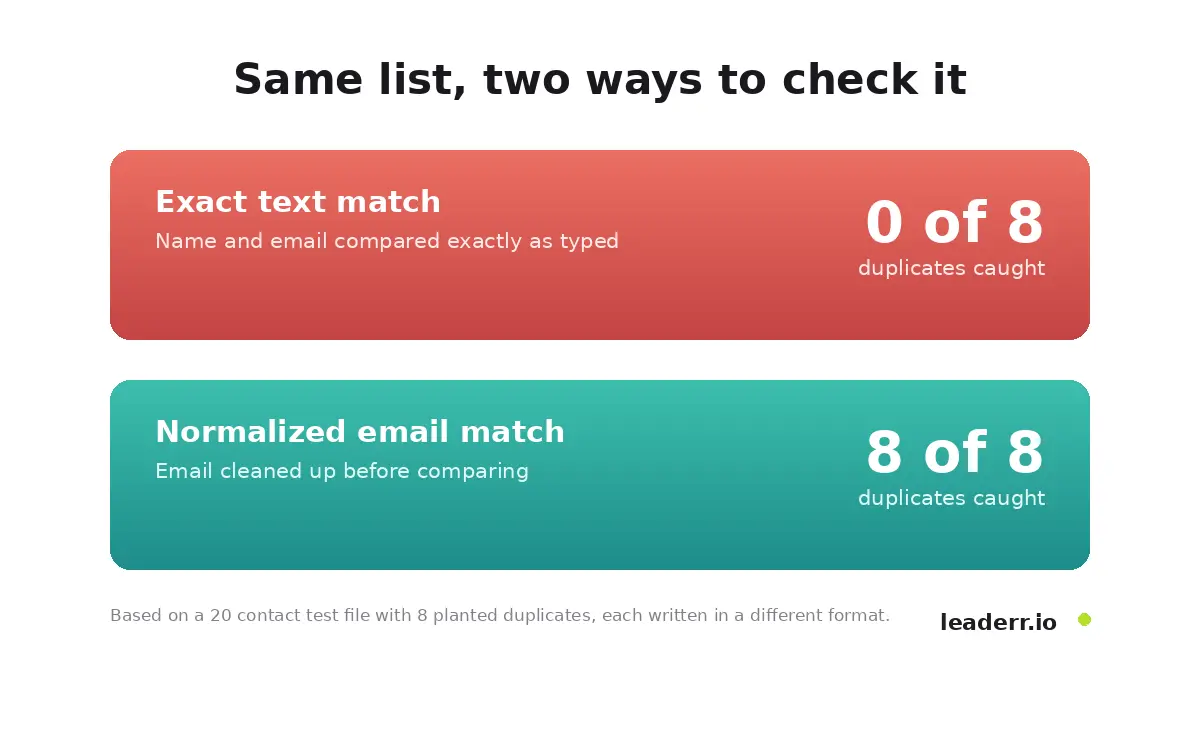
Zero out of eight versus eight out of eight. One method missed everything. That gap is the entire duplicate detection question in one picture.
A tool that merges on exact text alone leaves a list full of near identical entries. A tool that normalizes the email address first catches nearly everything a format change can throw at it.
A five minute test to run before any demo
Run this test first. Before trusting a vendor's stated detection rate, take twenty real contacts, copy eight of them into new rows with a small formatting change each, and import that file.
Count what survives as one contact rather than two. That number says more than any percentage printed on a pricing page.
What goes wrong after you import your list
A feature checklist proves nothing on its own. A tool can pass every line on it and still fail once real contacts move through it. These are the failures that surface after signup, not during a demo.
Symptom | Likely cause | Fix |
|---|---|---|
The same contact appears two or three times after a sync | Two systems syncing in both directions, each creating a new record instead of matching an existing one | Turn off two way sync on one side, or match on a normalized email before turning it back on |
A shared contact's edits do not show up for teammates | The free plan's seat limit is reached, so a teammate views a stale export instead of the live list | Check the seat count against the actual number of people who need edit access |
The contact count looks wrong right after import | A CSV with inconsistent name or email formatting, causing rows to merge or split unexpectedly | Normalize the CSV, trim spaces, lowercase emails, before importing it, not after |
A deleted contact reappears days later | The tool re syncs from a connected inbox or phone that still holds the old entry | Delete the contact at its original source, not only inside the new tool |
The first failure above is a common one. It has left a trail of unresolved help threads.
One report on HubSpot's community forum described 923 contacts turning into roughly four times that many after a two way sync, with three extra copies of each contact appearing only for two specific sales reps. Eight replies later, the thread closed with no confirmed fix. Matching rules and account permissions had both already been checked and ruled out.
Buying a list adds a different risk. The addresses arrive with their own accuracy and duplicate questions attached well before a single one reaches a new contact tool.
FAQs
Do I need contact management software, or a full CRM?
Not always the case. A shared address book covers storing and searching contacts, and it costs nothing. A full CRM earns its cost once a deal stage, a quote, or a sale linked follow up needs tracking against that contact.
Is there a free contact tool that doesn't cap out fast?
Yes, one does. Google Contacts holds 25,000 contacts for free, far above what most small teams or individuals need. Among sales contact managers, HubSpot's free tier caps at 1,000 contacts, and Zoho's caps at 5,000 records shared across contacts, deals, and tasks.
Can contact list software work with Gmail or Outlook?
In most cases, yes. Tools in both groups sync with Gmail or Outlook contacts directly. Streak and Copper build their entire product inside Gmail rather than syncing to it, worth noting if a team already lives in one inbox all day.
Does contact management software connect to the other tools already in use?
The address book group connects mainly to phones and email. Sales contact managers add more. A calendar, email tracking, and often a marketing tool, since the record needs to follow a contact through more than one department.
What is the easiest tool to start with for someone who isn't technical?
A shared address book. It works like the contacts app already on a phone, with no fields to configure and no pipeline to build before it becomes useful.
The free plan's cap decides more than its price
Most of this decision gets made before a single feature comparison starts. Count the contacts. Decide whether a sale needs tracking. Check what already covers the job today.
Everything after that follows from those three answers: the seats, the pipeline, the integrations. A shared address book and a sales contact manager both do their one job well. Neither one is wrong.
The mistake is picking by price or star rating, not by what the actual list needs.
Guidance reviewed September 18, 2026.
About the author
Michael Doyle writes about B2B sales at Leaderr. He covers prospecting, cold outreach, sales data, and pipeline building, with a focus on what actually works for SDRs, founders selling on their own, and small sales teams. Connect with him on LinkedIn.